n8n workflow · Chapter 5 of 5
Telegram Agent Control Bot + Daily Digest
Updated · Tested on n8n 1.x · Part of the n8n Real Estate ebook
The remote control for your real estate system: text your Telegram bot to add leads, check the pipeline or call a lead — plus a 9 AM briefing.
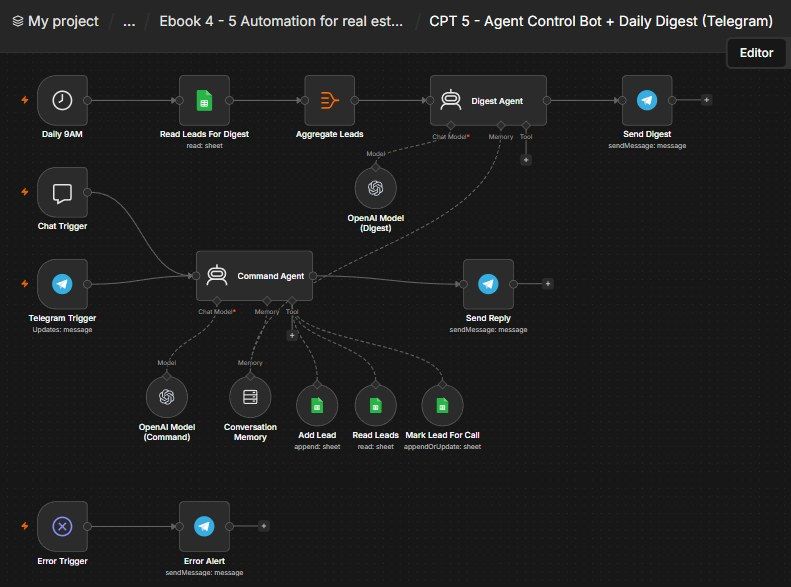
How this n8n workflow works
- 1You message your Telegram bot in plain language
- 2AI understands the request
- 3It adds leads, reads the pipeline or flags calls
- 4It replies with a short confirmation
- 5Every morning you get an AI briefing
Who this workflow is for
- Agency owners & team leads — run the CRM from their phone without opening a laptop or the sheet.
- Field agents — add a lead or trigger a call from the road by texting the bot.
- Any small sales team — a shared control bot + a morning briefing keeps everyone aligned.
Why it matters: The CRM only helps if people actually use it — and busy agents won't open a spreadsheet mid-day. A bot that adds leads, answers "what's hot?" and triggers calls straight from Telegram means the CRM gets used in the moment, and the 9 AM digest means the owner starts every day knowing exactly which leads to chase. It turns the whole Chapters 1–4 system into something you operate with a text message.
Inside the workflow: node by node
Every one of these nodes is explained in the ebook, with each setting, prompt and expression printed so you can copy it.
- 1. Telegram Trigger — Listen for Your Commands
- 2. Chat Trigger — Test Without Telegram
- 3. Command Agent — The Brain That Runs Commands
- 4. Add Lead (tool) — Append a New Lead by Voice/Text
- 5. Read Leads (tool) — Look Things Up
- 6. Mark Lead For Call (tool) — Hand a Lead to the Calling Agent
- 7. Send Reply — Answer the Owner
- 8. Daily 9AM — The Morning Trigger
- 9. Read Leads For Digest — Load the CRM
- 10. Aggregate Leads — Roll Rows Into One List
- 11. Digest Agent — Write the Morning Briefing
- 12. Send Digest — Deliver the Briefing
- 13. Error Trigger → Error Alert — The Safety Net
Before you start
- An n8n account (Cloud or self-hosted).
- A Telegram bot + your chat ID — the bot you text, and where the digest goes.
- An OpenAI (or OpenRouter) API key — powers the command agent + digest agent (uses gpt-4o-mini).
- A Google Sheets credential — the same RE CRM sheet (RE Leads) from Chapters 1–4.
Quick setup guide
- 1Credentials: Add Telegram, OpenAI/OpenRouter, and Google Sheets (see the video table). Do these once.
- 2Import the workflow: And reconnect every red credential node. Put your Sheet ID on all four Google Sheets nodes (Add Lead, Read Leads, Mark Lead For Call, Read Leads For Digest), and your chat ID on the Telegram Trigger (Restrict to Chat IDs), Conversation Memory (Key), Send Digest, and Error Alert. The Send Reply node uses the sender's chat id automatically.
- 3Test the bot: In the built-in chat: try "show pipeline", then "add a lead Test User, 2BHK Wakad, budget 60L, warm", then "hot leads". Confirm each replies sensibly and the sheet updates.
- 4Go live on Telegram: Activate the workflow, then text your bot the same commands from your phone.
- 5Check the digest: Run the digest branch manually (or wait for 9 AM) and confirm the morning briefing arrives.
What success looks like: You run the entire CRM by texting, and you wake up to an AI briefing telling you exactly who to chase — the whole Chapters 1–5 machine, controlled from your phone.
Common problems and fixes
Bot ignores you
Why: Your chat ID not in "Restrict to Chat IDs"
Fix: Put your real chat ID on the Telegram Trigger
Adds blank/garbled leads
Why: Command too vague
Fix: The system message asks it to clarify — give name + a couple of details
"Call X" doesn't trigger a call
Why: Chapter 3 not active, or phone not matched
Fix: Ensure CPT 3 is active; the lead must have a Phone; Mark Lead For Call matches on Phone
Bot can't find a lead
Why: Name/phone mismatch
Fix: Refer to the lead by the exact name/phone stored; ask "show hot leads" first to see names
No digest at 9 AM
Why: Workflow not active or wrong hour
Fix: Activate the workflow; set the Daily 9AM hour to your timezone
No replies at all
Why: Telegram/OpenAI credential wrong
Fix: Re-check the bot token, chat ID, and OpenAI key
Setup time
- With Claude Code30–45 minutes
Give the ebook to Claude Code and it builds the workflow for you.
- Import the JSON yourselfAbout 2 hours
Import the ready workflow JSON and connect your accounts.
- Build it by reading the ebookAbout 1 day
Follow every node and setting step by step to learn it fully.
Get this workflow
- Ready-to-import n8n workflow JSON
- Step-by-step PDF: every node and setting explained
- Copy-paste prompts and expressions — no coding
Frequently asked questions
Will this work on free n8n?
Yes. n8n itself can be free (the self-hosted Community edition) or you can use n8n Cloud. The workflow runs on both. You only pay for the outside services it uses, such as AI tokens, and many of them have free tiers to start.
How do I get the API keys (WhatsApp, OpenAI and others)?
The ebook includes a setup video for every API and account this workflow needs, so you can get each key step by step without any coding.
Do I need to know coding?
No. Every node, setting, prompt and expression is printed in the ebook, ready to copy-paste, and the workflow JSON can be imported in one click.
Can I use this Real Estate workflow for my clients?
Yes. Once it works for you, you can set it up for your own business or for clients and charge for the setup.
Bot ignores you: how do I fix it?
Your chat ID not in "Restrict to Chat IDs". Fix: Put your real chat ID on the Telegram Trigger.
Adds blank/garbled leads: how do I fix it?
Command too vague. Fix: The system message asks it to clarify — give name + a couple of details.
"Call X" doesn't trigger a call: how do I fix it?
Chapter 3 not active, or phone not matched. Fix: Ensure CPT 3 is active; the lead must have a Phone; Mark Lead For Call matches on Phone.