n8n workflow · Chapter 2 of 5
Cold Outreach Engine
Updated · Tested on n8n 1.x · Part of the n8n Marketing Agency ebook
A complete cold email system: writes a personalized email for each lead, sends at a human pace, understands every reply and follows up automatically.
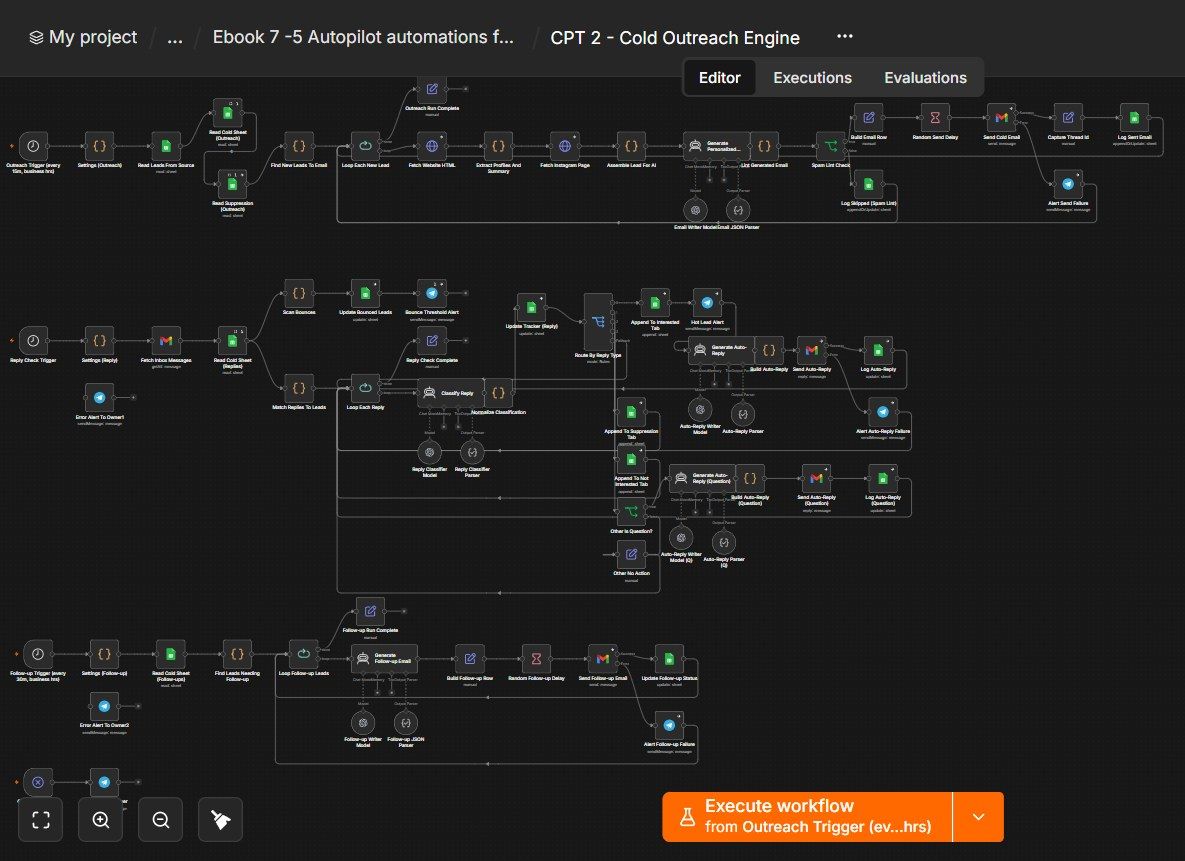
How this n8n workflow works
- 1It picks a new lead every 15 minutes
- 2AI writes a personal email from their website
- 3It is spam-checked and sent from Gmail
- 4AI sorts every reply that comes in
- 5Interested leads get a reply and Telegram alert
- 6Non-repliers get up to two follow-ups
Who this workflow is for
- Agencies & freelancers — turn a scraped lead list into booked discovery calls without hiring an SDR.
- B2B founders — run founder-to-founder outbound that actually gets replies (because it's personalized, not blasted).
- Anyone doing cold email — with built-in deliverability guards (caps, delays, spam-lint, bounce handling, suppression).
Why it matters: Cold email works — but only when it's personal, paced, and followed up. Doing that by hand caps you at a handful of emails a day. This engine writes a specific, true observation about each prospect, sends on a human rhythm, reads and understands every reply, and follows up on autopilot — so your pipeline fills while you do the work you actually sell.
Inside the workflow: node by node
Every one of these nodes is explained in the ebook, with each setting, prompt and expression printed so you can copy it.
- 1. Outreach Trigger — Every 15 Minutes, Business Hours
- 2. Settings (Outreach) — All Your Config in One Place
- 3. Read Leads From Source — Your Pool of Candidates
- 4. Read Cold Sheet (Outreach) — Who You've Already Emailed
- 5. Read Suppression (Outreach) — The Do-Not-Email List
- 6. Find New Leads To Email — Pick One, Safely
- 7. Fetch Website HTML — Download Their Site
- 8. Extract Profiles And Summary — Read the Useful Bits
- 9. Fetch Instagram Page — Grab Their Instagram
- 10. Assemble Lead For AI — Bundle Everything
- 11. Generate Personalized Email (AI)
- 12. Lint Generated Email — The Deliverability Gate
- 13. Spam Lint Check — Pass or Skip
- 14. Log Skipped (Spam Lint)
- 15. Random Send Delay — Don't Send Like a Robot
- 16. Send Cold Email — Send It via Gmail
- 17. Alert Send Failure (Telegram)
- 18. Capture Thread Id — Remember the Email Thread
- 19. Log Sent Email — Write It to the Tracker
- 20. Reply Check Trigger — Check the Inbox Every Few Hours
Before you start
- An n8n account (Cloud or self-hosted).
- A Gmail account + credential (OAuth) on a domain you're happy to send cold email from (ideally a separate sending domain, warmed up).
- An OpenAI API key — the email writer, reply classifier, auto-reply and follow-up writers use gpt-4o / gpt-4o-mini.
- A Google Sheets credential — a Cold Email Tracker sheet (with tabs: the tracker, Suppression, Interested, Not Interested), plus the Leads sheet from Chapter 1.
- A Telegram bot + your chat ID — hot-lead, bounce and error alerts.
Quick setup guide
- 1Credentials: Add Gmail, OpenAI, Google Sheets, and Telegram (see the video table). Use a dedicated, warmed-up sending domain if you can.
- 2Build the sheet: Create a Cold Email Tracker spreadsheet with the main tracker tab (columns like Lead Name, Company, Email, Email Sent, Sent Date, Subject, Email Body, Reply Status, Reply Date, Follow-up Status, Lead Status, Last Email Date, Reply Type, Follow-up Step, Bounced, Thread Id, Conversation History) plus Suppression, Interested, Not Interested tabs. Keep the Chapter-1 Leads sheet too. Copy both Sheet IDs.
- 3Import the workflow: . In all three Settings nodes, set your trackerSheetId, leadsSheetId, telegramChatId, and your sender identity / offer / signature. Reconnect every Gmail, Sheets and Telegram credential.
- 4Tune it: Cron schedules (business hours), dailyCap, perRun, followupOffsets [3,7], maxFollowupSteps, and the bannedSpamWords list all live in Settings.
- 5Test each engine: Manually run the sender with one test lead (send to yourself); reply to it and run the reply handler to see classification + auto-reply; wait/backdate a Sent Date and run the follow-up engine. Then Activate.
What success looks like: Personalized cold emails going out on a human rhythm, every reply understood and handled, hot leads pinged to your phone, opt-outs honored, and non-repliers followed up — all on autopilot.
Common problems and fixes
No emails send
Why: Daily cap hit, PAUSED row, or no new leads
Fix: Check the cap in Settings; remove PAUSED from Suppression; add fresh leads
Emails look generic
Why: Website/IG fetch failed (thin data)
Fix: That's neutral mode by design; ensure the website URL is valid
Email skipped (spam lint)
Why: Banned word / link / too long
Fix: The lint is protecting you; the reason is logged in the tracker
Replies not detected
Why: Wrong Gmail account or old messages
Fix: Fetch Inbox uses newerthan:30d; confirm the Gmail credential is the sending inbox
Auto-reply didn't send
Why: Not classified interested/question
Fix: Only those branches auto-reply; check the classification in the tracker
Unsubscribes still emailed
Why: Suppression tab not read
Fix: Engine 1's Read Suppression must point at the Suppression tab
Follow-ups never fire
Why: Offsets/steps or reply/bounce flags
Fix: Needs Email Sent = Yes, no reply/bounce, and days ≥ offset; max 2 steps
High bounce rate
Why: Bad list / cold domain
Fix: Warm your domain, clean your list; the bounce alert warns you to pause
Setup time
- With Claude Code30–45 minutes
Give the ebook to Claude Code and it builds the workflow for you.
- Import the JSON yourselfAbout 2 hours
Import the ready workflow JSON and connect your accounts.
- Build it by reading the ebookAbout 1 day
Follow every node and setting step by step to learn it fully.
Get this workflow
- Ready-to-import n8n workflow JSON
- Step-by-step PDF: every node and setting explained
- Copy-paste prompts and expressions — no coding
Frequently asked questions
Will this work on free n8n?
Yes. n8n itself can be free (the self-hosted Community edition) or you can use n8n Cloud. The workflow runs on both. You only pay for the outside services it uses, such as AI tokens, and many of them have free tiers to start.
How do I get the API keys (WhatsApp, OpenAI and others)?
The ebook includes a setup video for every API and account this workflow needs, so you can get each key step by step without any coding.
Do I need to know coding?
No. Every node, setting, prompt and expression is printed in the ebook, ready to copy-paste, and the workflow JSON can be imported in one click.
Can I use this Marketing Agencies workflow for my clients?
Yes. Once it works for you, you can set it up for your own business or for clients and charge for the setup.
No emails send: how do I fix it?
Daily cap hit, PAUSED row, or no new leads. Fix: Check the cap in Settings; remove PAUSED from Suppression; add fresh leads.
Emails look generic: how do I fix it?
Website/IG fetch failed (thin data). Fix: That's neutral mode by design; ensure the website URL is valid.
Email skipped (spam lint): how do I fix it?
Banned word / link / too long. Fix: The lint is protecting you; the reason is logged in the tracker.