n8n workflow · Chapter 3 of 5
Agency Cold-Calling & Receptionist Agent
Updated · Tested on n8n 1.x · Part of the n8n Marketing Agency ebook
An AI voice agent that calls your warm leads, pitches your agency and books discovery calls — then updates your sheet and sends you a summary.
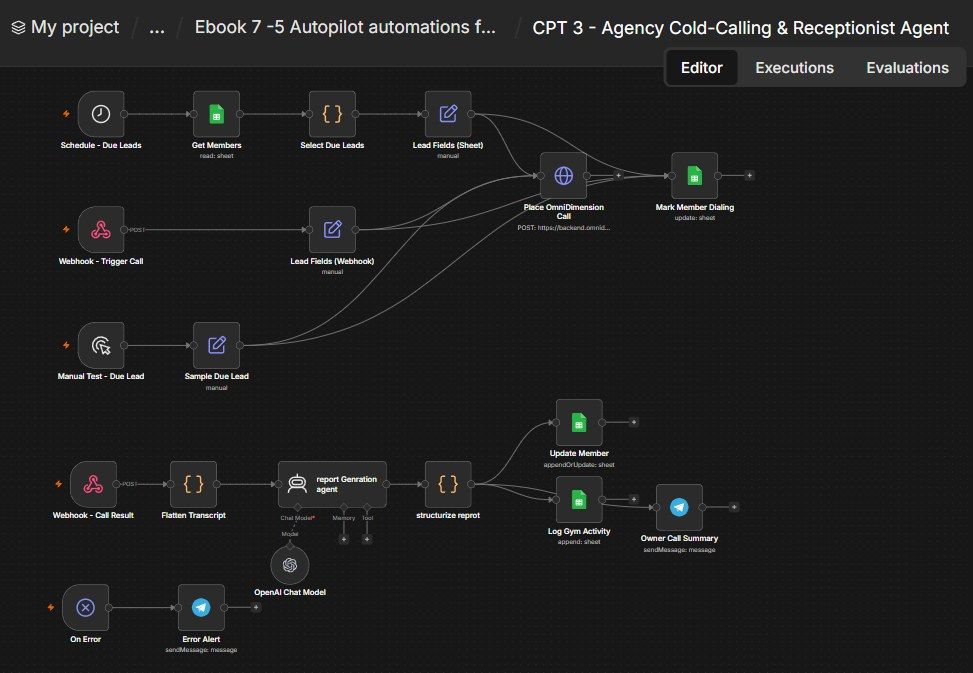
How this n8n workflow works
- 1Every hour it picks leads flagged for a call
- 2It builds the call context for each lead
- 3The AI voice agent dials the prospect
- 4After the call, AI writes a summary
- 5Your sheet is updated and you get a Telegram recap
Who this workflow is for
- Agencies & freelancers — call your warm leads without hiring a caller; book discovery calls on autopilot.
- Any high-ticket service seller — a voice follow-up dramatically lifts conversion over email alone.
- Busy founders — the agent calls, you just show up to the booked discovery calls.
Why it matters: Warm leads go cold fast, and most founders hate cold-calling. An AI that phones every warm prospect in a natural voice, pitches the exact service they're a fit for (using the angle your system already generated), and books the call — turns a scary, time-consuming task into a background process. You wake up to booked discovery calls and clean call notes.
Inside the workflow: node by node
Every one of these nodes is explained in the ebook, with each setting, prompt and expression printed so you can copy it.
- 1. Schedule - Due Leads — The Hourly Heartbeat
- 2. Get Members — Read the Leads
- 3. Select Due Leads — Pick Who to Call
- 4. Lead Fields (Sheet) — Build the Call Context
- 5. Place OmniDimension Call — Dial the Prospect
- 6. Webhook - Trigger Call — Instant Call From Anywhere
- 7. Lead Fields (Webhook)
- 8. Mark Member Dialing — Flag the Row
- 9. Manual Test - Due Lead — Fire a Test Call
- 10. Sample Due Lead — A Hard-Coded Test Prospect
- 11. Webhook - Call Result — Receive the Transcript
- 12. Flatten Transcript
- 13. report Genration agent — Write the Call Summary
- 14. structurize reprot — Split the Summary into Fields
- 15. Update Member — Write the Outcome Back
- 16. Log Gym Activity — Record the Call
- 17. Owner Call Summary — Telegram the Founder
- 18. On Error — Catch Any Crash
- 19. Error Alert — Message You the Details
Before you start
- An n8n account (Cloud or self-hosted).
- An OmniDimension account with a voice agent created and a phone number attached. You'll paste its API key into one node and set the agent's post-call webhook to this workflow.
- An OpenAI (or OpenRouter) API key — powers the summary agent (gpt-4o).
- A Google Sheets credential — the same Leads sheet from Chapters 1 & 2 (plus an RW Activity tab for the call log).
- A Telegram bot + your chat ID — the founder call summaries and error alerts.
Quick setup guide
- 1Credentials: Add OmniDimension (API key), OpenAI/OpenRouter, Google Sheets, and Telegram (see the video table).
- 2OmniDimension: Create a voice agent (give it your agency's pitch + a "book a discovery call" goal), attach a phone number, and copy your API key, agent ID and from-number ID.
- 3Import the workflow: . Reconnect every credential. Put your Sheet ID on all Google Sheets nodes, your chat ID on both Telegram nodes, and your API key + agent ID + from-number ID in Place OmniDimension Call.
- 4Wire the webhook back to OmniDimension: Set the agent's post-call webhook to this workflow's /rwcallresult URL, and set the same URL in the call node's callbackurl body.
- 5Test: Use Manual Test - Due Lead with your own number, take the call, then confirm the lead row updates, an activity row is added, and you get the Telegram summary. Then Activate.
What success looks like: Warm leads get a natural, on-message phone call, discovery calls get booked, and your CRM + Telegram fill with clean call outcomes — no dialing required.
Common problems and fixes
No call is placed
Why: Wrong OmniDimension key / agent ID / from-number ID
Fix: Re-check the Authorization header + agentid/fromnumberid in Place OmniDimension Call
Call happens but nothing saves
Why: Post-call webhook not set in OmniDimension
Fix: Set the agent's post-call webhook to your /rwcallresult URL
Summary fields blank
Why: Report agent didn't follow the format
Fix: Keep the System Message's plain-text Label: value format unchanged
Lead not updated
Why: Wrong match column
Fix: Update Member must match on Phone
No leads get called
Why: Nothing flagged / wrong Sheet ID
Fix: Flag a lead Next Action = Call; set the Sheet ID on Get Members
No Telegram summary
Why: Wrong chat ID
Fix: Check YOURCHATID on Owner Call Summary
Setup time
- With Claude Code30–45 minutes
Give the ebook to Claude Code and it builds the workflow for you.
- Import the JSON yourselfAbout 2 hours
Import the ready workflow JSON and connect your accounts.
- Build it by reading the ebookAbout 1 day
Follow every node and setting step by step to learn it fully.
Get this workflow
- Ready-to-import n8n workflow JSON
- Step-by-step PDF: every node and setting explained
- Copy-paste prompts and expressions — no coding
Frequently asked questions
Will this work on free n8n?
Yes. n8n itself can be free (the self-hosted Community edition) or you can use n8n Cloud. The workflow runs on both. You only pay for the outside services it uses, such as AI tokens, and many of them have free tiers to start.
How do I get the API keys (WhatsApp, OpenAI and others)?
The ebook includes a setup video for every API and account this workflow needs, so you can get each key step by step without any coding.
Do I need to know coding?
No. Every node, setting, prompt and expression is printed in the ebook, ready to copy-paste, and the workflow JSON can be imported in one click.
Can I use this Marketing Agencies workflow for my clients?
Yes. Once it works for you, you can set it up for your own business or for clients and charge for the setup.
No call is placed: how do I fix it?
Wrong OmniDimension key / agent ID / from-number ID. Fix: Re-check the Authorization header + agentid/fromnumberid in Place OmniDimension Call.
Call happens but nothing saves: how do I fix it?
Post-call webhook not set in OmniDimension. Fix: Set the agent's post-call webhook to your /rwcallresult URL.
Summary fields blank: how do I fix it?
Report agent didn't follow the format. Fix: Keep the System Message's plain-text Label: value format unchanged.