n8n workflow · Chapter 4 of 5
Reminders + No-show Reducer + Win-back + CRM & Reports
Updated · Tested on n8n 1.x · Part of the n8n Restaurant ebook
Makes sure guests show up and come back: sends reminders and win-back offers on WhatsApp, writes a daily specials post and delivers a 7 PM PDF report.
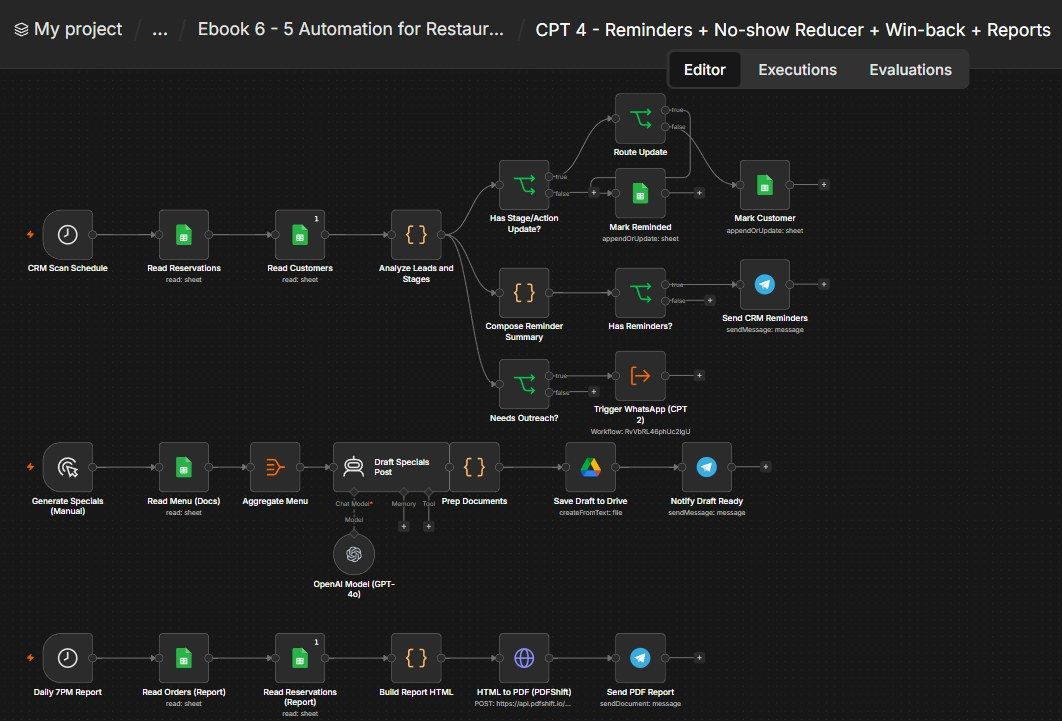
How this n8n workflow works
- 1Every 2 hours it reads reservations and customers
- 2It finds upcoming bookings and lapsed guests
- 3They get a WhatsApp reminder or win-back offer
- 4On demand, AI writes a Today's Specials post
- 5Every evening the manager gets a PDF report
Who this workflow is for
- Restaurants — cut no-shows with automatic reminders and refill quiet nights with win-back offers.
- Cafés, cloud kitchens, bakeries — a daily specials post and an owner report without lifting a finger.
- Any booking + orders business — the same three engines (remind, re-engage, report) apply widely.
Why it matters: No-shows and lapsed regulars are pure lost revenue, and most owners never see their own daily numbers. This workflow reminds every booking (fewer empty tables), re-invites customers who drifted away (more repeat orders), and lands a clean PDF of the day's performance on your phone every evening — so you manage by facts, not gut feel. It's the difference between a system that captures business and one that keeps it.
Inside the workflow: node by node
Every one of these nodes is explained in the ebook, with each setting, prompt and expression printed so you can copy it.
- 1. CRM Scan Schedule — Run Every 2 Hours
- 2. Read Reservations — Load the Bookings
- 3. Read Customers — Load the Customer List
- 4. Analyze Leads and Stages — The Brain
- 5. Has Stage/Action Update? — Does This Row Need a Sheet Write?
- 6. Route Update — Reservation or Customer?
- 7. Mark Reminded — Stamp the Reservation
- 8. Mark Customer — Flag the Win-Back
- 9. Needs Outreach? — Should We WhatsApp Them?
- 10. Trigger WhatsApp (CPT 2) — Send via the Chapter-2 Bot
- 11. Compose Reminder Summary — Build the Manager Recap
- 12. Has Reminders? — Was Anything Actually Sent?
- 13. Send CRM Reminders — Telegram the Recap
- 14. Generate Specials (Manual) — Run On Demand
- 15. Read Menu (Docs) — Load the Dishes
- 16. Aggregate Menu — Roll It Into One List
- 17. Draft Specials Post — The AI Copywriter
- 18. Prep Documents — Name the File + Grab the Text
- 19. Save Draft to Drive — Store It as a Google Doc
- 20. Notify Draft Ready — Ping the Manager
Before you start
- An n8n account (Cloud or self-hosted).
- A Google Sheets credential — the same Restaurant CRM (Reservations, Restaurant Customers, Menu, Orders).
- A Google Drive credential — to save the specials draft.
- An OpenAI (or OpenRouter) API key — writes the specials post (gpt-4o).
- A Telegram bot + your chat ID — the manager summaries and the PDF report.
- A PDFShift API key — converts the report HTML to PDF.
- Chapter 2 (CPT 2) must exist — this workflow calls it to send the WhatsApp reminders/win-backs.
Quick setup guide
- 1Credentials: Add Google Sheets, Google Drive, OpenAI/OpenRouter, Telegram, and PDFShift (see the video table).
- 2Import the workflow: . Reconnect every credential. Put your Sheet ID on all Google Sheets nodes, your chat ID on the three Telegram nodes, and your PDFShift key in HTML to PDF.
- 3Point the sub-workflow: Open Trigger WhatsApp (CPT 2) and select your Chapter 2 workflow.
- 4Tune the rules: The reminder window (today/tomorrow), the win-back threshold (30 days) and the offer text live in Analyze Leads and Stages — edit them to taste. Set the report time in Daily 7PM Report.
- 5Test each part: Run Generate Specials (Manual) for a post; execute the CRM Scan Schedule manually to test reminders; execute Daily 7PM Report to get a PDF. Then Activate.
What success looks like: Fewer no-shows, re-engaged regulars, a ready-to-post specials message, and a daily PDF that tells you exactly how the restaurant did — all automatic.
Common problems and fixes
No reminders go out
Why: No today/tomorrow bookings, or all already reminded
Fix: Add a test booking with Reminder Sent blank; check the date format
Same guest reminded twice
Why: Mark Reminded not writing
Fix: Ensure match column is Reservation ID and Reminder Sent is mapped
Win-backs never fire
Why: Last Contact missing or < 30 days
Fix: Set a Last Contact 30+ days old; check the customer isn't already flagged
WhatsApp not sent
Why: Sub-workflow not pointed at CPT 2
Fix: Select your Chapter 2 workflow in Trigger WhatsApp (CPT 2)
Specials post is generic/empty
Why: Menu tab empty or wrong Sheet ID
Fix: Fill the Menu tab (with Popular/Offer columns); set the Sheet ID
Report PDF fails
Why: Wrong/missing PDFShift key
Fix: Re-check the X-API-Key header value
Charts don't render in the PDF
Why: QuickChart URL blocked
Fix: Confirm the report HTML's image URLs load in a browser
No Telegram messages
Why: Wrong chat ID
Fix: Check YOURCHATID on all three Telegram nodes
Setup time
- With Claude Code30–45 minutes
Give the ebook to Claude Code and it builds the workflow for you.
- Import the JSON yourselfAbout 2 hours
Import the ready workflow JSON and connect your accounts.
- Build it by reading the ebookAbout 1 day
Follow every node and setting step by step to learn it fully.
Get this workflow
- Ready-to-import n8n workflow JSON
- Step-by-step PDF: every node and setting explained
- Copy-paste prompts and expressions — no coding
Frequently asked questions
Will this work on free n8n?
Yes. n8n itself can be free (the self-hosted Community edition) or you can use n8n Cloud. The workflow runs on both. You only pay for the outside services it uses, such as AI tokens, and many of them have free tiers to start.
How do I get the API keys (WhatsApp, OpenAI and others)?
The ebook includes a setup video for every API and account this workflow needs, so you can get each key step by step without any coding.
Do I need to know coding?
No. Every node, setting, prompt and expression is printed in the ebook, ready to copy-paste, and the workflow JSON can be imported in one click.
Can I use this Restaurants workflow for my clients?
Yes. Once it works for you, you can set it up for your own business or for clients and charge for the setup.
No reminders go out: how do I fix it?
No today/tomorrow bookings, or all already reminded. Fix: Add a test booking with Reminder Sent blank; check the date format.
Same guest reminded twice: how do I fix it?
Mark Reminded not writing. Fix: Ensure match column is Reservation ID and Reminder Sent is mapped.
Win-backs never fire: how do I fix it?
Last Contact missing or < 30 days. Fix: Set a Last Contact 30+ days old; check the customer isn't already flagged.