n8n workflow · Chapter 3 of 5
WhatsApp Instant Auto-Reply
Updated · Tested on n8n 1.x · Part of the n8n Sales ebook
Answers WhatsApp leads in seconds like a trained salesperson — recommends products from your real catalog, handles objections and flags hot leads to you.
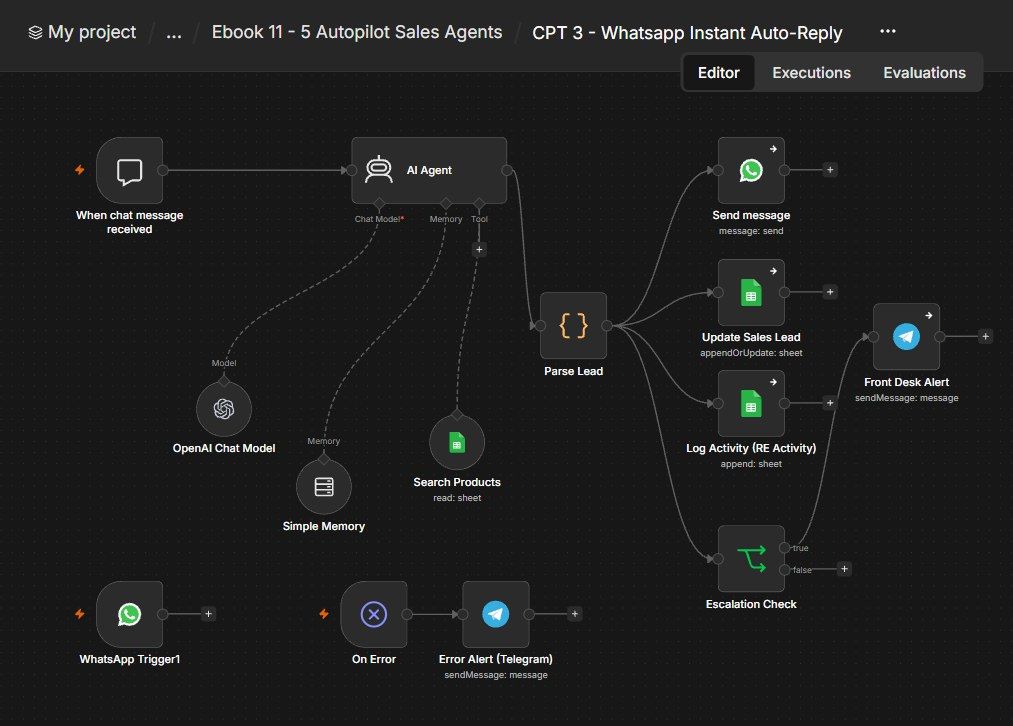
How this n8n workflow works
- 1A lead messages your WhatsApp number
- 2AI checks your product catalog
- 3It replies in the customer's language
- 4The lead and chat are saved to your CRM
- 5Hot leads trigger a Telegram alert
Who this workflow is for
Why it matters: any business selling on WhatsApp — the moment a lead messages, they get an instant, knowledgeable, on-brand reply instead of waiting hours. Speed-to-lead is the single biggest driver of conversion, and this makes it instant and 24/7.
Inside the workflow: node by node
Every one of these nodes is explained in the ebook, with each setting, prompt and expression printed so you can copy it.
- 1. When chat message received
- 2. WhatsApp Trigger1
- 3. AI Agent
- 4. OpenAI Chat Model
- 5. Simple Memory
- 6. Search Products
- 7. Send message
- 8. Parse Lead
- 9. Update Sales Lead
- 10. Escalation Check
- 11. Front Desk Alert
- 12. Log Activity (RE Activity)
- 13. On Error
- 14. Error Alert (Telegram)
Before you start
- An n8n account.
- A WhatsApp Cloud API number (Phone Number ID + token).
- A Google Sheet with a Products tab (catalog), a Sales Leads tab, and an Activity tab.
- An OpenAI / OpenRouter API key (gpt-4o).
- A Telegram bot + your chat ID (hot-lead + error alerts).
Quick setup guide
- 1Sheet: Build a Products tab (Name, Price, Description, Stock), a Sales Leads tab, and an activity tab. Put YOURSHEETID on all three Sheets nodes.
- 2Credentials: Connect WhatsApp (Phone Number ID), Google Sheets, OpenAI/OpenRouter, and Telegram (YOURCHATID).
- 3Personalize: Change the system message from AquaPure to your business + product type.
- 4Test: Click Open chat on the chat trigger and talk to the agent; confirm it uses the catalog, replies, and logs a lead. Then wire your WhatsApp number and send a real message.
What success looks like: Every WhatsApp lead gets an instant, knowledgeable, on-brand reply; hot leads hit your phone; and every conversation is captured in your CRM.
Common problems and fixes
Agent invents products
Why: Tool not connected
Fix: Attach Search Products and keep "NEVER invent" in the prompt
No WhatsApp reply
Why: Phone Number ID / token
Fix: Set YOURPHONENUMBERID; reconnect WhatsApp credential
No hot-lead alert
Why: Chat ID wrong / not Hot/Warm
Fix: Set YOURCHATID; only Hot/Warm escalate
Lead not saved
Why: Match column wrong
Fix: Keep Match on → Phone
Replies in wrong language
Why: Prompt edited
Fix: Keep the LANGUAGE RULE at the top of the system message
Setup time
- With Claude Code30–45 minutes
Give the ebook to Claude Code and it builds the workflow for you.
- Import the JSON yourselfAbout 2 hours
Import the ready workflow JSON and connect your accounts.
- Build it by reading the ebookAbout 1 day
Follow every node and setting step by step to learn it fully.
Get this workflow
- Ready-to-import n8n workflow JSON
- Step-by-step PDF: every node and setting explained
- Copy-paste prompts and expressions — no coding
Frequently asked questions
Will this work on free n8n?
Yes. n8n itself can be free (the self-hosted Community edition) or you can use n8n Cloud. The workflow runs on both. You only pay for the outside services it uses, such as AI tokens, and many of them have free tiers to start.
How do I get the API keys (WhatsApp, OpenAI and others)?
The ebook includes a setup video for every API and account this workflow needs, so you can get each key step by step without any coding.
Do I need to know coding?
No. Every node, setting, prompt and expression is printed in the ebook, ready to copy-paste, and the workflow JSON can be imported in one click.
Can I use this Sales (Growth) workflow for my clients?
Yes. Once it works for you, you can set it up for your own business or for clients and charge for the setup.
Agent invents products: how do I fix it?
Tool not connected. Fix: Attach Search Products and keep "NEVER invent" in the prompt.
No WhatsApp reply: how do I fix it?
Phone Number ID / token. Fix: Set YOURPHONENUMBERID; reconnect WhatsApp credential.
No hot-lead alert: how do I fix it?
Chat ID wrong / not Hot/Warm. Fix: Set YOURCHATID; only Hot/Warm escalate.