n8n workflow · Chapter 4 of 5
AI Sales Calling Agent
Updated · Tested on n8n 1.x · Part of the n8n Sales ebook
An AI voice agent calls your warm leads, pitches your product and handles objections — then summarizes the call, updates your CRM and sends you the result.
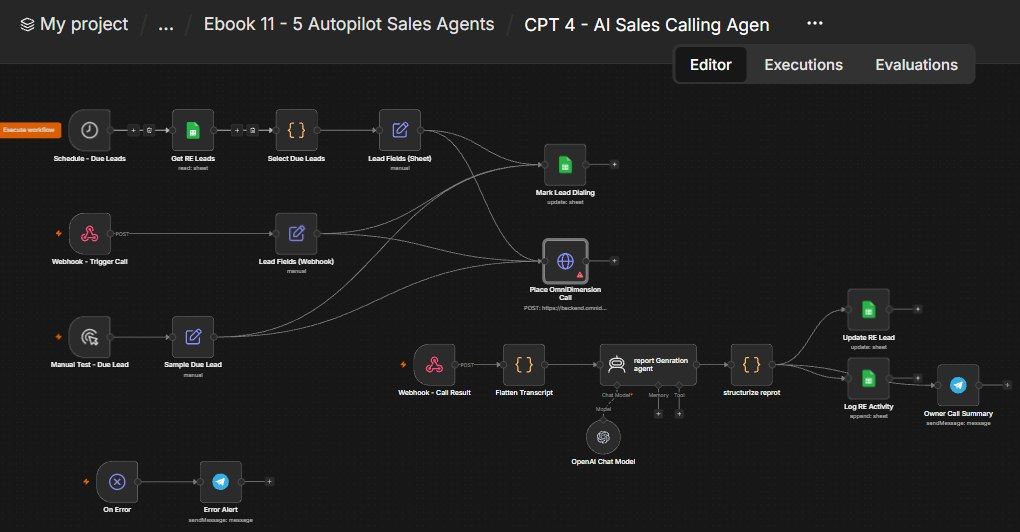
How this n8n workflow works
- 1Every hour it picks warm leads not yet called
- 2The AI voice agent dials the lead
- 3After the call, AI writes a summary
- 4Your CRM is updated
Who this workflow is for
Why it matters: sales teams who want warm leads called immediately and consistently — the AI handles first-touch calls at any hour, qualifies, and books the human only for leads worth their time. It turns "we'll call them tomorrow" into "they were called in minutes," which is where deals are won.
Inside the workflow: node by node
Every one of these nodes is explained in the ebook, with each setting, prompt and expression printed so you can copy it.
- 1. Schedule - Due Leads
- 2. Get RE Leads
- 3. Select Due Leads
- 4. Lead Fields (Sheet)
- 5. Webhook - Trigger Call
- 6. Lead Fields (Webhook)
- 7. Mark Lead Dialing
- 8. Manual Test - Due Lead
- 9. Sample Due Lead
- 10. Place OmniDimension Call
- 11. Webhook - Call Result
- 12. Flatten Transcript
- 13. report Generation agent
- 14. OpenAI Chat Model
- 15. structurize report
- 16. Update RE Lead
- 17. Log RE Activity
- 18. Owner Call Summary
- 19. On Error
- 20. Error Alert
Before you start
- An n8n account.
- An OmniDimension account with a voice agent + a from-number (and an API key).
- A Google Sheet CRM with a Sales Leads tab and an Activity tab.
- An OpenAI / OpenRouter API key (gpt-4o) for the summary.
- A Telegram bot + your chat ID.
Quick setup guide
- 1OmniDimension: Create a sales voice agent + a from-number, get your API key, and note the agent ID. Put the agent ID + from-number in the Place Call body, and the API key in its Header Auth credential.
- 2Callback: After activating, copy your Webhook - Call Result production URL into the callbackurl of the Place Call body (replace the subdomain with yours).
- 3Sheets + Telegram + AI: Set YOURSHEETID on all Sheets nodes, YOURCHATID on the Telegram nodes, and connect OpenAI/OpenRouter.
- 4Test: Click Manual Test - Due Lead (edit the sample to your own number) → confirm the AI calls you, and after the call the summary appears in Telegram and the sheet.
What success looks like: Warm leads get a real, context-aware AI sales call within the hour, every call is summarized and logged, and you get the outcome on your phone — zero manual dialing.
Common problems and fixes
No call placed
Why: Agent ID / from-number / API key wrong
Fix: Fill the Place Call body + Header Auth credential
No summary back
Why: Callback URL wrong
Fix: Put your real Webhook - Call Result URL in callbackurl
Lead called twice
Why: Stage not set
Fix: Keep Mark Lead Dialing (Stage = Calling) before the call
Summary fields blank
Why: Format changed
Fix: Keep the exact label format in the report system message
No Telegram summary
Why: Chat ID wrong
Fix: Set YOURCHATID on the Telegram nodes
Setup time
- With Claude Code30–45 minutes
Give the ebook to Claude Code and it builds the workflow for you.
- Import the JSON yourselfAbout 2 hours
Import the ready workflow JSON and connect your accounts.
- Build it by reading the ebookAbout 1 day
Follow every node and setting step by step to learn it fully.
Get this workflow
- Ready-to-import n8n workflow JSON
- Step-by-step PDF: every node and setting explained
- Copy-paste prompts and expressions — no coding
Frequently asked questions
Will this work on free n8n?
Yes. n8n itself can be free (the self-hosted Community edition) or you can use n8n Cloud. The workflow runs on both. You only pay for the outside services it uses, such as AI tokens, and many of them have free tiers to start.
How do I get the API keys (WhatsApp, OpenAI and others)?
The ebook includes a setup video for every API and account this workflow needs, so you can get each key step by step without any coding.
Do I need to know coding?
No. Every node, setting, prompt and expression is printed in the ebook, ready to copy-paste, and the workflow JSON can be imported in one click.
Can I use this Sales (Growth) workflow for my clients?
Yes. Once it works for you, you can set it up for your own business or for clients and charge for the setup.
No call placed: how do I fix it?
Agent ID / from-number / API key wrong. Fix: Fill the Place Call body + Header Auth credential.
No summary back: how do I fix it?
Callback URL wrong. Fix: Put your real Webhook - Call Result URL in callbackurl.
Lead called twice: how do I fix it?
Stage not set. Fix: Keep Mark Lead Dialing (Stage = Calling) before the call.