n8n workflow · Chapter 5 of 5
AI Follow-up, CRM
Updated · Tested on n8n 1.x · Part of the n8n Sales ebook
The command center for your sales system: text your Telegram bot to add leads, see hot leads or call someone — plus a morning digest and PDF reports.
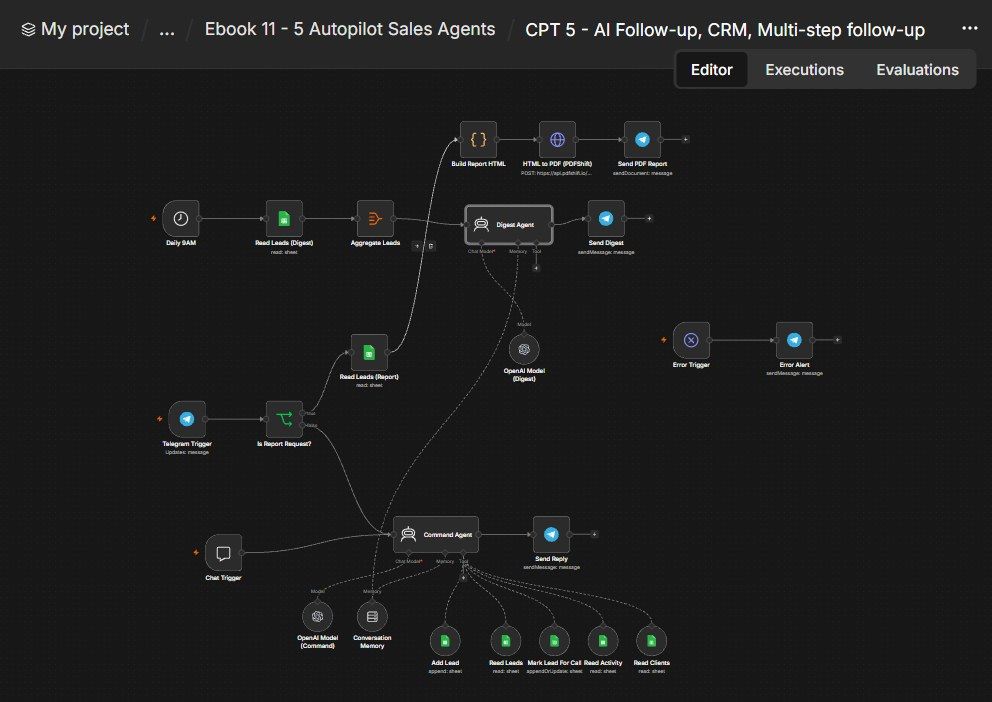
How this n8n workflow works
- 1You message your Telegram bot in plain language
- 2AI reads or updates your CRM
- 3It replies with a short answer
- 4Ask for a report to get a charted PDF
- 5Every morning you get a pipeline digest
Who this workflow is for
Why it matters: founders and sales managers who want their CRM in their pocket — no spreadsheets, no dashboards, just text your pipeline and get answers, plus an automatic morning briefing and on-demand reports. It closes the loop on the whole machine: leads scraped (Ch1), emailed (Ch2), chatted (Ch3), called (Ch4) — and managed here.
Inside the workflow: node by node
Every one of these nodes is explained in the ebook, with each setting, prompt and expression printed so you can copy it.
- 1. Telegram Trigger
- 2. Chat Trigger
- 3. Command Agent
- 4. OpenAI Model (Command)
- 5. Conversation Memory
- 6. Add Lead
- 7. Read Leads
- 8. Mark Lead For Call
- 9. Read Activity
- 10. Read Clients
- 11. Is Report Request?
- 12. Send Reply
- 13. Read Leads (Report)
- 14. Build Report HTML
- 15. HTML to PDF (PDFShift)
- 16. Send PDF Report
- 17. Daily 9AM
- 18. Read Leads (Digest)
- 19. Aggregate Leads
- 20. Digest Agent
Before you start
- An n8n account.
- A Telegram bot + your chat ID (restricted to you).
- A Google Sheet CRM with lead/activity/client tabs.
- An OpenAI / OpenRouter API key (gpt-4o-mini).
- A PDFShift account + API key (for the PDF report).
Quick setup guide
- 1Sheet: Have your CRM with the lead/activity/client tabs. Put YOURSHEETID on every Sheets node/tool.
- 2Credentials: Connect Telegram (YOURCHATID), Google Sheets, OpenAI/OpenRouter, and PDFShift (YOURPDFSHIFTKEY).
- 3Personalize: Change RevisionWave and the service list in both agents' system messages to your agency.
- 4Test: Message the bot "show hot leads", "add a lead: Acme, web development, Mumbai, hot", and "send me the weekly report" → confirm answers, a CRM row, and a PDF. Wait for the 9 AM digest (or run it manually).
What success looks like: Your entire pipeline is run from a chat — ask anything, add/flag leads by text, get a morning briefing, and pull a charted PDF report on demand.
Common problems and fixes
Bot doesn't answer
Why: Chat ID / not restricted
Fix: Set YOURCHATID on the trigger and memory
Agent can't read CRM
Why: Tools not attached
Fix: Attach the six Sheet tools; set YOURSHEETID
No PDF
Why: PDFShift key / "report" not in message
Fix: Set YOURPDFSHIFTKEY; include "report" in your text
Charts blank
Why: QuickChart blocked
Fix: QuickChart needs internet; the URLs are built in the code
Wrong period
Why: Keyword missing
Fix: Say "daily/weekly/monthly report"
Setup time
- With Claude Code30–45 minutes
Give the ebook to Claude Code and it builds the workflow for you.
- Import the JSON yourselfAbout 2 hours
Import the ready workflow JSON and connect your accounts.
- Build it by reading the ebookAbout 1 day
Follow every node and setting step by step to learn it fully.
Get this workflow
- Ready-to-import n8n workflow JSON
- Step-by-step PDF: every node and setting explained
- Copy-paste prompts and expressions — no coding
Frequently asked questions
Will this work on free n8n?
Yes. n8n itself can be free (the self-hosted Community edition) or you can use n8n Cloud. The workflow runs on both. You only pay for the outside services it uses, such as AI tokens, and many of them have free tiers to start.
How do I get the API keys (WhatsApp, OpenAI and others)?
The ebook includes a setup video for every API and account this workflow needs, so you can get each key step by step without any coding.
Do I need to know coding?
No. Every node, setting, prompt and expression is printed in the ebook, ready to copy-paste, and the workflow JSON can be imported in one click.
Can I use this Sales (Growth) workflow for my clients?
Yes. Once it works for you, you can set it up for your own business or for clients and charge for the setup.
Bot doesn't answer: how do I fix it?
Chat ID / not restricted. Fix: Set YOURCHATID on the trigger and memory.
Agent can't read CRM: how do I fix it?
Tools not attached. Fix: Attach the six Sheet tools; set YOURSHEETID.
No PDF: how do I fix it?
PDFShift key / "report" not in message. Fix: Set YOURPDFSHIFTKEY; include "report" in your text.