n8n workflow · Chapter 3 of 5
Trend Auto-Post Multi-Platform
Updated · Tested on n8n 1.x · Part of the n8n Social Media ebook
Every morning it finds the hottest trend for your business, writes four platform-specific posts with a matching image and publishes to LinkedIn, Facebook, Instagram and X.
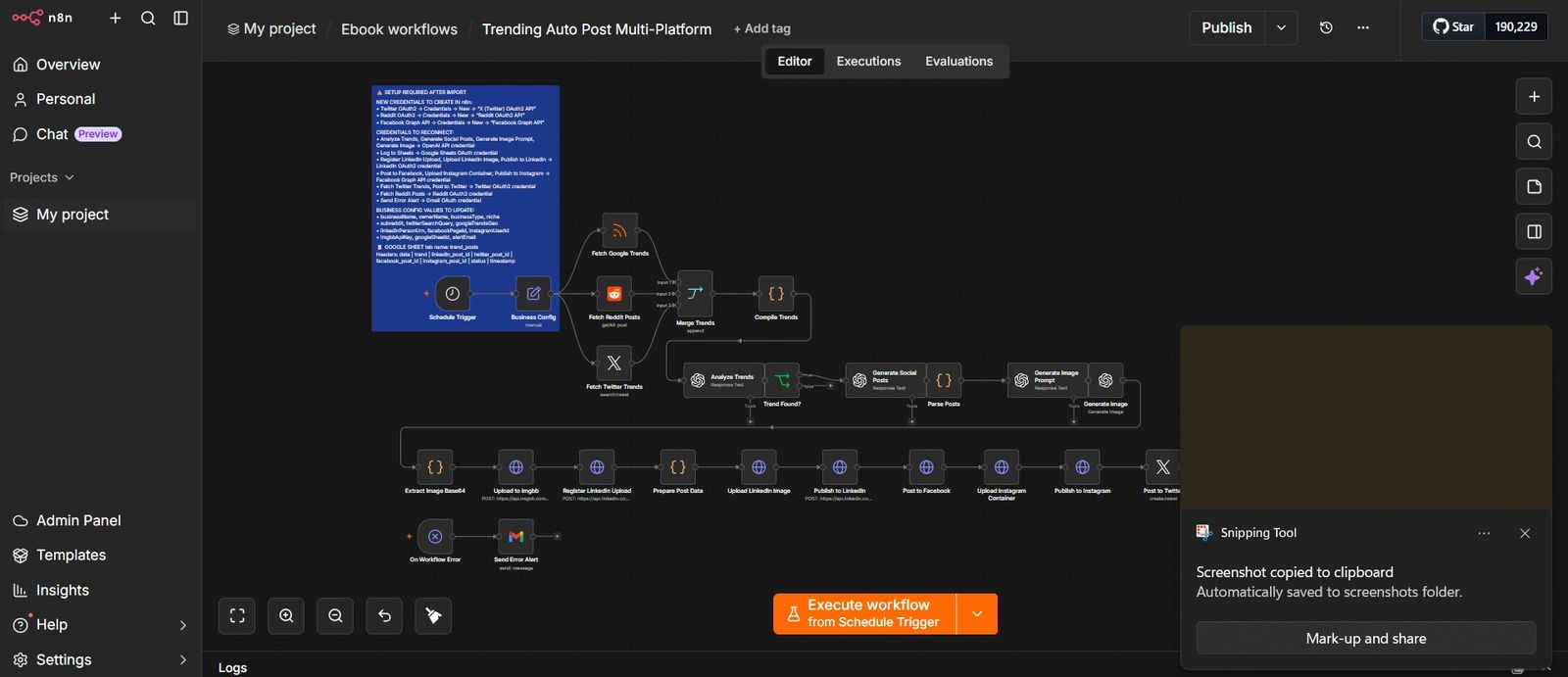
How this n8n workflow works
- 1It collects trends from Google, Reddit and X
- 2AI picks the best trend for your business
- 3AI writes four posts, one per platform
- 4An image is generated and hosted online
- 5Posts go live on all four networks
- 6Everything is logged; errors are emailed to you
Who this workflow is for
- Personal brands and founders — who want to look plugged-in and relevant across every network without living inside four apps all day.
- Agencies — running multi-platform presence for clients; one workflow per client, each with its own niche and accounts.
- Coaches, consultants, and creators — whose audience is split across platforms and who can't physically write four posts a day, every day.
- Local businesses — that know "being everywhere" builds trust but don't have a social media manager.
Why it matters: A social media manager who posts across four platforms daily costs $2,000–$6,000 per month. A tool subscription that only schedules (but doesn't write or pick trends) still costs $40–$100 per month and leaves the hardest part — what do I even post? — to you. This workflow does the thinking, the writing, the designing, and the posting, for a few cents of AI usage per day. It never misses a morning and never runs out of ideas, because the internet hands it a fresh trend every single day.
Inside the workflow: node by node
Every one of these nodes is explained in the ebook, with each setting, prompt and expression printed so you can copy it.
- 1. Schedule Trigger
- 2. Business Config
- 3. Fetch Google Trends
- 4. Fetch Reddit Posts
- 5. Fetch Twitter Trends
- 6. Merge Trends
- 7. Compile Trends
- 8. Analyze Trends
- 9. Trend Found?
- 10. Generate Social Posts
- 11. Parse Posts
- 12. Generate Image Prompt
- 13. Generate Image
- 14. Extract Image Base64
- 15. Upload to imgbb
- 16. Register LinkedIn Upload
- 17. Prepare Post Data
- 18. Upload LinkedIn Image
- 19. Publish to LinkedIn
- 20. Post to Facebook
Before you start
- An n8n account (free at n8n.io, or self-hosted)
- An OpenAI account with API access — writes the posts, picks the trend, makes the image
- A LinkedIn account with a developer app (for posting)
- A Twitter/X account with developer (API) access
- A Reddit account with an app registered (to read trending posts)
- A Facebook Page + Instagram Business account connected through a Meta (Facebook) developer app
- An imgbb account — a free image host that gives your image a public link (Facebook and Instagram need a public URL, not a file)
- A Google account (for the tracking Sheet)
Quick setup guide
- 1Create your Google Sheet: Go to sheets.google.com and create a new spreadsheet
- 2Add your credentials in n8n: Under n8n → Credentials → New, add each: OpenAI, LinkedIn OAuth2, Twitter/X OAuth2, Reddit OAuth2, Facebook Graph API, Google Sheets, Gmail
- 3Import the workflow: In n8n → top-right menu → Import from file → select workflow-03-trending-multi-platform.json
- 4Fill in your Business Config: Open the Business Config node and replace every field with your own details and IDs
- 5Reconnect every red credential node: After importing, several nodes show red — click each and select your saved credential
- 6Test it: Click Execute workflow to run once now
- 7Go live: Confirm the Schedule Trigger time suits your audience
What success looks like: A relevant, trend-based post live on all four networks, a matching image, and a logged row with IDs. If all of that happened, your multi-platform autopilot is working.
Common problems and fixes
"Failed to parse AI post output as JSON"
Why: The AI wrapped its answer in extra text
Fix: Re-run; if it repeats, open Generate Social Posts and re-stress "Return ONLY a valid JSON object" in the system message
Twitter node errors with a rate limit
Why: Free Twitter API daily cap hit
Fix: Wait for the cap to reset, or upgrade your Twitter developer plan
Facebook/Instagram post fails
Why: Image URL not reachable, or wrong IDs
Fix: Confirm the imgbb upload succeeded and that Page ID / Instagram User ID in Business Config are correct
Instagram fails but Facebook works
Why: Instagram isn't a Business/Creator account, or the container step failed
Fix: Connect Instagram as Business + Page; check Node 21 ran green before Node 22
LinkedIn post has no image
Why: Register or Upload step failed
Fix: Confirm Nodes 16 and 18 ran green; refresh the LinkedIn-Version header date if needed
"Upload registration failed" error
Why: LinkedIn Person URN wrong or missing
Fix: Double-check linkedinPersonUrn in Business Config matches your real LinkedIn ID
All nodes red after import
Why: Credentials never transfer between accounts
Fix: Click each red node and select your saved credential
Setup time
- With Claude Code30–45 minutes
Give the ebook to Claude Code and it builds the workflow for you.
- Import the JSON yourselfAbout 2 hours
Import the ready workflow JSON and connect your accounts.
- Build it by reading the ebookAbout 1 day
Follow every node and setting step by step to learn it fully.
Get this workflow
- Ready-to-import n8n workflow JSON
- Step-by-step PDF: every node and setting explained
- Copy-paste prompts and expressions — no coding
Frequently asked questions
Will this work on free n8n?
Yes. n8n itself can be free (the self-hosted Community edition) or you can use n8n Cloud. The workflow runs on both. You only pay for the outside services it uses, such as AI tokens, and many of them have free tiers to start.
How do I get the API keys (WhatsApp, OpenAI and others)?
The ebook includes a setup video for every API and account this workflow needs, so you can get each key step by step without any coding.
Do I need to know coding?
No. Every node, setting, prompt and expression is printed in the ebook, ready to copy-paste, and the workflow JSON can be imported in one click.
Can I use this Social Media workflow for my clients?
Yes. Once it works for you, you can set it up for your own business or for clients and charge for the setup.
"Failed to parse AI post output as JSON": how do I fix it?
The AI wrapped its answer in extra text. Fix: Re-run; if it repeats, open Generate Social Posts and re-stress "Return ONLY a valid JSON object" in the system message.
Twitter node errors with a rate limit: how do I fix it?
Free Twitter API daily cap hit. Fix: Wait for the cap to reset, or upgrade your Twitter developer plan.
Facebook/Instagram post fails: how do I fix it?
Image URL not reachable, or wrong IDs. Fix: Confirm the imgbb upload succeeded and that Page ID / Instagram User ID in Business Config are correct.