n8n workflow · Chapter 1 of 5
Automatic Shorts Generator
Updated · Tested on n8n 1.x · Part of the n8n Video Editor ebook
Turns one long video into captioned short clips with Vizard — you approve each on Telegram, and approved clips are saved to Drive. One video, a week of content.
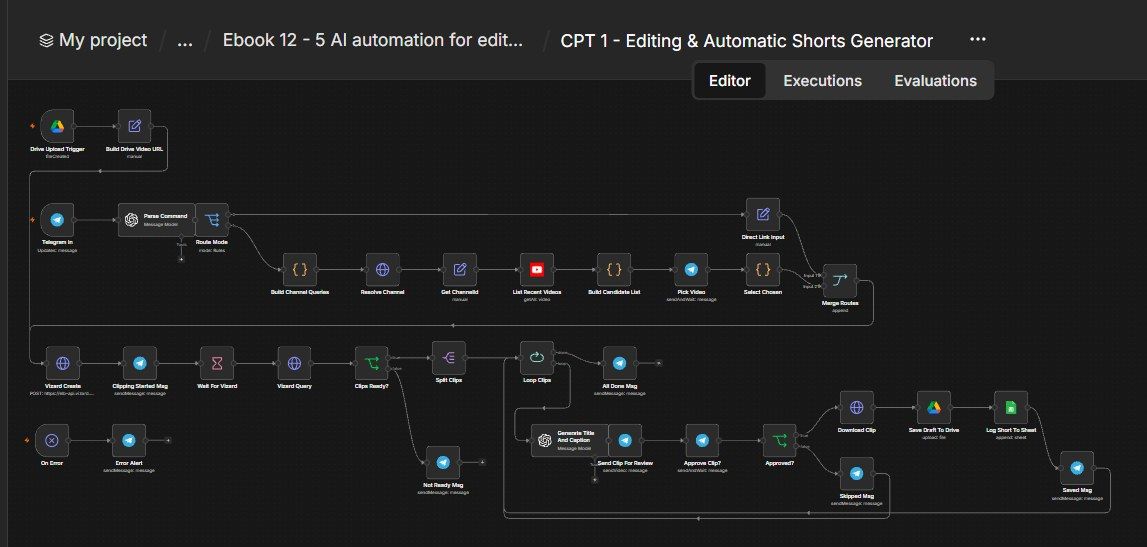
How this n8n workflow works
- 1Upload a video to Drive or message the bot
- 2Vizard cuts clips with captions and silence removed
- 3AI writes a title, caption and hashtags
- 4Each clip comes to Telegram for yes or no
- 5Approved clips are saved to Drive and logged
Who this workflow is for
Why it matters: video editors, agencies, and faceless-clip channels who repurpose long videos/podcasts into shorts at volume. Instead of manually scrubbing for clip-worthy moments, Vizard finds them, captions them, and you just approve the winners from your phone — turning hours of editing into a few taps.
Inside the workflow: node by node
Every one of these nodes is explained in the ebook, with each setting, prompt and expression printed so you can copy it.
- 1. Telegram In
- 2. Parse Command
- 3. Route Mode
- 4. Direct Link Input (mode C)
- 5. Build Channel Queries (mode B)
- 6. Resolve Channel
- 7. Get ChannelId
- 8. List Recent Videos
- 9. Build Candidate List
- 10. Pick Video
- 11. Select Chosen
- 12. Merge Routes
- 13. Vizard Create
- 14. Clipping Started Msg
- 15. Wait For Vizard
- 16. Vizard Query
- 17. Clips Ready?
- 18. Split Clips
- 19. Loop Clips
- 20. Generate Title And Caption
Before you start
- An n8n account.
- A Telegram bot + your chat ID.
- A Vizard account + API key.
- A YouTube (Google) OAuth credential (for channel scanning — mode B).
- An OpenAI / OpenRouter API key (gpt-4o-mini).
- Google Drive + Google Sheets credentials (save + log).
Quick setup guide
- 1Credentials: Connect your Telegram bot, Vizard (API key in the VIZARDAIAPIKEY header on both Vizard nodes), YouTube, OpenAI/OpenRouter, Google Drive + Sheets.
- 2IDs: Set YOURCHATID on the Telegram nodes, YOURDRIVEFOLDERID on Save to Drive, YOURSHEETID on Log to Sheet, and YOURRAWUPLOADSFOLDERID on the Drive trigger.
- 3Test (direct link): Message the bot a YouTube/podcast link → confirm it clips, sends shorts for review, and saves the ones you approve.
- 4Test (channels): Message a creator's @handle → confirm it lists 5 videos, you pick one, and it clips that.
What success looks like: You hand the bot a link (or drop a file), and a few minutes later you're just tapping "haan/nahi" on finished, captioned shorts — the editing is done for you.
Common problems and fixes
"Clips abhi ready nahi"
Why: Vizard still rendering
Fix: Increase the Wait, or message again to re-query
Vizard error
Why: API key wrong / credits
Fix: Put a valid YOURVIZARDKEY in both Vizard headers; check Vizard credits
Channel not found
Why: Handle/ID wrong
Fix: Use the exact @handle or UC… channel ID
Drive-file clip fails
Why: File not public
Fix: Make the uploaded file shareable so Vizard can fetch it
Nothing saved
Why: You replied "nahi"
Fix: Reply "haan" / "yes" to approve
Setup time
- With Claude Code30–45 minutes
Give the ebook to Claude Code and it builds the workflow for you.
- Import the JSON yourselfAbout 2 hours
Import the ready workflow JSON and connect your accounts.
- Build it by reading the ebookAbout 1 day
Follow every node and setting step by step to learn it fully.
Get this workflow
- Ready-to-import n8n workflow JSON
- Step-by-step PDF: every node and setting explained
- Copy-paste prompts and expressions — no coding
Frequently asked questions
Will this work on free n8n?
Yes. n8n itself can be free (the self-hosted Community edition) or you can use n8n Cloud. The workflow runs on both. You only pay for the outside services it uses, such as AI tokens, and many of them have free tiers to start.
How do I get the API keys (WhatsApp, OpenAI and others)?
The ebook includes a setup video for every API and account this workflow needs, so you can get each key step by step without any coding.
Do I need to know coding?
No. Every node, setting, prompt and expression is printed in the ebook, ready to copy-paste, and the workflow JSON can be imported in one click.
Can I use this Editors workflow for my clients?
Yes. Once it works for you, you can set it up for your own business or for clients and charge for the setup.
"Clips abhi ready nahi": how do I fix it?
Vizard still rendering. Fix: Increase the Wait, or message again to re-query.
Vizard error: how do I fix it?
API key wrong / credits. Fix: Put a valid YOURVIZARDKEY in both Vizard headers; check Vizard credits.
Channel not found: how do I fix it?
Handle/ID wrong. Fix: Use the exact @handle or UC… channel ID.