n8n workflow · Chapter 2 of 5
Reels, UGC & B-Rolls Generator
Updated · Tested on n8n 1.x · Part of the n8n Video Editor ebook
Send a script or photo to your Telegram bot and get custom AI video footage — b-roll and UGC-style shots without hunting through stock libraries.
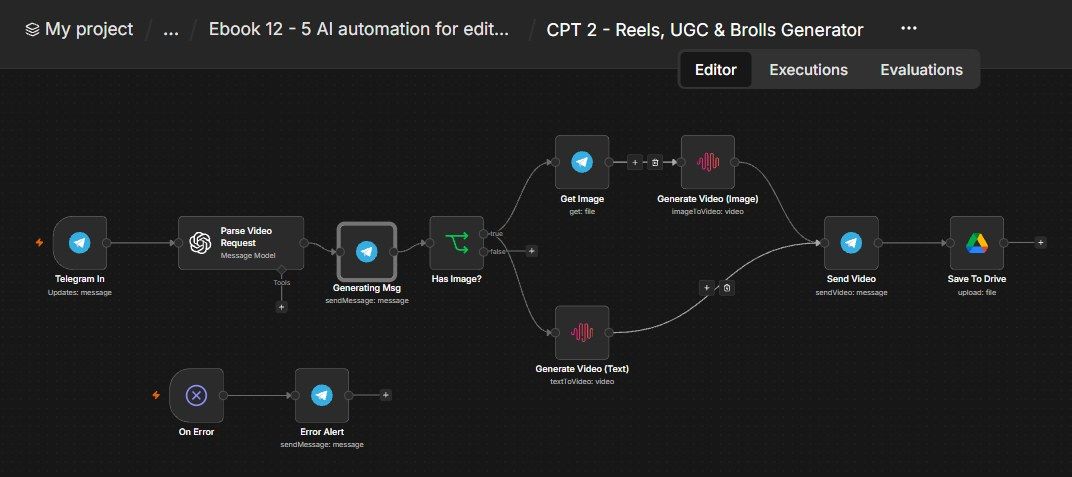
How this n8n workflow works
- 1You send text or a photo to Telegram
- 2AI turns it into a video scene prompt
- 3MiniMax generates the video
- 4The clip is sent to you on Telegram
- 5A copy is saved to Google Drive
Who this workflow is for
Why it matters: editors and agencies who need b-roll and filler footage they can't always shoot — a drone shot of a city, a product spinning on a table, a mood scene for a reel — or who want to turn a single product photo into a moving shot. Instead of buying stock or booking a shoot, you describe it and get a usable clip in a minute or two.
Inside the workflow: node by node
Every one of these nodes is explained in the ebook, with each setting, prompt and expression printed so you can copy it.
- 1. Telegram In
- 2. Parse Video Request
- 3. Generating Msg
- 4. Has Image?
- 5. Get Image (image path)
- 6. Generate Video (Image)
- 7. Generate Video (Text)
- 8. Send Video
- 9. Save To Drive
- 10. On Error
- 11. Error Alert
Before you start
- An n8n account with AI Gateway credits (powers MiniMax — no separate key needed).
- A Telegram bot + your chat ID.
- An OpenAI / OpenRouter API key (gpt-4o-mini, for the request parser).
- Google Drive credentials (to save clips).
Quick setup guide
- 1Credentials: Connect your Telegram bot, OpenAI/OpenRouter, and Google Drive. Make sure your n8n has AI Gateway credits (for MiniMax).
- 2IDs: Set YOURCHATID on the Telegram nodes and YOURDRIVEFOLDERID on Save To Drive.
- 3Test (text): Message the bot make a cinematic slow drone shot over a misty forest at sunrise, vertical → confirm a 9:16 clip comes back and lands in Drive.
- 4Test (image): Send a product photo with the caption animate this: slow 360 spin on a studio table → confirm it animates the photo.
What success looks like: You type a scene (or drop a photo) and a minute later you've got a usable, saved clip — b-roll on demand, no camera required.
Common problems and fixes
"Insufficient gateway credits"
Why: N8n AI Gateway out of credits
Fix: Top up gateway credits in n8n
Wrong aspect ratio
Why: Parser guessed
Fix: Say "vertical" / "horizontal" explicitly in your message
Image not animated
Why: Photo not detected
Fix: Send the image with a caption, not as a file/document
Clip not in Drive
Why: Folder ID wrong
Fix: Paste the correct YOURDRIVEFOLDERID
Blurry / short clip
Why: Model limits
Fix: Keep to 6 s / 768P (the settings shown); regenerate with a clearer prompt
Setup time
- With Claude Code30–45 minutes
Give the ebook to Claude Code and it builds the workflow for you.
- Import the JSON yourselfAbout 2 hours
Import the ready workflow JSON and connect your accounts.
- Build it by reading the ebookAbout 1 day
Follow every node and setting step by step to learn it fully.
Get this workflow
- Ready-to-import n8n workflow JSON
- Step-by-step PDF: every node and setting explained
- Copy-paste prompts and expressions — no coding
Frequently asked questions
Will this work on free n8n?
Yes. n8n itself can be free (the self-hosted Community edition) or you can use n8n Cloud. The workflow runs on both. You only pay for the outside services it uses, such as AI tokens, and many of them have free tiers to start.
How do I get the API keys (WhatsApp, OpenAI and others)?
The ebook includes a setup video for every API and account this workflow needs, so you can get each key step by step without any coding.
Do I need to know coding?
No. Every node, setting, prompt and expression is printed in the ebook, ready to copy-paste, and the workflow JSON can be imported in one click.
Can I use this Editors workflow for my clients?
Yes. Once it works for you, you can set it up for your own business or for clients and charge for the setup.
"Insufficient gateway credits": how do I fix it?
N8n AI Gateway out of credits. Fix: Top up gateway credits in n8n.
Wrong aspect ratio: how do I fix it?
Parser guessed. Fix: Say "vertical" / "horizontal" explicitly in your message.
Image not animated: how do I fix it?
Photo not detected. Fix: Send the image with a caption, not as a file/document.