n8n workflow · Chapter 3 of 5
Viral Thumbnail Generator
Updated · Tested on n8n 1.x · Part of the n8n Video Editor ebook
Send a topic to your Telegram bot and get a 1080p thumbnail in the style of top YouTube thumbnails — reply with a change to edit just that part.
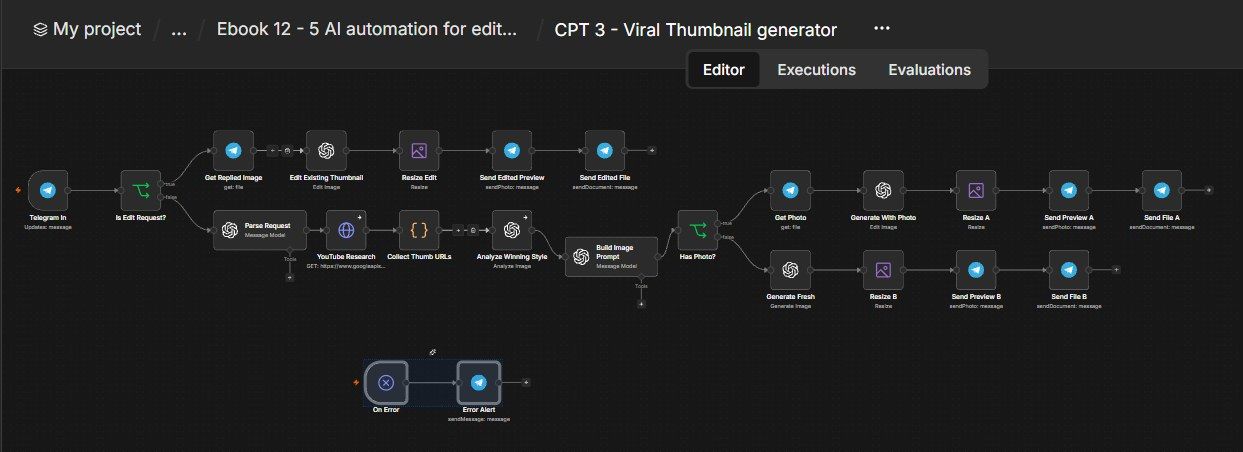
How this n8n workflow works
- 1You send a topic, title or photo
- 2AI studies top YouTube thumbnails on that topic
- 3AI writes a detailed image prompt
- 4gpt-image-1 creates the thumbnail
Who this workflow is for
Why it matters: editors and agencies — the thumbnail is the single highest-leverage, highest-paid deliverable, and clients ask for it constantly. This produces a research-backed, Photoshop-quality thumbnail in ~30 seconds without opening Photoshop, and lets the client tweak it by just replying in chat.
Inside the workflow: node by node
Every one of these nodes is explained in the ebook, with each setting, prompt and expression printed so you can copy it.
- 1. Telegram In
- 2. Is Edit Request?
- 3. Get Replied Image
- 4. Edit Existing Thumbnail
- 5. Resize Edit
- 6. Send Edited Preview
- 7. Send Edited File
- 8. Parse Request
- 9. YouTube Research
- 10. Collect Thumb URLs
- 11. Analyze Winning Style
- 12. Build Image Prompt
- 13. Has Photo?
- 14. Get Photo
- 15. Generate With Photo
- 16. Resize A
- 17. Send Preview A
- 18. Send File A
- 19. Generate Fresh
- 20. Resize B
Before you start
- An n8n account.
- A Telegram bot + your chat ID.
- A real OpenAI API key with image credits (for gpt-image-1 + gpt-4o vision).
- An OpenRouter key (for the gpt-4o-mini text steps) — optional; you can use OpenAI for those too.
- A YouTube (Google) OAuth credential (for research).
Quick setup guide
- 1Credentials: Connect Telegram, your real OpenAI key (with image credits — used by all gpt-image-1 and gpt-4o nodes), OpenRouter (text nodes), and YouTube OAuth.
- 2IDs: Set YOURCHATID on the Telegram Trigger and the Error Alert.
- 3Test (fresh): Message Thumbnail for a video about making ₹1 lakh with AI, title: 1 LAKH WITH AI → confirm you get a preview + full-res file with that exact title.
- 4Test (edit): Reply to that thumbnail with make the background blue → confirm only the background changes.
- 5Test (your face): Send your photo with a caption topic → confirm your real face appears in the thumbnail.
What success looks like: You send one line, and 30 seconds later you have a research-backed, click-magnet, full-resolution thumbnail — editable by just replying.
Common problems and fixes
"gpt-image-1 not available"
Why: Using OpenRouter for image
Fix: Use a real OpenAI key on the image/vision nodes
Billing / credits error
Why: OpenAI image credits empty
Fix: Add credits to your OpenAI account
Title text wrong/garbled
Why: Model rewrote it
Fix: Phrase it as title: YOUR EXACT TEXT; the parser copies it verbatim
Face changed
Why: Fidelity too low
Fix: Keep Input Fidelity → High on the edit/with-photo nodes
No research results
Why: Topic too narrow
Fix: Use a broader topic keyword
Setup time
- With Claude Code30–45 minutes
Give the ebook to Claude Code and it builds the workflow for you.
- Import the JSON yourselfAbout 2 hours
Import the ready workflow JSON and connect your accounts.
- Build it by reading the ebookAbout 1 day
Follow every node and setting step by step to learn it fully.
Get this workflow
- Ready-to-import n8n workflow JSON
- Step-by-step PDF: every node and setting explained
- Copy-paste prompts and expressions — no coding
Frequently asked questions
Will this work on free n8n?
Yes. n8n itself can be free (the self-hosted Community edition) or you can use n8n Cloud. The workflow runs on both. You only pay for the outside services it uses, such as AI tokens, and many of them have free tiers to start.
How do I get the API keys (WhatsApp, OpenAI and others)?
The ebook includes a setup video for every API and account this workflow needs, so you can get each key step by step without any coding.
Do I need to know coding?
No. Every node, setting, prompt and expression is printed in the ebook, ready to copy-paste, and the workflow JSON can be imported in one click.
Can I use this Editors workflow for my clients?
Yes. Once it works for you, you can set it up for your own business or for clients and charge for the setup.
"gpt-image-1 not available": how do I fix it?
Using OpenRouter for image. Fix: Use a real OpenAI key on the image/vision nodes.
Billing / credits error: how do I fix it?
OpenAI image credits empty. Fix: Add credits to your OpenAI account.
Title text wrong/garbled: how do I fix it?
Model rewrote it. Fix: Phrase it as title: YOUR EXACT TEXT; the parser copies it verbatim.