n8n workflow · Chapter 5 of 5
Personalized Cold Emailing
Updated · Tested on n8n 1.x · Part of the n8n Video Editor ebook
Pitches your editing services to every lead by email — AI researches each lead, writes a personal email, checks it for spam and sends it from your Gmail.
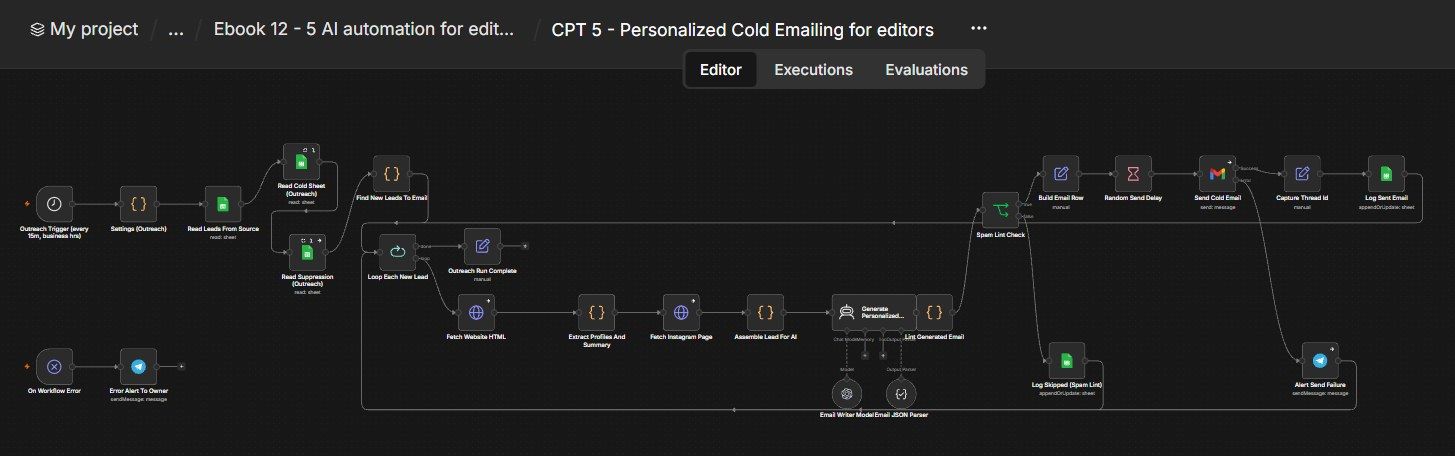
How this n8n workflow works
- 1Every 15 minutes it picks the next new lead
- 2It reads the lead's website and Instagram
- 3AI writes a short personalized email
- 4A spam check blocks risky emails
- 5The email is sent from Gmail and logged
Who this workflow is for
Why it matters: editors and agencies who want a steady flow of warm replies without manually writing hundreds of emails. Because every email references a true, specific detail about the recipient's content, reply rates are far higher than generic blasts — and the caps + lint + random delays protect your domain's reputation.
Inside the workflow: node by node
Every one of these nodes is explained in the ebook, with each setting, prompt and expression printed so you can copy it.
- 1. Outreach Trigger (every 15m, business hrs)
- 2. Settings (Outreach)
- 3. Read Leads From Source
- 4. Read Cold Sheet (Outreach)
- 5. Read Suppression (Outreach)
- 6. Find New Leads To Email
- 7. Loop Each New Lead
- 8. Outreach Run Complete
- 9. Fetch Website HTML
- 10. Extract Profiles And Summary
- 11. Fetch Instagram Page
- 12. Assemble Lead For AI
- 13. Generate Personalized Email (AI Agent)
- 14. Email Writer Model
- 15. Email JSON Parser
- 16. Lint Generated Email
- 17. Spam Lint Check
- 18. Build Email Row
- 19. Random Send Delay
- 20. Send Cold Email
Before you start
- An n8n account.
- A Gmail account + Gmail OAuth credential (your sending inbox).
- An OpenAI API key (gpt-4o).
- Your leads sheet (from Chapter 4) + a tracker sheet (with a RevisionWave Cold Email Tracker tab and a Suppression tab) + Google Sheets credential.
- A Telegram bot + your chat ID (for failure alerts).
Quick setup guide
- 1Credentials: Connect Gmail, OpenAI, Google Sheets, and Telegram.
- 2Settings node: Open Settings (Outreach) and set your senderName, senderIdentity, offer, signature, YOURTRACKERSHEETID, YOURLEADSSHEETID, and YOURCHATID.
- 3Sheets: Make sure your tracker has a RevisionWave Cold Email Tracker tab (with the columns above) and a Suppression tab.
- 4Test one send: Temporarily set perRun to 1 and run once manually → confirm one personalized email sends and a row appears in the tracker.
- 5Activate: Turn the workflow on; it now emails new leads automatically during business hours.
What success looks like: Scraped leads quietly become personalized, spam-safe emails that land in inboxes and start real conversations — all logged, capped, and reply-tracked, with zero manual writing.
Common problems and fixes
Nothing sends
Why: PAUSED set, cap hit, or no new leads
Fix: Check Suppression tab, daily cap, and that leads aren't all already in tracker
Emails feel generic
Why: Website/IG fetch returned nothing
Fix: Expected for thin leads (NEUTRAL MODE); better leads give better emails
Draft always skipped
Why: Banned word in signature/offer
Fix: Review bannedSpamWords vs your Settings text
Going to spam
Why: Too many sends / HTML
Fix: Keep Email Type = Text, keep caps low, warm up the domain
Follow-ups don't thread
Why: Thread Id empty
Fix: Ensure Capture Thread Id runs after Send and logs to the tracker
Setup time
- With Claude Code30–45 minutes
Give the ebook to Claude Code and it builds the workflow for you.
- Import the JSON yourselfAbout 2 hours
Import the ready workflow JSON and connect your accounts.
- Build it by reading the ebookAbout 1 day
Follow every node and setting step by step to learn it fully.
Get this workflow
- Ready-to-import n8n workflow JSON
- Step-by-step PDF: every node and setting explained
- Copy-paste prompts and expressions — no coding
Frequently asked questions
Will this work on free n8n?
Yes. n8n itself can be free (the self-hosted Community edition) or you can use n8n Cloud. The workflow runs on both. You only pay for the outside services it uses, such as AI tokens, and many of them have free tiers to start.
How do I get the API keys (WhatsApp, OpenAI and others)?
The ebook includes a setup video for every API and account this workflow needs, so you can get each key step by step without any coding.
Do I need to know coding?
No. Every node, setting, prompt and expression is printed in the ebook, ready to copy-paste, and the workflow JSON can be imported in one click.
Can I use this Editors workflow for my clients?
Yes. Once it works for you, you can set it up for your own business or for clients and charge for the setup.
Nothing sends: how do I fix it?
PAUSED set, cap hit, or no new leads. Fix: Check Suppression tab, daily cap, and that leads aren't all already in tracker.
Emails feel generic: how do I fix it?
Website/IG fetch returned nothing. Fix: Expected for thin leads (NEUTRAL MODE); better leads give better emails.
Draft always skipped: how do I fix it?
Banned word in signature/offer. Fix: Review bannedSpamWords vs your Settings text.