n8n workflow · Chapter 1 of 5
Client Content Factory
Updated · Tested on n8n 1.x · Part of the n8n Agency Client Delivery ebook
Type a topic and a team of AI agents writes a ready-to-shoot reel script, caption and hashtags — reviewed and rewritten until it scores 9/10.
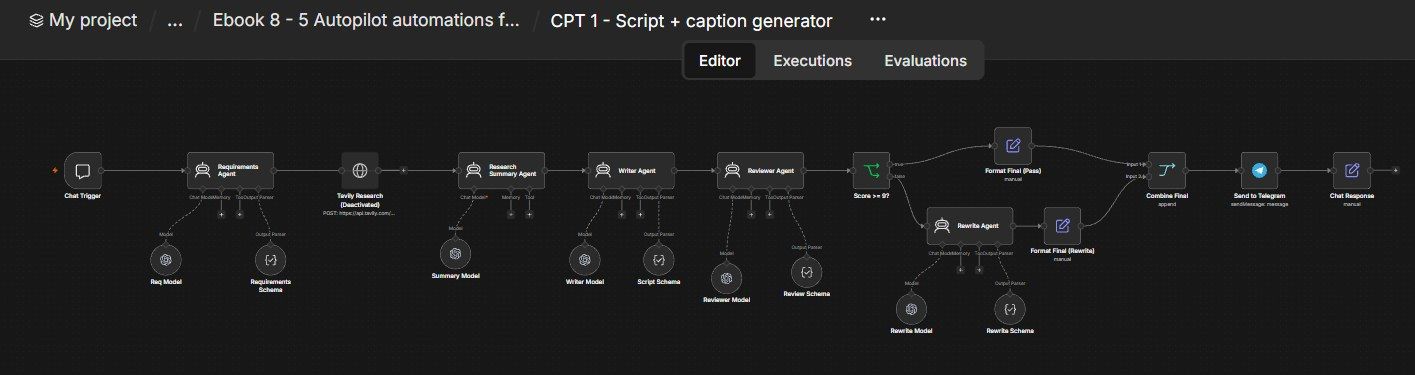
How this n8n workflow works
- 1You send a topic in chat or Telegram
- 2AI works out the brief and researches facts
- 3AI writes the script, caption and hashtags
- 4A reviewer AI scores it and requests rewrites
- 5Final script is sent to your Telegram
Who this workflow is for
- Content & social-media agencies — produce scripts for every client, every day, in minutes.
- Faceless-channel operators — an endless supply of short-form scripts.
- Solo creators & coaches — never stare at a blank page again.
Why it matters: Scriptwriting is the bottleneck in content delivery. A good writer costs money and time; AI without structure produces bland, factually shaky scripts. This workflow gives you a self-checking writer that researches, writes, grades and rewrites — so what reaches you is already close to publish-ready. One topic in, a shootable script out.
Inside the workflow: node by node
Every one of these nodes is explained in the ebook, with each setting, prompt and expression printed so you can copy it.
- 1. Chat Trigger — Where You Type the Topic
- 2. Requirements Agent — Turn Your Sentence Into a Brief
- 3. Req Model — The Brain for the Brief
- 4. Requirements Schema — Lock the Output Shape
- 5. Tavily Research — Live Web Facts (Optional, Disabled)
- 6. Research Summary Agent — A Trustworthy Fact Brief
- 7. Summary Model — The Brain for Research
- 8. Writer Agent — Write the Reel Script
- 9. Writer Model & Node 10: Script Schema
- 10. Reviewer Agent — The Strict Editor
- 11. Reviewer Model & Node 13: Review Schema
- 12. Score >= 9? — The Quality Gate
- 13. Rewrite Agent — Fix Everything the Editor Flagged
- 14. Rewrite Model & Rewrite Schema
- 15. Format Final (Pass) — Assemble the Passed Script
- 16. Format Final (Rewrite) — Assemble the Rewritten Script
- 17. Combine Final — Join the Two Branches
- 18. Send to Telegram — Deliver the Script to Your Phone
- 19. Chat Response — Show It in the Chat Window Too
Before you start
- An n8n account (Cloud or self-hosted).
- An OpenAI or OpenRouter API key — powers all the AI agents (this build uses gpt-4o-mini for the light jobs and gpt-4o for writing/reviewing).
- A Telegram bot + your chat ID — where the finished script is delivered.
- (Optional) a Tavily API key — for live web research; the Tavily node ships disabled, so you can ignore it to start.
Quick setup guide
- 1Credentials: Add your OpenAI/OpenRouter key and your Telegram bot (see the video table). (Tavily is optional — skip it.)
- 2Import the workflow: . Reconnect the credential on every model node and on Send to Telegram.
- 3Set your chat ID: Put YOURCHATID → your real Telegram chat ID on the Send to Telegram node.
- 4Personalize (optional): Tweak the default platform/audience/language in the Requirements Agent's system message if your clients aren't Hinglish Gen-Z reels.
- 5Test: Open the chat, type a topic, and watch the script land in Telegram.
What success looks like: One short topic in, a fully structured, self-graded, publish-ready Hinglish reel script (with caption + hashtags) out — every time, in under a minute.
Common problems and fixes
No output / error on an agent
Why: Model credential missing
Fix: Reconnect OpenAI/OpenRouter on every Chat Model node
Script is pure English or uses Devanagari
Why: System message edited/removed
Fix: Restore the "Hinglish ONLY, never Devanagari" rules
Always rewrites (never passes)
Why: Reviewer too strict for your niche
Fix: Lower the pass bar in the IF (e.g. ≥ 8) or ease the reviewer rubric
Nothing arrives on Telegram
Why: Wrong chat ID / bot not started
Fix: Set your chat ID; message your bot once so it can DM you
Fields missing downstream
Why: Output parser off
Fix: Turn Require Specific Output Format ON and keep the schema nodes attached
Facts look wrong
Why: AI wrote from memory
Fix: Verify claims before publishing, or enable the Tavily research node
Setup time
- With Claude Code30–45 minutes
Give the ebook to Claude Code and it builds the workflow for you.
- Import the JSON yourselfAbout 2 hours
Import the ready workflow JSON and connect your accounts.
- Build it by reading the ebookAbout 1 day
Follow every node and setting step by step to learn it fully.
Get this workflow
- Ready-to-import n8n workflow JSON
- Step-by-step PDF: every node and setting explained
- Copy-paste prompts and expressions — no coding
Frequently asked questions
Will this work on free n8n?
Yes. n8n itself can be free (the self-hosted Community edition) or you can use n8n Cloud. The workflow runs on both. You only pay for the outside services it uses, such as AI tokens, and many of them have free tiers to start.
How do I get the API keys (WhatsApp, OpenAI and others)?
The ebook includes a setup video for every API and account this workflow needs, so you can get each key step by step without any coding.
Do I need to know coding?
No. Every node, setting, prompt and expression is printed in the ebook, ready to copy-paste, and the workflow JSON can be imported in one click.
Can I use this Marketing Agency clients workflow for my clients?
Yes. Once it works for you, you can set it up for your own business or for clients and charge for the setup.
No output / error on an agent: how do I fix it?
Model credential missing. Fix: Reconnect OpenAI/OpenRouter on every Chat Model node.
Script is pure English or uses Devanagari: how do I fix it?
System message edited/removed. Fix: Restore the "Hinglish ONLY, never Devanagari" rules.
Always rewrites (never passes): how do I fix it?
Reviewer too strict for your niche. Fix: Lower the pass bar in the IF (e.g. ≥ 8) or ease the reviewer rubric.