n8n workflow · Chapter 5 of 5
Client Reviews & Reply Manager
Updated · Tested on n8n 1.x · Part of the n8n Agency Client Delivery ebook
Reputation management on autopilot: asks recent customers for Google reviews on WhatsApp and drafts a reply to every new review, so you just skim and post.
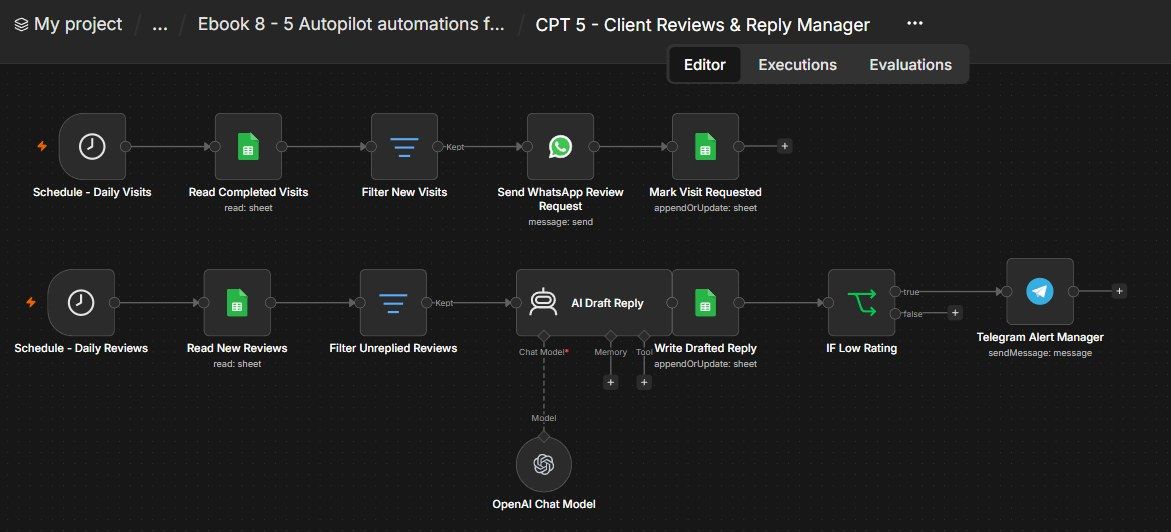
How this n8n workflow works
- 1Daily, it reads the client's visits sheet
- 2New customers get a WhatsApp review request
- 3Daily, it finds new reviews without a reply
- 4AI drafts a polite reply in their language
- 5Low ratings trigger a Telegram alert to the manager
Who this workflow is for
- Agencies offering reputation management to local clients (clinics, salons, restaurants, gyms).
- Local businesses who want more reviews without nagging customers manually.
- Anyone who struggles to reply to every review on time.
Why it matters: Star rating and review volume directly drive local discovery and trust — yet most businesses forget to ask, and reply late or not at all. This workflow systematically asks every customer (once), and ensures every review gets a thoughtful, brand-safe reply fast — with unhappy reviews escalated so they're handled personally. It's a high-value, recurring service an agency can sell and run on autopilot.
Inside the workflow: node by node
Every one of these nodes is explained in the ebook, with each setting, prompt and expression printed so you can copy it.
- 1. Schedule - Daily Visits — The 10 AM Trigger
- 2. Read Completed Visits — Load the Customer List
- 3. Filter New Visits — Only Those Not Yet Asked
- 4. Send WhatsApp Review Request — The Ask
- 5. Mark Visit Requested — Don't Ask Twice
- 6. Schedule - Daily Reviews — The 11 AM Trigger
- 7. Read New Reviews — Load the Reviews
- 8. Filter Unreplied Reviews — Only the New Ones
- 9. AI Draft Reply — The Brand-Safe Reply Writer
- 10. OpenAI Chat Model — The Brain
- 11. Write Drafted Reply — Save the Draft
- 12. IF Low Rating — Catch the Unhappy Ones
- 13. Telegram Alert Manager — Escalate
Before you start
- An n8n account (Cloud or self-hosted).
- A Google Sheets credential — for the Visits and Reviews sheets.
- A WhatsApp Business Cloud setup (a phone number ID + a valid token) — for the review requests.
- An OpenAI / OpenRouter API key — powers the reply drafting (gpt-4o-mini).
- A Telegram bot + your chat ID — for the low-rating alert.
- The client's Google review link.
Quick setup guide
- 1Build the two sheets: (columns above). Add a couple of test rows: a Visit with reviewrequested blank; a Review with replydraft blank (try one 5 and one 2).
- 2Credentials: Google Sheets, WhatsApp Business Cloud, OpenAI/OpenRouter, Telegram.
- 3Import the workflow: . Set YOURSHEETID on all four Sheets nodes, pick your WhatsApp sender number, drop in the client's review link in the WhatsApp text, and set YOURCHATID on the Telegram node.
- 4Test each branch: With Execute Workflow: watch a WhatsApp go out and the visit get marked; watch a reply get drafted, saved, and the 2 trigger a Telegram alert.
- 5Activate: So both branches run daily.
What success looks like: Customers get asked (once), every review gets a warm, language-matched, brand-safe reply drafted for approval, and low ratings never slip through — a complete, sellable reputation service on autopilot.
Common problems and fixes
WhatsApp doesn't send
Why: Token expired / number not set
Fix: Use a valid token; pick the sender number ID from the dropdown
Everyone messaged again
Why: Reviewrequested not updated
Fix: Keep Mark Visit Requested matching on visitid
Reply in the wrong language
Why: System message edited
Fix: Restore the "detect the review's language and reply in it" rule
Replies too long / risky
Why: Rubric changed
Fix: Keep the "under 60 words, no fault, no names" rules
No low-rating alert
Why: Wrong chat ID / rating not a number
Fix: Set YOURCHATID; ensure rating is numeric
Duplicate review rows
Why: Matching column wrong
Fix: Match on reviewid in Write Drafted Reply
Setup time
- With Claude Code30–45 minutes
Give the ebook to Claude Code and it builds the workflow for you.
- Import the JSON yourselfAbout 2 hours
Import the ready workflow JSON and connect your accounts.
- Build it by reading the ebookAbout 1 day
Follow every node and setting step by step to learn it fully.
Get this workflow
- Ready-to-import n8n workflow JSON
- Step-by-step PDF: every node and setting explained
- Copy-paste prompts and expressions — no coding
Frequently asked questions
Will this work on free n8n?
Yes. n8n itself can be free (the self-hosted Community edition) or you can use n8n Cloud. The workflow runs on both. You only pay for the outside services it uses, such as AI tokens, and many of them have free tiers to start.
How do I get the API keys (WhatsApp, OpenAI and others)?
The ebook includes a setup video for every API and account this workflow needs, so you can get each key step by step without any coding.
Do I need to know coding?
No. Every node, setting, prompt and expression is printed in the ebook, ready to copy-paste, and the workflow JSON can be imported in one click.
Can I use this Marketing Agency clients workflow for my clients?
Yes. Once it works for you, you can set it up for your own business or for clients and charge for the setup.
WhatsApp doesn't send: how do I fix it?
Token expired / number not set. Fix: Use a valid token; pick the sender number ID from the dropdown.
Everyone messaged again: how do I fix it?
Reviewrequested not updated. Fix: Keep Mark Visit Requested matching on visitid.
Reply in the wrong language: how do I fix it?
System message edited. Fix: Restore the "detect the review's language and reply in it" rule.