n8n workflow · Chapter 4 of 5
Client Viral Thumbnail Generator
Updated · Tested on n8n 1.x · Part of the n8n Agency Client Delivery ebook
Send a topic to a Telegram bot and get a click-worthy YouTube thumbnail, designed by AI from top-performing thumbnails — reply with a change to edit it.
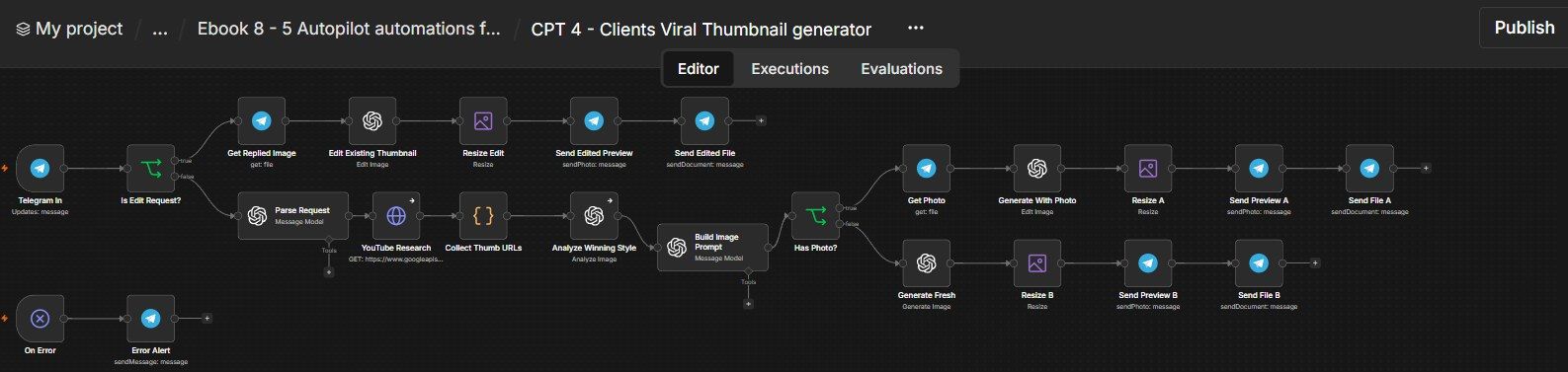
How this n8n workflow works
- 1You send a topic, title or your photo
- 2AI studies top thumbnails on YouTube
- 3AI writes a detailed image prompt
- 4gpt-image-1 creates the thumbnail and sends it back
- 5Reply with a change to edit just that part
Who this workflow is for
- Agencies & thumbnail designers — produce on-brand, research-based thumbnails for every client video.
- Creators & coaches — stop guessing; get click-tested styles in seconds.
- Faceless channels — consistent, professional thumbnails at scale.
Why it matters: Click-through rate is the single biggest lever on a video's reach, and a designer charges real money per thumbnail with a slow turnaround. This bot researches what's already winning, bakes in the exact title, uses the creator's face, and delivers a polished thumbnail in under a minute — with one-reply edits.
Inside the workflow: node by node
Every one of these nodes is explained in the ebook, with each setting, prompt and expression printed so you can copy it.
- 1. Telegram In — Your Request Channel
- 2. Is Edit Request? — New or Edit?
- 3. Get Replied Image
- 4. Edit Existing Thumbnail
- 5. Resize Edit
- 6. Send Edited Preview → Node 7: Send Edited File
- 7. Parse Request
- 8. YouTube Research
- 9. Collect Thumb URLs
- 10. Analyze Winning Style
- 11. Build Image Prompt
- 12. Has Photo?
- 13. Get Photo → Node 15: Generate With Photo
- 14. Resize A → Node 17: Send Preview A → Node 18: Send File A
- 15. Generate Fresh → Node 20: Resize B → Node 21: Send Preview B → Node 22: Send File B
- 16. On Error → Node 24: Error Alert
Before you start
- An n8n account (Cloud or self-hosted).
- A Telegram bot + your chat ID — the request/delivery channel.
- An OpenAI API key — with gpt-image-1 image credits (the image generation isn't free) and access to gpt-4o / gpt-4o-mini for the text/vision steps. (OpenRouter is used for the text nodes in this build.)
- A YouTube (Google) OAuth credential — to pull top thumbnails for the topic.
Quick setup guide
- 1Credentials: Telegram, OpenAI (with gpt-image-1 image credits), and a YouTube OAuth credential.
- 2Import the workflow: . Reconnect every OpenAI/Telegram/YouTube credential. Set YOURCHATID on the Telegram Trigger + Error Alert.
- 3Test a fresh thumbnail: Message the bot, e.g. "thumbnail: I QUIT MY JOB, tech niche". You'll get a preview + full-res file.
- 4Test with your face: Send the same with your photo attached → it builds around your face.
- 5Test an edit: Reply to a returned thumbnail with "make the text bigger and background red" → it edits only that.
What success looks like: Research-backed, MrBeast-style thumbnails with your exact title (and your face), delivered in under a minute, editable by reply.
Common problems and fixes
Image step errors / 400
Why: No gpt-image-1 credits
Fix: Add image credits to your OpenAI account
Title text wrong or misspelled
Why: Request unclear
Fix: State it explicitly: "title should say X"
Face not used
Why: Photo not attached to the message
Fix: Attach the photo to the same message
Edit changes too much
Why: Replied to wrong image / vague ask
Fix: Reply to the exact thumbnail; be specific
No top thumbnails found
Why: YouTube OAuth not connected
Fix: Connect the YouTube Data API credential
No Telegram output
Why: Wrong chat ID
Fix: Set YOURCHATID; message your bot once
Setup time
- With Claude Code30–45 minutes
Give the ebook to Claude Code and it builds the workflow for you.
- Import the JSON yourselfAbout 2 hours
Import the ready workflow JSON and connect your accounts.
- Build it by reading the ebookAbout 1 day
Follow every node and setting step by step to learn it fully.
Get this workflow
- Ready-to-import n8n workflow JSON
- Step-by-step PDF: every node and setting explained
- Copy-paste prompts and expressions — no coding
Frequently asked questions
Will this work on free n8n?
Yes. n8n itself can be free (the self-hosted Community edition) or you can use n8n Cloud. The workflow runs on both. You only pay for the outside services it uses, such as AI tokens, and many of them have free tiers to start.
How do I get the API keys (WhatsApp, OpenAI and others)?
The ebook includes a setup video for every API and account this workflow needs, so you can get each key step by step without any coding.
Do I need to know coding?
No. Every node, setting, prompt and expression is printed in the ebook, ready to copy-paste, and the workflow JSON can be imported in one click.
Can I use this Marketing Agency clients workflow for my clients?
Yes. Once it works for you, you can set it up for your own business or for clients and charge for the setup.
Image step errors / 400: how do I fix it?
No gpt-image-1 credits. Fix: Add image credits to your OpenAI account.
Title text wrong or misspelled: how do I fix it?
Request unclear. Fix: State it explicitly: "title should say X".
Face not used: how do I fix it?
Photo not attached to the message. Fix: Attach the photo to the same message.