n8n workflow · Chapter 1 of 5
Brand Identity Generator
Updated · Tested on n8n 1.x · Part of the n8n Branding Agency ebook
Your branding studio in a chat: send a one-line brief and get a logo and moodboard with palette, fonts, tagline and brand voice — reply to edit.
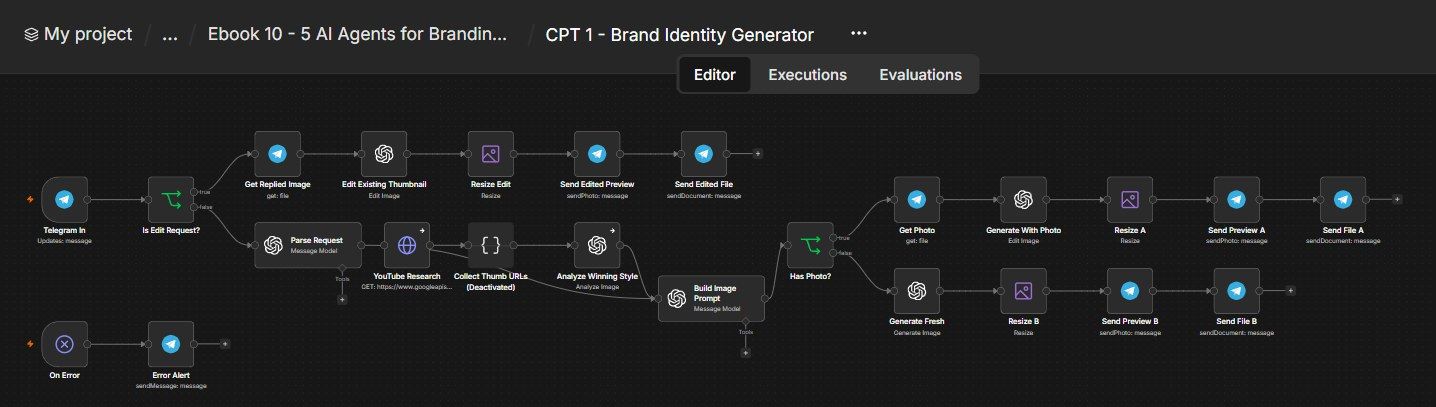
How this n8n workflow works
- 1You send a brief or photo to Telegram
- 2AI turns it into a structured brand brief
- 3AI designs the palette, fonts, tagline and voice
- 4gpt-image-1 renders the logo and moodboard
Who this workflow is for
- Branding & design freelancers / agencies who want first-draft identities in seconds to show clients.
- Founders & small businesses who need a logo, palette and brand voice but can't afford a designer yet.
- Content creators spinning up sub-brands, series art, or merch concepts on the fly.
Why it matters: A brand identity concept normally takes a designer hours and a client several back-and-forths. Here it's one Telegram message and a reply-to-edit loop — so you can explore ten directions in the time it used to take to brief one. Agencies use it to win the pitch (walk in with concepts already made); founders use it to launch today instead of next month.
Inside the workflow: node by node
Every one of these nodes is explained in the ebook, with each setting, prompt and expression printed so you can copy it.
- 1. Telegram In
- 2. Is Edit Request?
- 3. Get Replied Image
- 4. Edit Existing Thumbnail
- 5. Resize Edit
- 6. Send Edited Preview
- 7. Send Edited File
- 8. Parse Request
- 9. YouTube Research (optional, deactivated by default)
- 10. Collect Thumb URLs (optional)
- 11. Analyze Winning Style (optional)
- 12. Build Image Prompt
- 13. Has Photo?
- 14. Get Photo
- 15. Generate With Photo
- 16. Resize A
- 17. Send Preview A
- 18. Send File A
- 19. Generate Fresh
- 20. Resize B
Before you start
- An n8n account.
- A Telegram bot (from BotFather) + your chat ID (so only you can use it).
- An OpenAI API key with gpt-image-1 and gpt-4o access (image generation + image analysis).
- An OpenRouter API key (or OpenAI) for the small text models (gpt-4o-mini) that write the briefs.
- (Optional) a YouTube Data API credential if you want the trend-research branch.
Quick setup guide
- 1Create the bot.: Make a Telegram bot with BotFather, connect it in n8n, and put your chat ID in Telegram In (and Error Alert).
- 2Add the AI credentials.: Connect your OpenAI key (for gpt-image-1 + gpt-4o) and your OpenRouter/OpenAI key (for the gpt-4o-mini text nodes).
- 3(Optional) enable research.: If you want trend-informed art, connect a YouTube Data API credential and activate the YouTube Research / Collect URLs / Analyze Style nodes.
- 4Test the generate path.: Activate the workflow and send your bot a brief, e.g. "a bold modern coffee brand called Ember for young professionals, dark green and gold." You should get a moodboard + the written palette/fonts/tagline/voice.
- 5Test the edit loop.: Reply to that image with "make the logo rounder and use navy instead of green" → confirm it edits that exact design.
What success looks like: You type one sentence and get back a usable brand concept — logo, palette, fonts, tagline, voice — and can refine it conversationally by replying, all from your phone.
Common problems and fixes
Bot doesn't respond
Why: Chat ID wrong / workflow inactive
Fix: Set YOURCHATID in Telegram In; Activate the workflow
"model not found" / image fails
Why: No gpt-image-1 access or quota
Fix: Enable gpt-image-1 on your OpenAI account; add credits
Brief fields come back empty
Why: Text model/credential issue
Fix: Check the OpenRouter/OpenAI credential on Parse & Build nodes
Edit redraws the whole image
Why: Input Fidelity not High
Fix: Set Input Fidelity → High on the edit nodes
Brand name misspelled in art
Why: Model text rendering
Fix: Re-run, or reply "fix the spelling to <name>" to edit it
Research branch errors
Why: YouTube API not set up
Fix: Leave the research nodes deactivated (they're optional)
Setup time
- With Claude Code30–45 minutes
Give the ebook to Claude Code and it builds the workflow for you.
- Import the JSON yourselfAbout 2 hours
Import the ready workflow JSON and connect your accounts.
- Build it by reading the ebookAbout 1 day
Follow every node and setting step by step to learn it fully.
Get this workflow
- Ready-to-import n8n workflow JSON
- Step-by-step PDF: every node and setting explained
- Copy-paste prompts and expressions — no coding
Frequently asked questions
Will this work on free n8n?
Yes. n8n itself can be free (the self-hosted Community edition) or you can use n8n Cloud. The workflow runs on both. You only pay for the outside services it uses, such as AI tokens, and many of them have free tiers to start.
How do I get the API keys (WhatsApp, OpenAI and others)?
The ebook includes a setup video for every API and account this workflow needs, so you can get each key step by step without any coding.
Do I need to know coding?
No. Every node, setting, prompt and expression is printed in the ebook, ready to copy-paste, and the workflow JSON can be imported in one click.
Can I use this Branding Agencies workflow for my clients?
Yes. Once it works for you, you can set it up for your own business or for clients and charge for the setup.
Bot doesn't respond: how do I fix it?
Chat ID wrong / workflow inactive. Fix: Set YOURCHATID in Telegram In; Activate the workflow.
"model not found" / image fails: how do I fix it?
No gpt-image-1 access or quota. Fix: Enable gpt-image-1 on your OpenAI account; add credits.
Brief fields come back empty: how do I fix it?
Text model/credential issue. Fix: Check the OpenRouter/OpenAI credential on Parse & Build nodes.