n8n workflow · Chapter 2 of 5
Brand Guidelines / Brand-Book PDF
Updated · Tested on n8n 1.x · Part of the n8n Branding Agency ebook
Turns a brand identity into a polished, client-ready brand guidelines PDF — written, designed, emailed to the client and logged automatically.
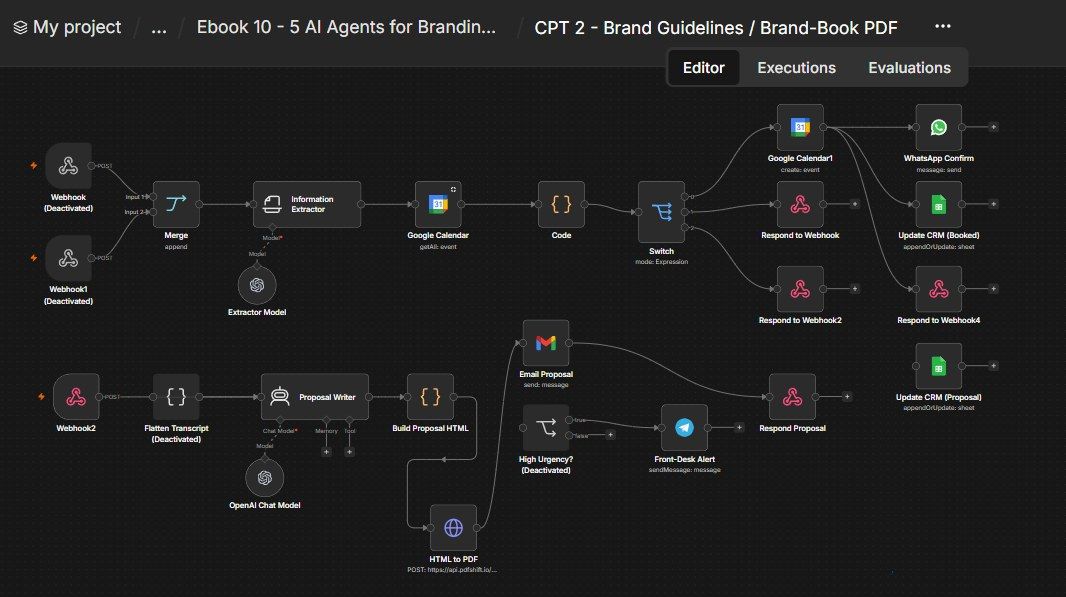
How this n8n workflow works
- 1A webhook receives the brand details
- 2AI writes the full brand guidelines
- 3They are designed into a styled brand book
- 4PDFShift converts it into a PDF
- 5Gmail emails the PDF to the client
- 6Your CRM sheet is updated
Who this workflow is for
- Branding & design agencies that deliver brand guideline documents to every client.
- Freelance brand designers who want a studio-quality PDF without opening InDesign.
- Agencies running discovery calls who also want booking + CRM automation in one place.
Why it matters: The brand-book is often the single most billable deliverable an agency produces, and assembling it by hand eats hours per client. Here the whole thing — strategy copy, layout, PDF, delivery email, CRM update — happens in seconds from one webhook call. You can generate a client-ready brand-book the moment a deal closes.
Inside the workflow: node by node
Every one of these nodes is explained in the ebook, with each setting, prompt and expression printed so you can copy it.
- 1. Webhook — Brand Book
- 2. Proposal Writer
- 3. OpenAI Chat Model
- 4. Build Proposal HTML
- 5. HTML to PDF
- 6. Email Proposal
- 7. Update CRM (Proposal)
- 8. Respond Proposal
- 9. Webhook — Availability
- 10. Webhook1 — Book Call
- 11. Information Extractor
- 12. Extractor Model
- 13. Google Calendar (Get Availability)
- 14. Code (Availability Calculator)
- 15. Switch
- 16. Merge
- 17. Respond to Webhook (available)
- 18. Respond to Webhook2 (not available)
- 19. Google Calendar1 (Create Event)
- 20. Respond to Webhook4 (booked)
Before you start
- An n8n account.
- An OpenAI / OpenRouter API key (the strategist model, gpt-4o).
- A PDFShift account + API key (HTML→PDF).
- A Gmail credential (to email the PDF).
- A Google Sheet (your CRM) + Google Sheets credential.
- (Optional, for the booking flow) Google Calendar + WhatsApp Cloud API + Telegram bot credentials.
Quick setup guide
- 1Credentials: Connect OpenAI/OpenRouter, Gmail, Google Sheets (and, for the optional flow, Google Calendar, WhatsApp, Telegram).
- 2PDFShift: Put YOURPDFSHIFTKEY in the HTML to PDF node's X-API-Key header.
- 3Set your IDs/brand: YOURSHEETID on both CRM nodes, your Leads tab name, and replace RevisionWave / revisionwave.com in the HTML footer and email sign-off with your agency.
- 4Test the brand-book: POST a brand (name, palette, fonts, tagline, voice, customeremail) to rwbrandbook → confirm a styled PDF arrives by email and the CRM row updates.
- 5(Optional) enable booking: Activate the Webhook / Webhook1 / High Urgency nodes and connect Calendar/WhatsApp/Telegram if you want the discovery-call system.
What success looks like: One webhook call turns a brand's raw identity into a polished, emailed brand-book PDF and a tracked deal — and, if you switch it on, books discovery calls end-to-end.
Common problems and fixes
PDF never arrives
Why: PDFShift key wrong / out of credits
Fix: Check YOURPDFSHIFTKEY; top up PDFShift
PDF looks unstyled
Why: HTML/CSS broken by content
Fix: Keep the esc() calls; test with simple input
Guidelines empty
Why: Model returned non-JSON
Fix: Keep "Return ONLY minified JSON" in the system message
Email has no attachment
Why: Wrong binary field
Fix: Keep Attachment Field Name = data
CRM row not updating
Why: Match key mismatch
Fix: Keep Match on → Phone; set YOURSHEETID
Booking replies wrong
Why: Switch/extractor issue
Fix: Check the Information Extractor output and Switch expression
Setup time
- With Claude Code30–45 minutes
Give the ebook to Claude Code and it builds the workflow for you.
- Import the JSON yourselfAbout 2 hours
Import the ready workflow JSON and connect your accounts.
- Build it by reading the ebookAbout 1 day
Follow every node and setting step by step to learn it fully.
Get this workflow
- Ready-to-import n8n workflow JSON
- Step-by-step PDF: every node and setting explained
- Copy-paste prompts and expressions — no coding
Frequently asked questions
Will this work on free n8n?
Yes. n8n itself can be free (the self-hosted Community edition) or you can use n8n Cloud. The workflow runs on both. You only pay for the outside services it uses, such as AI tokens, and many of them have free tiers to start.
How do I get the API keys (WhatsApp, OpenAI and others)?
The ebook includes a setup video for every API and account this workflow needs, so you can get each key step by step without any coding.
Do I need to know coding?
No. Every node, setting, prompt and expression is printed in the ebook, ready to copy-paste, and the workflow JSON can be imported in one click.
Can I use this Branding Agencies workflow for my clients?
Yes. Once it works for you, you can set it up for your own business or for clients and charge for the setup.
PDF never arrives: how do I fix it?
PDFShift key wrong / out of credits. Fix: Check YOURPDFSHIFTKEY; top up PDFShift.
PDF looks unstyled: how do I fix it?
HTML/CSS broken by content. Fix: Keep the esc() calls; test with simple input.
Guidelines empty: how do I fix it?
Model returned non-JSON. Fix: Keep "Return ONLY minified JSON" in the system message.