n8n workflow · Chapter 3 of 5
Brand Audit Agent
Updated · Tested on n8n 1.x · Part of the n8n Branding Agency ebook
Point it at any website and get a scored brand audit PDF emailed to the prospect — a ready-made lead magnet or pitch opener.
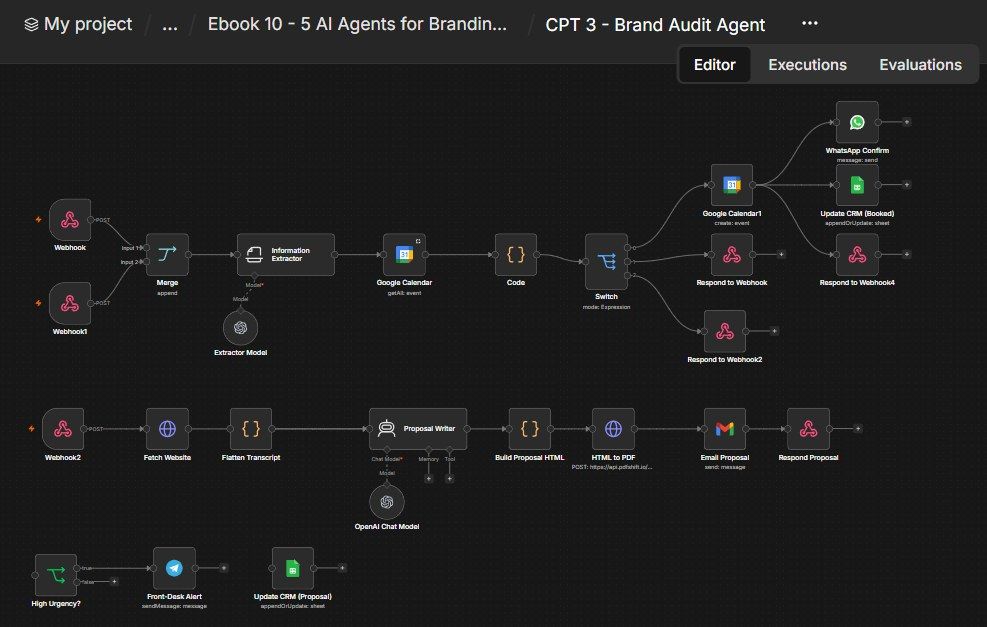
How this n8n workflow works
- 1A webhook receives the website URL
- 2The workflow downloads the live page
- 3AI audits the brand and scores it out of 10
- 4A styled audit report is turned into a PDF
- 5Gmail emails it and the CRM is updated
Who this workflow is for
- Branding / marketing agencies who want a free, impressive lead magnet to open conversations.
- Freelancers auditing a prospect's brand before a sales call.
- Sales teams that attach a scored audit to every outbound pitch.
Why it matters: "Here's a free audit of your brand" is one of the highest-converting opens in agency sales. Doing it by hand takes an hour per prospect; here it's one webhook call and ~20 seconds. You can audit a whole list of prospects overnight and show up to every call with a tailored, scored report.
Inside the workflow: node by node
Every one of these nodes is explained in the ebook, with each setting, prompt and expression printed so you can copy it.
- 1. Webhook — Brand Audit
- 2. Fetch Website
- 3. Proposal Writer (the Auditor)
- 4. OpenAI Chat Model
- 5. Build Proposal HTML
- 6. HTML to PDF
- 7. Email Proposal
- 8. Update CRM (Proposal)
- 9. Respond Proposal
- 10. Webhook — Availability
- 11. Webhook1 — Book Call
- 12. Information Extractor
- 13. Extractor Model
- 14. Google Calendar (Get Availability)
- 15. Code (Availability Calculator)
- 16. Switch
- 17. Merge
- 18. Respond to Webhook (available)
- 19. Respond to Webhook2 (not available)
- 20. Google Calendar1 (Create Event)
Before you start
- An n8n account.
- An OpenAI / OpenRouter API key (gpt-4o).
- A PDFShift account + API key (HTML→PDF).
- A Gmail credential and a Google Sheet (CRM) + Google Sheets credential.
- (Optional, for booking) Google Calendar, WhatsApp Cloud API, Telegram bot.
Quick setup guide
- 1Credentials: Connect OpenAI/OpenRouter, Gmail, Google Sheets (and, for the optional flow, Calendar/WhatsApp/Telegram).
- 2PDFShift: Put YOURPDFSHIFTKEY in the HTML to PDF node's X-API-Key header.
- 3Set your IDs/brand: YOURSHEETID on the CRM nodes, your Leads tab name, and replace RevisionWave / revisionwave.com in the HTML footer and email with your agency.
- 4Test the audit: POST { "url": "https://example.com", "businessname": "Example", "customeremail": "you@you.com" } to rwbrandaudit → confirm a scored audit PDF arrives by email and the CRM updates.
- 5(Optional) enable booking: Activate the Webhook / Webhook1 / High Urgency nodes and connect Calendar/WhatsApp/Telegram.
What success looks like: You paste a prospect's URL and seconds later have a branded, scored audit PDF in their inbox — the perfect, automated conversation-opener for agency sales.
Common problems and fixes
Empty / generic audit
Why: Site blocked the fetch
Fix: Normal for some sites; try another URL or add headers to Fetch Website
No score in the PDF
Why: Model didn't return score
Fix: Keep "score … as a number" in the system message
PDF never arrives
Why: PDFShift key / credits
Fix: Check YOURPDFSHIFTKEY; top up PDFShift
Audit cut off
Why: Page content too long
Fix: The .slice(0, 6000) cap is intentional; raise it only if needed
CRM not updating
Why: Match key mismatch
Fix: Keep Match on → Phone; set YOURSHEETID
Setup time
- With Claude Code30–45 minutes
Give the ebook to Claude Code and it builds the workflow for you.
- Import the JSON yourselfAbout 2 hours
Import the ready workflow JSON and connect your accounts.
- Build it by reading the ebookAbout 1 day
Follow every node and setting step by step to learn it fully.
Get this workflow
- Ready-to-import n8n workflow JSON
- Step-by-step PDF: every node and setting explained
- Copy-paste prompts and expressions — no coding
Frequently asked questions
Will this work on free n8n?
Yes. n8n itself can be free (the self-hosted Community edition) or you can use n8n Cloud. The workflow runs on both. You only pay for the outside services it uses, such as AI tokens, and many of them have free tiers to start.
How do I get the API keys (WhatsApp, OpenAI and others)?
The ebook includes a setup video for every API and account this workflow needs, so you can get each key step by step without any coding.
Do I need to know coding?
No. Every node, setting, prompt and expression is printed in the ebook, ready to copy-paste, and the workflow JSON can be imported in one click.
Can I use this Branding Agencies workflow for my clients?
Yes. Once it works for you, you can set it up for your own business or for clients and charge for the setup.
Empty / generic audit: how do I fix it?
Site blocked the fetch. Fix: Normal for some sites; try another URL or add headers to Fetch Website.
No score in the PDF: how do I fix it?
Model didn't return score. Fix: Keep "score … as a number" in the system message.
PDF never arrives: how do I fix it?
PDFShift key / credits. Fix: Check YOURPDFSHIFTKEY; top up PDFShift.