n8n workflow · Chapter 5 of 5
Discovery + Branding Proposal (Email)
Updated · Tested on n8n 1.x · Part of the n8n Branding Agency ebook
The closer: books discovery calls on your real calendar, then sends a personalized, priced branding proposal as a designed PDF after the call.
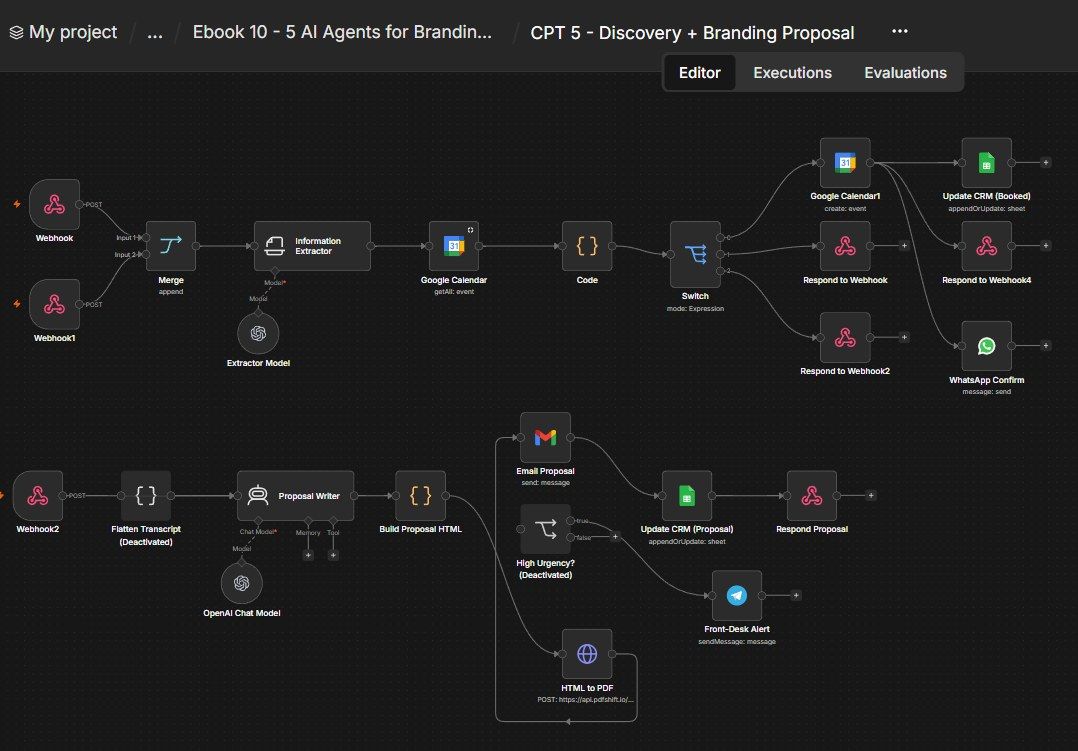
How this n8n workflow works
- 1A webhook checks your Google Calendar for free slots
- 2Booking creates the event and sends WhatsApp confirmation
- 3After the call, AI writes a priced proposal
- 4It is designed and converted to PDF
- 5Gmail emails it and the CRM is updated
Who this workflow is for
- Branding agencies who want discovery calls booked and proposals sent without lifting a finger.
- Freelance brand designers who lose deals by being slow with the proposal.
- Any service business that sells via a discovery call + a written proposal.
Why it matters: The two places deals die are scheduling friction and slow proposals. This removes both: prospects self-book against your real calendar, and minutes after the call a tailored, priced, professional proposal is in their inbox — while they're still excited. Speed plus polish is what closes.
Inside the workflow: node by node
Every one of these nodes is explained in the ebook, with each setting, prompt and expression printed so you can copy it.
- 1. Webhook — Availability
- 2. Webhook1 — Book Call
- 3. Information Extractor
- 4. Extractor Model
- 5. Google Calendar (Get Availability)
- 6. Code (Availability Calculator)
- 7. Switch
- 8. Merge
- 9. Respond to Webhook (available)
- 10. Respond to Webhook2 (not available)
- 11. Google Calendar1 (Create Event)
- 12. Respond to Webhook4 (booked)
- 13. WhatsApp Confirm
- 14. Update CRM (Booked)
- 15. High Urgency?
- 16. Front-Desk Alert
- 17. Flatten Transcript
- 18. Webhook2 — Brand Proposal
- 19. Proposal Writer
- 20. Build Proposal HTML
Before you start
- An n8n account.
- Google Calendar + Google Sheets + Gmail (one OAuth2 setup) credentials.
- An OpenAI / OpenRouter API key (gpt-4o).
- A PDFShift account + API key.
- A WhatsApp Cloud API credential and a Telegram bot (confirmations + alerts).
Quick setup guide
- 1Credentials: Connect Google (Calendar + Sheets + Gmail), OpenAI/OpenRouter, PDFShift, WhatsApp and Telegram.
- 2Set your IDs/brand: YOURSHEETID on both CRM nodes, YOURPDFSHIFTKEY on HTML to PDF, YOURCHATID on Front-Desk Alert, YOURPHONENUMBERID on WhatsApp.
- 3Personalize: In Proposal Writer, replace RevisionWave and the ₹ price menu with your agency + prices; in Build Proposal HTML, change the brand name, colours, tagline and footer.
- 4Test discovery: POST a timeframe to rwbrandavailability, then a booking to rwbrandbookcall → confirm the calendar event, WhatsApp, and CRM "Call Booked".
- 5Test proposal: POST the post-call details to rwbrandproposal → confirm a designed proposal PDF arrives with the right service, price, sections and CTA, and the CRM logs "Proposal Sent".
What success looks like: A prospect self-books a discovery call against your real calendar, and minutes after the call a polished, personalized, priced branding proposal lands in their inbox — and both steps are tracked in your CRM, with zero manual work.
Common problems and fixes
Wrong/empty times
Why: Timeframe not parsed
Fix: Check the Information Extractor output + timezone
Double bookings
Why: Calendar not read
Fix: Confirm the Get-Many calendar is your real one
Proposal PDF missing
Why: PDFShift key / credits
Fix: Set YOURPDFSHIFTKEY; top up PDFShift
Price looks wrong
Why: Menu not edited
Fix: Update the price menu in Proposal Writer's system message
Proposal unstyled
Why: HTML broken by content
Fix: Keep the esc() calls; test with simple input
CRM not updating
Why: Match key mismatch
Fix: Keep Match on → Phone; set YOURSHEETID
Setup time
- With Claude Code30–45 minutes
Give the ebook to Claude Code and it builds the workflow for you.
- Import the JSON yourselfAbout 2 hours
Import the ready workflow JSON and connect your accounts.
- Build it by reading the ebookAbout 1 day
Follow every node and setting step by step to learn it fully.
Get this workflow
- Ready-to-import n8n workflow JSON
- Step-by-step PDF: every node and setting explained
- Copy-paste prompts and expressions — no coding
Frequently asked questions
Will this work on free n8n?
Yes. n8n itself can be free (the self-hosted Community edition) or you can use n8n Cloud. The workflow runs on both. You only pay for the outside services it uses, such as AI tokens, and many of them have free tiers to start.
How do I get the API keys (WhatsApp, OpenAI and others)?
The ebook includes a setup video for every API and account this workflow needs, so you can get each key step by step without any coding.
Do I need to know coding?
No. Every node, setting, prompt and expression is printed in the ebook, ready to copy-paste, and the workflow JSON can be imported in one click.
Can I use this Branding Agencies workflow for my clients?
Yes. Once it works for you, you can set it up for your own business or for clients and charge for the setup.
Wrong/empty times: how do I fix it?
Timeframe not parsed. Fix: Check the Information Extractor output + timezone.
Double bookings: how do I fix it?
Calendar not read. Fix: Confirm the Get-Many calendar is your real one.
Proposal PDF missing: how do I fix it?
PDFShift key / credits. Fix: Set YOURPDFSHIFTKEY; top up PDFShift.