n8n workflow · Chapter 4 of 5
Client Acquisition Engine
Updated · Tested on n8n 1.x · Part of the n8n Branding Agency ebook
Text your Telegram bot "find me 20 cafes in Pune" and get scored, ready-to-pitch leads saved to your CRM — no forms or manual research.
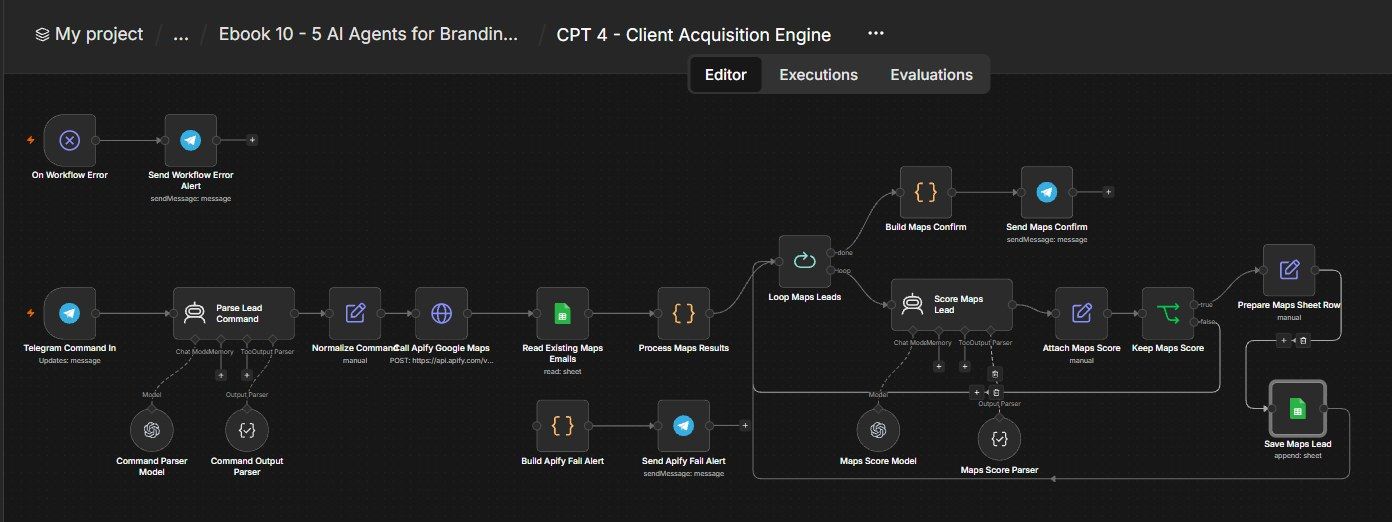
How this n8n workflow works
- 1You send a request to the Telegram bot
- 2AI turns it into search details
- 3Apify scrapes matching businesses from Google Maps
- 4Duplicates and leads without email are removed
- 5AI scores each lead and keeps the good ones
- 6Leads are saved and you get a Telegram summary
Who this workflow is for
- Branding / marketing agencies who need a steady flow of qualified prospects.
- Freelancers who hate cold-lead research and want it on tap.
- Sales teams that want scored leads with a ready outreach angle, not a raw list.
Why it matters: Lead research is the grind that stops agencies from selling. This turns "find prospects" into a 30-second text message and hands back a scored, deduped, CRM-ready list with a personalized angle for each one — so your team spends time pitching, not Googling. Run it a few times a week and your pipeline never runs dry.
Inside the workflow: node by node
Every one of these nodes is explained in the ebook, with each setting, prompt and expression printed so you can copy it.
- 1. Telegram Command In
- 2. Parse Lead Command
- 3. Command Parser Model
- 4. Command Output Parser
- 5. Normalize Command
- 6. Call Apify Google Maps
- 7. Build Apify Fail Alert
- 8. Send Apify Fail Alert
- 9. Read Existing Maps Emails
- 10. Process Maps Results
- 11. Loop Maps Leads
- 12. Score Maps Lead
- 13. Maps Score Model
- 14. Maps Score Parser
- 15. Attach Maps Score
- 16. Keep Maps Score
- 17. Prepare Maps Sheet Row
- 18. Save Maps Lead
- 19. Build Maps Confirm
- 20. Send Maps Confirm
Before you start
- An n8n account.
- A Telegram bot + your chat ID (so only you can command it).
- An Apify account + API token (for the Google Maps scraper actor).
- An OpenAI / OpenRouter API key (gpt-4o-mini for the two AI steps).
- A Google Sheet (your CRM) + Google Sheets credential.
Quick setup guide
- 1Create the bot: With BotFather, connect it in n8n, and put your chat ID in all four Telegram nodes.
- 2Apify: Create an Apify account, open the Google Maps with contact details actor, and paste your API token after token= in the Call Apify Google Maps URL.
- 3AI + Sheets: Connect your OpenRouter/OpenAI key and your Google Sheets credential; set YOURSHEETID and your Leads tab name in both Sheets nodes.
- 4Test: Activate the workflow and text your bot something like "find me 15 cafes in Pune for branding." Watch the leads appear in your sheet and the confirmation come back.
- 5Tune: Adjust the keep-score threshold (6), the count clamp (50), or the serviceoffer default to fit your agency.
What success looks like: You text a request and, a minute later, your CRM has fresh, deduped, scored prospects — each tagged Hot/Warm with a tailored opening line — ready for your outreach workflow to pick up.
Common problems and fixes
No leads found
Why: Niche/city too narrow, or no emails
Fix: Broaden the category/city; the scraper only keeps businesses with emails
Apify fail alert
Why: Token wrong / out of credits
Fix: Put a valid YOURAPIFYTOKEN in the URL; check Apify credits
Everything scored low
Why: Service offer mismatch
Fix: Make serviceoffer match the leads (e.g. "branding")
Duplicates saved
Why: CRM email column misnamed
Fix: The dedupe reads the Email column — keep that header
Bot silent
Why: Chat ID wrong / inactive
Fix: Set YOURCHATID on all Telegram nodes; Activate the workflow
Phone shows as error in Sheet
Why: Formula injection
Fix: The textSafe apostrophe trick handles this — keep it
Setup time
- With Claude Code30–45 minutes
Give the ebook to Claude Code and it builds the workflow for you.
- Import the JSON yourselfAbout 2 hours
Import the ready workflow JSON and connect your accounts.
- Build it by reading the ebookAbout 1 day
Follow every node and setting step by step to learn it fully.
Get this workflow
- Ready-to-import n8n workflow JSON
- Step-by-step PDF: every node and setting explained
- Copy-paste prompts and expressions — no coding
Frequently asked questions
Will this work on free n8n?
Yes. n8n itself can be free (the self-hosted Community edition) or you can use n8n Cloud. The workflow runs on both. You only pay for the outside services it uses, such as AI tokens, and many of them have free tiers to start.
How do I get the API keys (WhatsApp, OpenAI and others)?
The ebook includes a setup video for every API and account this workflow needs, so you can get each key step by step without any coding.
Do I need to know coding?
No. Every node, setting, prompt and expression is printed in the ebook, ready to copy-paste, and the workflow JSON can be imported in one click.
Can I use this Branding Agencies workflow for my clients?
Yes. Once it works for you, you can set it up for your own business or for clients and charge for the setup.
No leads found: how do I fix it?
Niche/city too narrow, or no emails. Fix: Broaden the category/city; the scraper only keeps businesses with emails.
Apify fail alert: how do I fix it?
Token wrong / out of credits. Fix: Put a valid YOURAPIFYTOKEN in the URL; check Apify credits.
Everything scored low: how do I fix it?
Service offer mismatch. Fix: Make serviceoffer match the leads (e.g. "branding").