n8n workflow · Chapter 3 of 4
Appointment Bot — WhatsApp Chat Bot
Updated · Tested on n8n 1.x · Part of the n8n Clinic & Hospital ebook
A WhatsApp booking assistant plus daily reminders — patients book in seconds by chat, and everyone is reminded the day before, so fewer empty chairs.
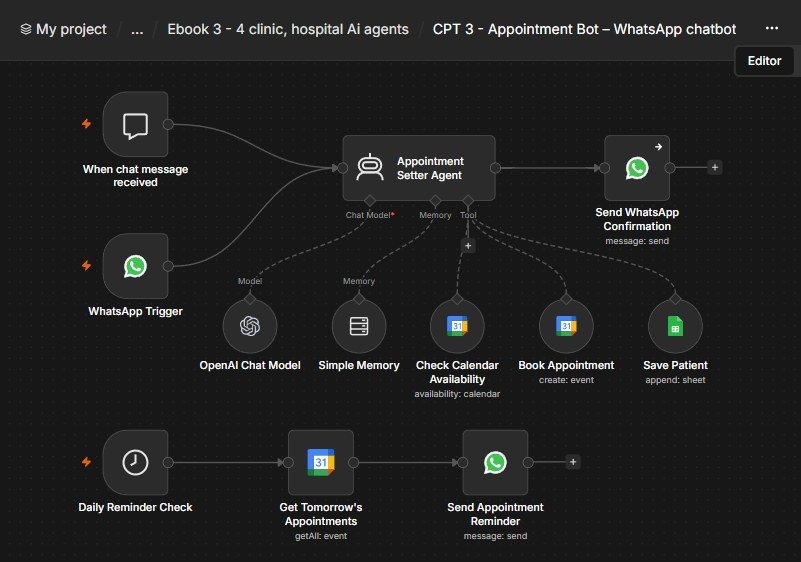
How this n8n workflow works
- 1A patient messages your clinic on WhatsApp
- 2AI collects their details one question at a time
- 3It checks the calendar and books the slot
- 4The booking is logged and confirmed on WhatsApp
- 5Each morning, tomorrow's patients get a WhatsApp reminder
Who this workflow is for
- Clinics, dental & aesthetic practices — let patients self-book by WhatsApp and cut no-shows with automatic day-before reminders.
- Diagnostic labs & specialists — book slots and remind patients to fast / prepare.
- Any appointment business — salons, tutors, vets — same booking + reminder pattern.
Why it matters: No-shows quietly bleed revenue — an empty slot can't be resold at the last minute. Reminders alone are proven to cut no-shows significantly, and self-service booking captures patients who'd never call. This runs both for a few cents of AI + WhatsApp per patient.
Inside the workflow: node by node
Every one of these nodes is explained in the ebook, with each setting, prompt and expression printed so you can copy it.
- 1. WhatsApp Trigger — The Front Door
- 2. Appointment Setter Agent — The Brain
- 3. OpenAI Chat Model — The Model
- 4. Simple Memory — Remember the Chat
- 5. Check Calendar Availability — Is the Slot Free?
- 6. Book Appointment — Create the Event
- 7. Save Patient — Log to the Sheet
- 8. Send WhatsApp Confirmation — Close the Loop
- 9. Daily Reminder Check — The Morning Timer
- 10. Get Tomorrow's Appointments — Who's Coming Tomorrow
- 11. Send Appointment Reminder — The Nudge
Before you start
- An n8n account (Cloud or self-hosted)
- A WhatsApp Business Cloud API setup (Meta) — trigger (incoming) + send (reply & reminders)
- An OpenRouter API key (used through n8n's OpenAI node) — the AI brain
- A Google Calendar credential — the clinic's booking calendar
- A Google Sheets credential — the patient log
Quick setup guide
- 1Credentials: Add WhatsApp Cloud API (trigger + send), OpenRouter (as the OpenAI credential), Google Calendar, and Google Sheets (see the video table). Do these once.
- 2Make your patient sheet: With headers Name, Phone, Service, AppointmentTime; copy its Sheet ID into the Save Patient node.
- 3Import the workflow: And reconnect every red credential node. Set your calendar in all three Google Calendar nodes, your Sheet ID in Save Patient, and your WhatsApp credentials on the trigger + both send nodes.
- 4Edit the Agent's System Message: To your clinic (name, hours, doctors, services, fees). Keep the rule that writes Phone: [digits] into the event, or reminders won't find the number.
- 5Set the reminder time: (Node 9) to your preferred hour, then Activate the workflow and message your real WhatsApp number.
What success looks like: A natural WhatsApp booking, a real calendar event + sheet row, and an automatic day-before reminder — all hands-free.
Common problems and fixes
Agent asks everything at once
Why: System message edited so "one question at a time" was weakened
Fix: Keep the COLLECT / one-question rule intact
Books an already-taken slot
Why: Availability check skipped or wrong calendar
Fix: Ensure the Check Availability tool points at the real calendar and the agent calls it before booking
Reminder sends to nobody
Why: Phone not written into the event description
Fix: Keep the booking rule that writes Phone: [digits]; the reminder parses it from description
Wrong day reminded
Why: Timezone mismatch
Fix: Set your timezone in n8n settings; the "tomorrow" window uses it
No WhatsApp messages
Why: Credential not connected / number not verified in Meta
Fix: Re-do the WhatsApp Cloud API setup; add test numbers in Meta first
Books but no sheet row
Why: Sheet ID or headers wrong
Fix: Use the exact Sheet ID and headers Name, Phone, Service, AppointmentTime
Setup time
- With Claude Code30–45 minutes
Give the ebook to Claude Code and it builds the workflow for you.
- Import the JSON yourselfAbout 2 hours
Import the ready workflow JSON and connect your accounts.
- Build it by reading the ebookAbout 1 day
Follow every node and setting step by step to learn it fully.
Get this workflow
- Ready-to-import n8n workflow JSON
- Step-by-step PDF: every node and setting explained
- Copy-paste prompts and expressions — no coding
Frequently asked questions
Will this work on free n8n?
Yes. n8n itself can be free (the self-hosted Community edition) or you can use n8n Cloud. The workflow runs on both. You only pay for the outside services it uses, such as AI tokens, and many of them have free tiers to start.
How do I get the API keys (WhatsApp, OpenAI and others)?
The ebook includes a setup video for every API and account this workflow needs, so you can get each key step by step without any coding.
Do I need to know coding?
No. Every node, setting, prompt and expression is printed in the ebook, ready to copy-paste, and the workflow JSON can be imported in one click.
Can I use this Clinic & Hospital workflow for my clients?
Yes. Once it works for you, you can set it up for your own business or for clients and charge for the setup.
Agent asks everything at once: how do I fix it?
System message edited so "one question at a time" was weakened. Fix: Keep the COLLECT / one-question rule intact.
Books an already-taken slot: how do I fix it?
Availability check skipped or wrong calendar. Fix: Ensure the Check Availability tool points at the real calendar and the agent calls it before booking.
Reminder sends to nobody: how do I fix it?
Phone not written into the event description. Fix: Keep the booking rule that writes Phone: [digits]; the reminder parses it from description.