n8n workflow · Chapter 4 of 4
Review + Instant Auto-Reply
Updated · Tested on n8n 1.x · Part of the n8n Clinic & Hospital ebook
Puts your clinic's reputation on autopilot: asks recent patients for Google reviews on WhatsApp and has AI draft a polite reply to every review.
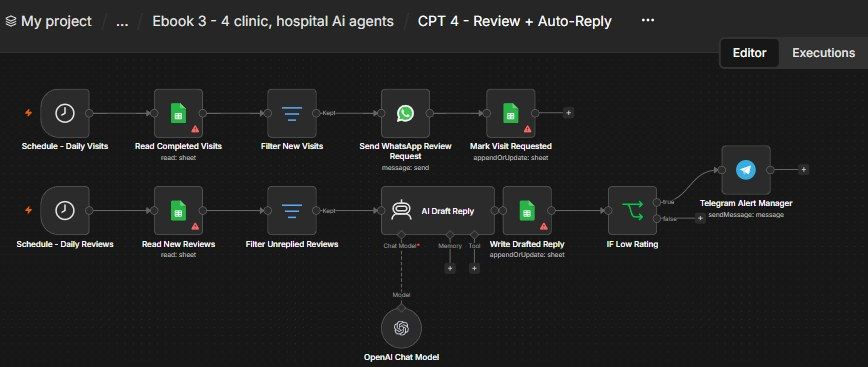
How this n8n workflow works
- 1Daily, it reads your completed visits sheet
- 2New patients get a WhatsApp review request
- 3Daily, it reads new reviews from your sheet
- 4AI drafts a polite public reply
- 5Low ratings send a Telegram alert to the manager
Who this workflow is for
- Clinics, dentists, aesthetic & specialty practices — grow the Google rating that brings in new patients, and never leave a review unanswered.
- Any local business (salons, gyms, restaurants) — the exact same request + auto-reply pattern works with a Google review link.
Why it matters: More reviews and faster replies directly lift your Google ranking and click-through — and a thoughtful public reply to a bad review often matters more to future patients than the review itself. Automating it means it actually happens, every day, for pennies.
Inside the workflow: node by node
Every one of these nodes is explained in the ebook, with each setting, prompt and expression printed so you can copy it.
- 1. Schedule - Daily Visits — The Timer
- 2. Read Completed Visits — Who Visited Recently
- 3. Filter New Visits — Only the Not-Yet-Asked
- 4. Send WhatsApp Review Request — The Ask
- 5. Mark Visit Requested — Don't Ask Twice
- 6. Schedule - Daily Reviews — The Timer
- 7. Read New Reviews — Pull the Latest Reviews
- 8. Filter Unreplied Reviews — Only the New Ones
- 9. AI Draft Reply — Write the Public Reply
- 10. OpenAI Chat Model — The Model
- 11. Write Drafted Reply — Save the Draft
- 12. IF Low Rating — Does a Human Need to See This?
- 13. Telegram Alert Manager — Tap the Manager
Before you start
- An n8n account (Cloud or self-hosted)
- A Google Sheets credential — holds the Completed Visits + Reviews sheets
- A WhatsApp Business Cloud API setup (Meta) — sends the review requests
- An OpenRouter API key (used through n8n's OpenAI node) — drafts the replies
- A Telegram bot + chat ID — the low-rating alert
- Your Google review link (from your Google Business Profile — the g.page/r/... short link)
- Completed Visits — columns include visitid, patientname, phone, reviewrequested, requestedat.
- Reviews — columns include reviewid, reviewername, rating, reviewtext, replydraft, draftedat.
Quick setup guide
- 1Credentials: Add Google Sheets, WhatsApp Cloud API, OpenRouter (as the OpenAI credential), and Telegram (see the video table).
- 2Make two sheets: (or two tabs): Completed Visits (visitid, patientname, phone, reviewrequested, requestedat) and Reviews (reviewid, reviewername, rating, reviewtext, replydraft, draftedat).
- 3Import the workflow: And set both Sheet IDs (they're blank on purpose): Read Completed Visits + Mark Visit Requested → your Completed Visits sheet; Read New Reviews + Write Drafted Reply → your Reviews sheet.
- 4Paste your Google review link: Into the Send WhatsApp Review Request text, edit the AI system message to your clinic, and set your Telegram chat ID.
- 5Activate.: Both timers now run daily on their own.
What success looks like: Patients getting one-time review requests, every review with a ready-to-post AI draft, and the manager pinged on every low rating — all automatic.
Common problems and fixes
Nothing runs
Why: Sheet IDs still blank
Fix: Set both Google Sheet IDs (they're intentionally empty in the template)
Same patient asked repeatedly
Why: Reviewrequested not being written back
Fix: Keep Mark Visit Requested matching on visitid; ensure each visit has a unique visitid
Same review re-drafted daily
Why: Replydraft not written back
Fix: Keep Write Drafted Reply matching on reviewid
Reply admits fault / names staff
Why: System message rules removed
Fix: Keep the "do NOT admit fault / no medical details / no staff names" rules
No Telegram alert on bad reviews
Why: Chat ID wrong, or rating stored as text
Fix: Check the chat ID; make sure rating is a number so ≤ 3 works
Review link broken
Why: Placeholder not replaced
Fix: Paste your real g.page/r/... Google review link
Setup time
- With Claude Code30–45 minutes
Give the ebook to Claude Code and it builds the workflow for you.
- Import the JSON yourselfAbout 2 hours
Import the ready workflow JSON and connect your accounts.
- Build it by reading the ebookAbout 1 day
Follow every node and setting step by step to learn it fully.
Get this workflow
- Ready-to-import n8n workflow JSON
- Step-by-step PDF: every node and setting explained
- Copy-paste prompts and expressions — no coding
Frequently asked questions
Will this work on free n8n?
Yes. n8n itself can be free (the self-hosted Community edition) or you can use n8n Cloud. The workflow runs on both. You only pay for the outside services it uses, such as AI tokens, and many of them have free tiers to start.
How do I get the API keys (WhatsApp, OpenAI and others)?
The ebook includes a setup video for every API and account this workflow needs, so you can get each key step by step without any coding.
Do I need to know coding?
No. Every node, setting, prompt and expression is printed in the ebook, ready to copy-paste, and the workflow JSON can be imported in one click.
Can I use this Clinic & Hospital workflow for my clients?
Yes. Once it works for you, you can set it up for your own business or for clients and charge for the setup.
Nothing runs: how do I fix it?
Sheet IDs still blank. Fix: Set both Google Sheet IDs (they're intentionally empty in the template).
Same patient asked repeatedly: how do I fix it?
Reviewrequested not being written back. Fix: Keep Mark Visit Requested matching on visitid; ensure each visit has a unique visitid.
Same review re-drafted daily: how do I fix it?
Replydraft not written back. Fix: Keep Write Drafted Reply matching on reviewid.