n8n workflow · Chapter 1 of 5
AI Content Studio (Start to End)
Updated · Tested on n8n 1.x · Part of the n8n Content Creator ebook
One Telegram bot that gives you content ideas, finished scripts and pro thumbnails — just talk to it and AI routes your request to the right tool.
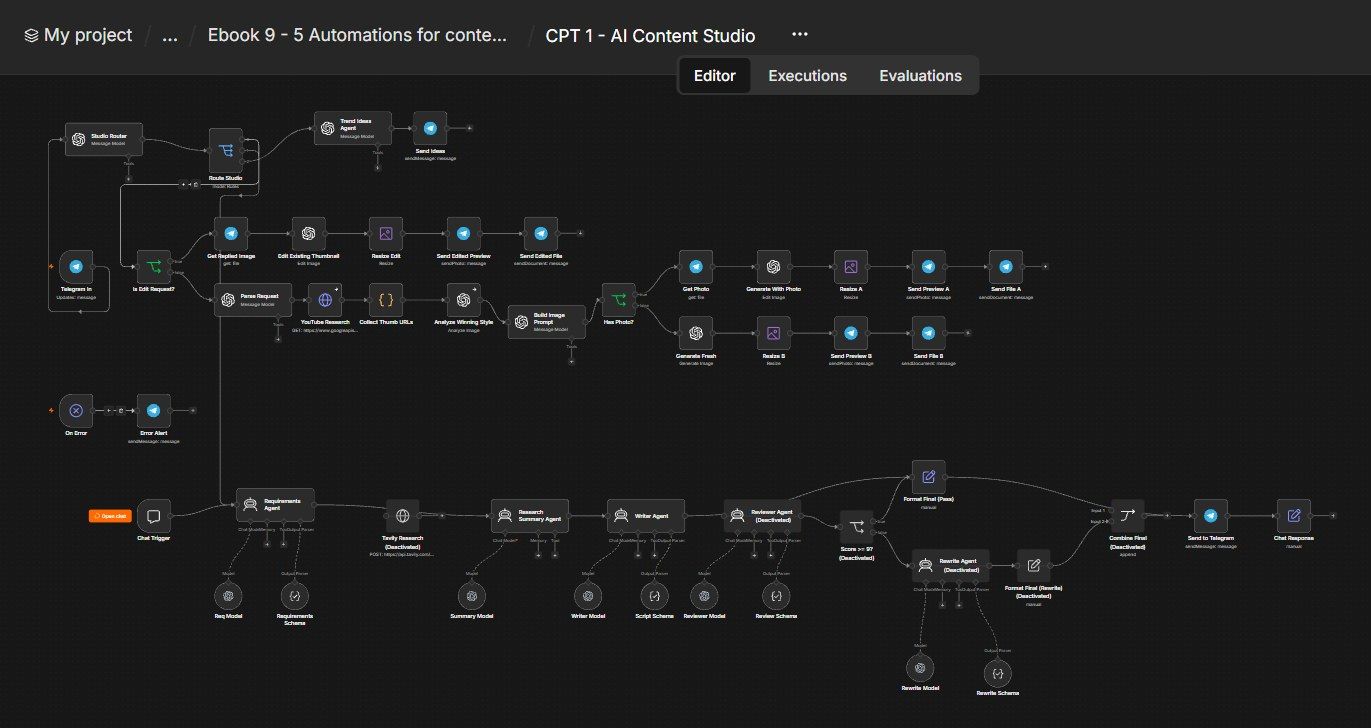
How this n8n workflow works
- 1You message the bot on Telegram
- 2AI decides: idea, script or thumbnail
- 3Ideas: you get 5 fresh ideas with hooks
- 4Scripts: AI writes, grades and polishes a reel script
- 5Thumbnails: AI studies YouTube and creates one
- 6Results are sent back on Telegram
Who this workflow is for
- Solo creators & influencers — a whole content team in one chat.
- Faceless-channel operators — endless ideas, scripts and thumbnails.
- Agencies — service many creator clients from one bot.
Why it matters: The three hardest, most recurring content jobs — deciding what to make, writing it, and designing the thumbnail — are exactly where creators stall. This bot removes all three bottlenecks from a phone, with research and quality-checking built in. It's the foundation the rest of the book plugs into (scripts feed Chapter 2's avatar videos; everything feeds Chapter 3's publisher).
Inside the workflow: node by node
Every one of these nodes is explained in the ebook, with each setting, prompt and expression printed so you can copy it.
- 1. Telegram In — Your One Command Channel
- 2. Studio Router — Classify the Request
- 3. Route Studio — Send It Down the Right Path
- 4. Trend Ideas Agent
- 5. Send Ideas
- 6. Chat Trigger — Test Entry
- 7. Requirements Agent — Build the Brief
- 8. Tavily Research — Live Web Facts (Optional, Disabled)
- 9. Research Summary Agent — A Trustworthy Fact Brief
- 10. Writer Agent — Write the Reel Script
- 11. Reviewer Agent — The Strict Editor
- 12. Score >= 9? — Quality Gate
- 13. Format Final (Pass)
- 14. Rewrite Agent — Fix and Improve
- 15. Format Final (Rewrite)
- 16. Combine Final
- 17. Send to Telegram
- 18. Chat Response
- 19. Is Edit Request? — New or Edit?
- 20. Get Replied Image
Before you start
- An n8n account (Cloud or self-hosted).
- A Telegram bot + your chat ID — the single command channel.
- An OpenAI / OpenRouter API key — powers the text agents (gpt-4o / gpt-4o-mini) and gpt-image-1 thumbnails (image credits needed).
- A YouTube (Google) OAuth credential — for the thumbnail research.
- (Optional) a Tavily API key — live web research for scripts (the Tavily node ships disabled).
Quick setup guide
- 1Credentials: Telegram, OpenAI/OpenRouter (with gpt-image-1 credits), YouTube OAuth. (Tavily optional.)
- 2Import the workflow: . Reconnect every model/Telegram/YouTube credential. Set YOURCHATID on the Telegram Trigger, Send to Telegram, and Error Alert.
- 3Test each intent: "give me fitness ideas" (idea), "script: morning habits" (script), "thumbnail: I QUIT MY JOB" (thumbnail), then reply to a thumbnail to edit it.
- 4Activate.:
What success looks like: One bot that answers "what should I post?", "write it for me", and "make the thumbnail" — instantly, from your phone.
Common problems and fixes
Wrong branch runs
Why: Router misread intent
Fix: Say the intent plainly ("script:", "thumbnail:", "ideas")
Image step errors
Why: No gpt-image-1 credits
Fix: Add image credits to OpenAI
Script always rewrites
Why: Reviewer too strict
Fix: Lower the IF bar (e.g. ≥ 8)
No top thumbnails
Why: YouTube OAuth missing
Fix: Connect the YouTube Data API credential
Nothing on Telegram
Why: Wrong chat ID
Fix: Set YOURCHATID; message your bot once
Setup time
- With Claude Code30–45 minutes
Give the ebook to Claude Code and it builds the workflow for you.
- Import the JSON yourselfAbout 2 hours
Import the ready workflow JSON and connect your accounts.
- Build it by reading the ebookAbout 1 day
Follow every node and setting step by step to learn it fully.
Get this workflow
- Ready-to-import n8n workflow JSON
- Step-by-step PDF: every node and setting explained
- Copy-paste prompts and expressions — no coding
Frequently asked questions
Will this work on free n8n?
Yes. n8n itself can be free (the self-hosted Community edition) or you can use n8n Cloud. The workflow runs on both. You only pay for the outside services it uses, such as AI tokens, and many of them have free tiers to start.
How do I get the API keys (WhatsApp, OpenAI and others)?
The ebook includes a setup video for every API and account this workflow needs, so you can get each key step by step without any coding.
Do I need to know coding?
No. Every node, setting, prompt and expression is printed in the ebook, ready to copy-paste, and the workflow JSON can be imported in one click.
Can I use this Content Creators workflow for my clients?
Yes. Once it works for you, you can set it up for your own business or for clients and charge for the setup.
Wrong branch runs: how do I fix it?
Router misread intent. Fix: Say the intent plainly ("script:", "thumbnail:", "ideas").
Image step errors: how do I fix it?
No gpt-image-1 credits. Fix: Add image credits to OpenAI.
Script always rewrites: how do I fix it?
Reviewer too strict. Fix: Lower the IF bar (e.g. ≥ 8).