n8n workflow · Chapter 4 of 5
Brand Deal / Sponsorship Agent (Money Making)
Updated · Tested on n8n 1.x · Part of the n8n Content Creator ebook
An AI agent that finds brands that pay creators, pitches them, handles replies and follows up — while you get Telegram alerts for the deals that matter.
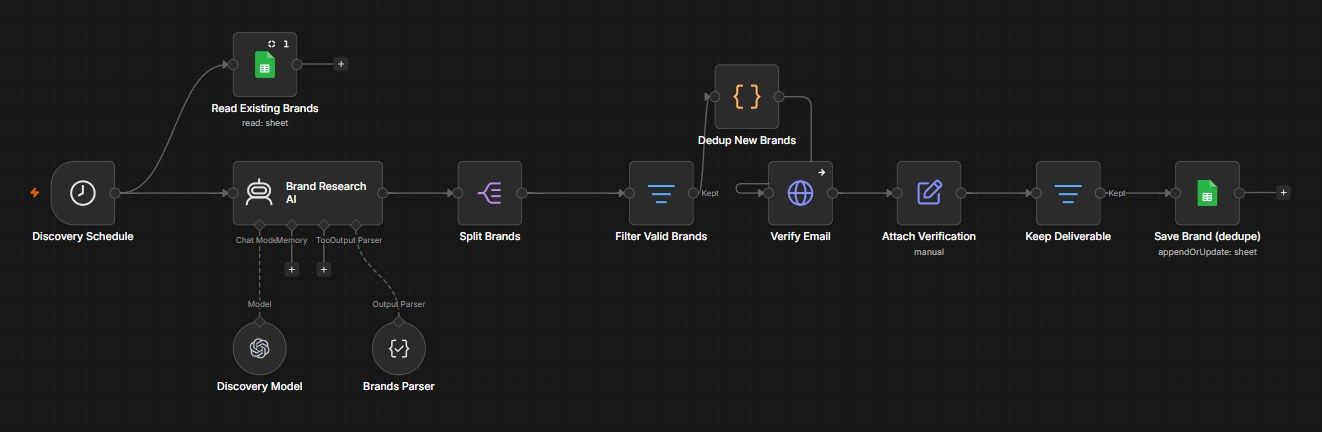
How this n8n workflow works
- 1AI finds and verifies brands that sponsor creators
- 2It sends personalized pitches from two Gmail inboxes
- 3AI reads and sorts every reply
- 4It auto-replies and alerts you on Telegram
- 5Gentle follow-ups go to brands that didn't reply
- 6You control the agent from Telegram
Who this workflow is for
- Creators & influencers who want sponsorship income without a manager.
- Faceless channels monetizing a niche audience.
- Small creator teams / agencies running outreach for talent.
Why it matters: Brand deals are the highest-value income for a creator, but the work — finding brands, pitching, chasing, negotiating — is a full-time sales job most creators never do. This agent runs that entire pipeline 24/7 with spam-safe, human-sounding emails and a human (you) kept in the loop only for the decisions that matter.
Inside the workflow: node by node
Every one of these nodes is explained in the ebook, with each setting, prompt and expression printed so you can copy it.
- 1. Setup Trigger (run once)
- 2. Tab: Brands (and the other three Tab creators)
- 3. Discovery Schedule
- 4. Brand Research AI
- 5. Discovery Model
- 6. Brands Parser
- 7. Split Brands
- 8. Filter Valid Brands
- 9. Read Existing Brands
- 10. Dedup New Brands
- 11. Verify Email
- 12. Attach Verification
- 13. Keep Deliverable
- 14. Save Brand (dedupe)
- 15. Outreach Schedule
- 16. Read Brands
- 17. Read Send-Log
- 18. Pick Target & Account
- 19. Write Outreach Email
- 20. Email Model
Before you start
- An n8n account.
- Two Gmail accounts (to rotate outreach) connected as Gmail credentials.
- A Google Sheet (the CRM) with tabs: Brands, Interested, Deals-Final, Send-Log.
- An OpenAI / OpenRouter API key (with web-search capability for discovery).
- A Telegram bot + your chat ID (alerts + control).
- A MyEmailVerifier API key (to validate brand emails before sending).
Quick setup guide
- 1Read the in-workflow setup note.: Create the four sheet tabs by clicking Setup Trigger (run once) → Execute.
- 2Credentials: Connect both Gmail accounts, Google Sheets, OpenAI/OpenRouter (web-search model), Telegram, and add your MyEmailVerifier key in Verify Email.
- 3Personalize the prompts: In Brand Research AI, Write Outreach Email and Write Follow-up AI, replace the sample creator profile (name, niche, handle, follower count) with yours.
- 4Set IDs: YOURSHEETID on every Sheets node, your two sender accounts in Pick Target & Account, YOURCHATID on the Telegram nodes, and confirm the two Gmail credentials on the send/reply nodes.
- 5Test each branch: With Execute, then Activate. Start with a tiny daily cap.
What success looks like: A self-running sponsorship pipeline — brands found and pitched daily, replies negotiated, hot deals flagged to your phone, follow-ups handled — turning your audience into income with you in control from Telegram.
Common problems and fixes
No brands found
Why: Model lacks web search / quota
Fix: Use a web-search-capable model with credits
Emails not sending
Why: Gmail credential / cap reached
Fix: Reconnect both Gmail creds; check the daily CAP and 8–23 window
Everything marked invalid
Why: Verifier key wrong
Fix: Put a valid MyEmailVerifier key in Verify Email
Bot replies to a brand you wanted
Why: Not set to HOLD
Fix: Tell the control bot "hold <brand>" (sets Status = HOLD)
No Telegram alerts
Why: Wrong chat ID
Fix: Set YOURCHATID on all Telegram nodes
Follow-ups never stop
Why: Count not updating
Fix: Keep Update Follow-up Count matching on ContactEmail
Landing in spam
Why: Volume/words
Fix: Keep caps low, warm the inboxes, keep the "no spam words" rules
Setup time
- With Claude Code30–45 minutes
Give the ebook to Claude Code and it builds the workflow for you.
- Import the JSON yourselfAbout 2 hours
Import the ready workflow JSON and connect your accounts.
- Build it by reading the ebookAbout 1 day
Follow every node and setting step by step to learn it fully.
Get this workflow
- Ready-to-import n8n workflow JSON
- Step-by-step PDF: every node and setting explained
- Copy-paste prompts and expressions — no coding
Frequently asked questions
Will this work on free n8n?
Yes. n8n itself can be free (the self-hosted Community edition) or you can use n8n Cloud. The workflow runs on both. You only pay for the outside services it uses, such as AI tokens, and many of them have free tiers to start.
How do I get the API keys (WhatsApp, OpenAI and others)?
The ebook includes a setup video for every API and account this workflow needs, so you can get each key step by step without any coding.
Do I need to know coding?
No. Every node, setting, prompt and expression is printed in the ebook, ready to copy-paste, and the workflow JSON can be imported in one click.
Can I use this Content Creators workflow for my clients?
Yes. Once it works for you, you can set it up for your own business or for clients and charge for the setup.
No brands found: how do I fix it?
Model lacks web search / quota. Fix: Use a web-search-capable model with credits.
Emails not sending: how do I fix it?
Gmail credential / cap reached. Fix: Reconnect both Gmail creds; check the daily CAP and 8–23 window.
Everything marked invalid: how do I fix it?
Verifier key wrong. Fix: Put a valid MyEmailVerifier key in Verify Email.