n8n workflow · Chapter 5 of 5
Auto DM-Reply + Superfan Detect, Email/Lead Capture
Updated · Tested on n8n 1.x · Part of the n8n Content Creator ebook
Turns DMs and comments into relationships and an email list — AI drafts a reply to every message, flags superfans and captures email addresses.
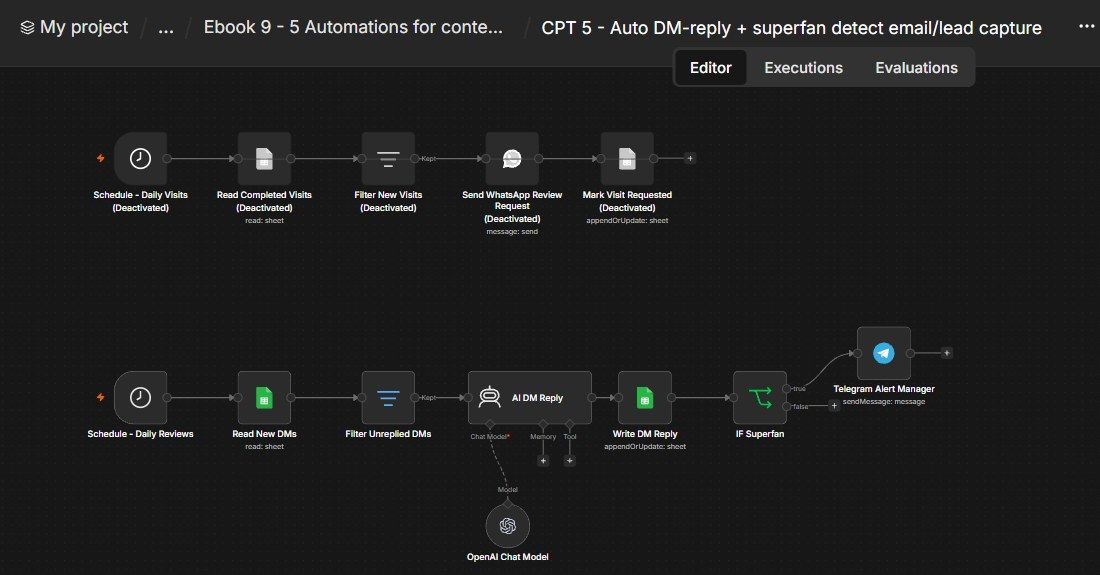
How this n8n workflow works
- 1Daily, it reads new DMs from your sheet
- 2AI writes a friendly reply in the fan's language
- 3It tags superfans and extracts any email
- 4Everything is saved back to the sheet
- 5Superfans trigger a Telegram alert
- 6A daily branch sends WhatsApp review requests
Who this workflow is for
- Creators / influencers drowning in DMs and comments who want every fan answered and every buyer/collab lead captured.
- Faceless & multilingual channels — the AI replies in whatever language the fan wrote in.
- Coaches, freelancers, small brands turning social engagement into an owned email list (not rented followers).
Why it matters: Replies within minutes keep fans engaged and the algorithm happy, but the real prize is the owned email list — superfans and leads pulled out of casual DMs automatically, so you're never dependent on a platform to reach your audience. The Telegram alert means you personally step in for exactly the high-value conversations and ignore the rest.
Inside the workflow: node by node
Every one of these nodes is explained in the ebook, with each setting, prompt and expression printed so you can copy it.
- 1. Schedule - Daily Visits
- 2. Read Completed Visits
- 3. Filter New Visits
- 4. Send WhatsApp Review Request
- 5. Mark Visit Requested
- 6. Schedule - Daily Reviews
- 7. Read New DMs
- 8. Filter Unreplied DMs
- 9. AI DM Reply
- 10. OpenAI Chat Model
- 11. Write DM Reply
- 12. IF Superfan
- 13. Telegram Alert Manager
Before you start
- An n8n account.
- A Google Sheet with two tabs: Creator DMs (columns: dmid, username, platform, message, replydraft, issuperfan, leademail, draftedat) and Completed Visits (columns: visitid, patientname/name, phone, reviewrequested, requestedat).
- An OpenAI API key (uses gpt-4o-mini).
- A Telegram bot + your chat ID (superfan/lead alerts).
- A WhatsApp Cloud API setup (Phone Number ID + credential) for the review branch.
Quick setup guide
- 1Build the sheet.: Create the Google Sheet with the two tabs and the columns listed in Prerequisites (Creator DMs and Completed Visits).
- 2Connect credentials: Google Sheets, OpenAI, Telegram, and (for Branch B) WhatsApp Cloud API.
- 3Set your IDs: Put YOURSHEETID on all four Sheets nodes, YOURCHATID on the Telegram node, and YOURPHONENUMBERID + your review link on the WhatsApp node.
- 4Personalize: Edit the WhatsApp message wording (and the patientname column name) for your audience; tweak the AI system message tone if you like (keep the 3-line output format intact).
- 5Test each branch: With Execute (add one test row to each tab), confirm the sheet updates and a test Telegram alert fires, then Activate.
What success looks like: Every DM gets a ready-to-send reply in the fan's language, superfans and email leads are flagged to your phone and saved in a sheet you own, and your review requests go out daily without ever double-messaging anyone.
Common problems and fixes
No DMs processed
Why: Creator DMs empty or all have replydraft
Fix: Add rows; clear replydraft to re-process
Issuperfan always "no"
Why: AI output format changed
Fix: Keep the system message's exact 3-line format
Leademail blank
Why: No email in the message, or format off
Fix: Normal if no email; check the EMAIL: line is present
No Telegram alert
Why: Wrong chat ID / not a superfan
Fix: Set YOURCHATID; only superfans alert
WhatsApp not sending
Why: Phone Number ID / credential / 24-hour window
Fix: Check YOURPHONENUMBERID, reconnect WhatsApp, use an approved template if outside the window
Someone messaged twice
Why: Match key wrong
Fix: Keep Match on = visitid / dmid
Setup time
- With Claude Code30–45 minutes
Give the ebook to Claude Code and it builds the workflow for you.
- Import the JSON yourselfAbout 2 hours
Import the ready workflow JSON and connect your accounts.
- Build it by reading the ebookAbout 1 day
Follow every node and setting step by step to learn it fully.
Get this workflow
- Ready-to-import n8n workflow JSON
- Step-by-step PDF: every node and setting explained
- Copy-paste prompts and expressions — no coding
Frequently asked questions
Will this work on free n8n?
Yes. n8n itself can be free (the self-hosted Community edition) or you can use n8n Cloud. The workflow runs on both. You only pay for the outside services it uses, such as AI tokens, and many of them have free tiers to start.
How do I get the API keys (WhatsApp, OpenAI and others)?
The ebook includes a setup video for every API and account this workflow needs, so you can get each key step by step without any coding.
Do I need to know coding?
No. Every node, setting, prompt and expression is printed in the ebook, ready to copy-paste, and the workflow JSON can be imported in one click.
Can I use this Content Creators workflow for my clients?
Yes. Once it works for you, you can set it up for your own business or for clients and charge for the setup.
No DMs processed: how do I fix it?
Creator DMs empty or all have replydraft. Fix: Add rows; clear replydraft to re-process.
Issuperfan always "no": how do I fix it?
AI output format changed. Fix: Keep the system message's exact 3-line format.
Leademail blank: how do I fix it?
No email in the message, or format off. Fix: Normal if no email; check the EMAIL: line is present.