n8n workflow · Chapter 2 of 5
HeyGen Avatar Video Generator (Video Creation)
Updated · Tested on n8n 1.x · Part of the n8n Content Creator ebook
Turns a topic or URL into a vertical talking-head AI video with your HeyGen avatar — no filming needed. The finished link lands in Telegram.
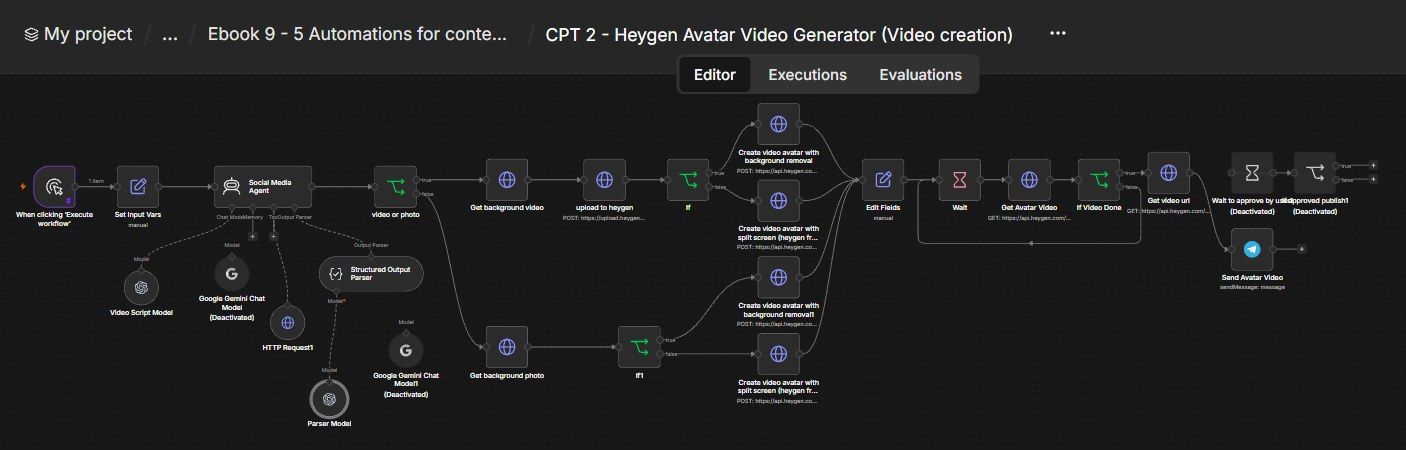
How this n8n workflow works
- 1You set your topic, avatar and voice
- 2AI writes a 30-40 second script and caption
- 3A screenshot or scroll video becomes the background
- 4HeyGen renders your avatar video
- 5The finished video link is sent to Telegram
Who this workflow is for
- Faceless creators & news/commentary channels — daily videos without ever filming.
- Busy founders/creators — turn a blog post into a talking-head short in minutes.
- Agencies — produce avatar videos for clients at scale.
Why it matters: Video is the highest-reach, highest-effort content format — filming, lighting, editing, re-takes. An AI avatar collapses all of that into an API call. One topic or link becomes a polished vertical video, on brand, in one language, ready for Chapter 3 to publish.
Inside the workflow: node by node
Every one of these nodes is explained in the ebook, with each setting, prompt and expression printed so you can copy it.
- 1. When clicking 'Execute workflow' — The Trigger
- 2. Set Input Vars — All Your Settings in One Place
- 3. Social Media Agent — Write the Spoken Script
- 4. video or photo — Which Background Type?
- 5. Get background video (ScreenshotOne)
- 6. Get background photo (ScreenshotOne)
- 7. upload to heygen (video path only)
- 8. If (video path) — Background Removal On?
- 9. If1 (photo path) — Background Removal On?
- 10. Create video (bg-removal, video background)
- 11. Create video (split-screen, video background)
- 12. Create video (bg-removal, photo background)
- 13. Create video (split-screen, photo background)
- 14. Edit Fields — Capture the Video ID
- 15. Wait → Node 16: Get Avatar Video → Node 17: If Video Done
- 16. Get video url → Node 19: Send Avatar Video
Before you start
- An n8n account (Cloud or self-hosted).
- A HeyGen account + API key, plus an avatarid and voiceid (background removal needs the paid HeyGen API).
- A ScreenshotOne account + API key — to capture the page background (free trial, no card).
- An OpenAI / OpenRouter API key — for the script agent.
- A Telegram bot + your chat ID — where the finished video link is delivered.
Quick setup guide
- 1Accounts & keys: HeyGen (API key + an avatarid & voiceid), ScreenshotOne (API key), OpenAI/OpenRouter, Telegram.
- 2Import the workflow: . In Set Input Vars, paste your ScreenshotOne + HeyGen keys, your avatarid & voiceid, set backgroundtype (video/photo) and backgroundremoval (true only on a paid HeyGen plan), and the topic/URL.
- 3Set YOURCHATID: On the Send Avatar Video node and connect your OpenRouter + Telegram credentials.
- 4Execute: And watch: script written → background captured → HeyGen renders → polls → video link arrives in Telegram.
What success looks like: A topic or link in, a polished vertical talking-head avatar video out — no camera, no editing — delivered to your phone.
Common problems and fixes
HeyGen 401 / error
Why: Wrong or missing API key
Fix: Paste a valid heygenapikey in Set Input Vars
Background removal fails
Why: Free plan
Fix: Set backgroundremoval: false, or upgrade to paid HeyGen
No background captured
Why: ScreenshotOne key missing
Fix: Add your screenshotone.comAPIKEY
Video never "completes"
Why: Render still running
Fix: The Wait→poll loop handles it; raise the Wait for long videos
Script has emojis/line breaks
Why: System message edited
Fix: Restore "plain text only, no emojis/line breaks"
No Telegram message
Why: Wrong chat ID
Fix: Set YOURCHATID; message your bot once
Setup time
- With Claude Code30–45 minutes
Give the ebook to Claude Code and it builds the workflow for you.
- Import the JSON yourselfAbout 2 hours
Import the ready workflow JSON and connect your accounts.
- Build it by reading the ebookAbout 1 day
Follow every node and setting step by step to learn it fully.
Get this workflow
- Ready-to-import n8n workflow JSON
- Step-by-step PDF: every node and setting explained
- Copy-paste prompts and expressions — no coding
Frequently asked questions
Will this work on free n8n?
Yes. n8n itself can be free (the self-hosted Community edition) or you can use n8n Cloud. The workflow runs on both. You only pay for the outside services it uses, such as AI tokens, and many of them have free tiers to start.
How do I get the API keys (WhatsApp, OpenAI and others)?
The ebook includes a setup video for every API and account this workflow needs, so you can get each key step by step without any coding.
Do I need to know coding?
No. Every node, setting, prompt and expression is printed in the ebook, ready to copy-paste, and the workflow JSON can be imported in one click.
Can I use this Content Creators workflow for my clients?
Yes. Once it works for you, you can set it up for your own business or for clients and charge for the setup.
HeyGen 401 / error: how do I fix it?
Wrong or missing API key. Fix: Paste a valid heygenapikey in Set Input Vars.
Background removal fails: how do I fix it?
Free plan. Fix: Set backgroundremoval: false, or upgrade to paid HeyGen.
No background captured: how do I fix it?
ScreenshotOne key missing. Fix: Add your screenshotone.comAPIKEY.