n8n workflow · Chapter 2 of 5
Order Status / Returns & Refunds Bot (WISMO)
Updated · Tested on n8n 1.x · Part of the n8n Customer Support ebook
A 24/7 WhatsApp and website bot that answers "where is my order?" from your Orders sheet, and logs return or refund requests for your team.
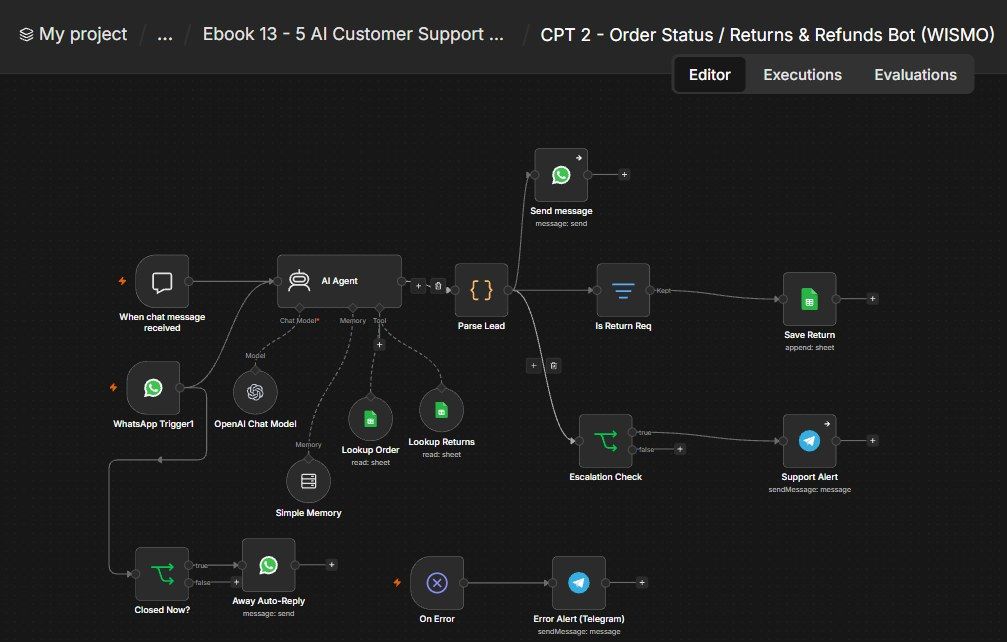
How this n8n workflow works
- 1A customer messages on WhatsApp or website chat
- 2AI looks up their order in your sheet
- 3It replies with status and tracking
- 4Return or refund requests are logged
- 5Refunds and complaints alert your manager on Telegram
Who this workflow is for
Why it matters: any store or SaaS that gets flooded with "where's my order?" messages. This auto-handles the highest-volume, lowest-value question instantly and correctly (grounded in your real order sheet), captures return requests cleanly, and routes refunds/complaints to a human — cutting ticket volume dramatically while improving response time.
Inside the workflow: node by node
Every one of these nodes is explained in the ebook, with each setting, prompt and expression printed so you can copy it.
- 1. WhatsApp Trigger1
- 2. When chat message received
- 3. AI Agent
- 4. OpenAI Chat Model
- 5. Simple Memory
- 6. Lookup Order (Tool)
- 7. Lookup Returns (Tool)
- 8. Parse Lead
- 9. Send message
- 10. Is Return Req
- 11. Save Return
- 12. Escalation Check
- 13. Support Alert
- 14. Closed Now?
- 15. Away Auto-Reply
- 16. On Error
- 17. Error Alert (Telegram)
Before you start
- An n8n account.
- A WhatsApp Business (Cloud API) number + credential (for live use).
- An OpenAI API key (gpt-4o).
- A Google Sheet with Orders and Returns tabs + Google Sheets credential.
- A Telegram bot + your chat ID (for escalations).
Quick setup guide
- 1Credentials: Connect WhatsApp Business (your phone number ID + token), OpenAI, Google Sheets, and Telegram.
- 2IDs: Set YOURSHEETID on the two Lookup tools and Save Return, YOURCHATID on the two Telegram nodes, and YOURPHONENUMBERID on the WhatsApp send nodes.
- 3Sheets: Build an Orders tab (Order ID, Date, Customer, Phone, Items, Amount, Status, Carrier, Tracking Link, ETA) and a Returns tab (Return ID, Date, Order ID, Customer, Phone, Type, Reason, Status, Notes). Seed a few test orders.
- 4Test (chat): Click Open chat on the Chat Trigger and ask "where is order ORD-1001?" → confirm it reports the real status/tracking from your sheet.
- 5Go live: Connect WhatsApp and activate.
What success looks like: Customers get instant, accurate order answers on WhatsApp day and night, returns are captured cleanly, and your team only gets pinged for refunds and complaints — grounded entirely in your real order data.
Common problems and fixes
Agent invents an order
Why: Tool not wired / sheet empty
Fix: Wire Lookup Order via aitool; seed the Orders sheet
"Error fetching options" on WhatsApp
Why: Credential/number not set
Fix: Add your WhatsApp Business phone number ID + token
Nothing replies on WhatsApp
Why: Webhook not verified
Fix: Complete the WhatsApp Cloud API webhook setup
Return not logged
Why: Intent not detected
Fix: Ensure the message clearly says return/refund/replace
Wrong language reply
Why:
Fix: The LANGUAGE RULE mirrors the customer; keep it in the system message
Setup time
- With Claude Code30–45 minutes
Give the ebook to Claude Code and it builds the workflow for you.
- Import the JSON yourselfAbout 2 hours
Import the ready workflow JSON and connect your accounts.
- Build it by reading the ebookAbout 1 day
Follow every node and setting step by step to learn it fully.
Get this workflow
- Ready-to-import n8n workflow JSON
- Step-by-step PDF: every node and setting explained
- Copy-paste prompts and expressions — no coding
Frequently asked questions
Will this work on free n8n?
Yes. n8n itself can be free (the self-hosted Community edition) or you can use n8n Cloud. The workflow runs on both. You only pay for the outside services it uses, such as AI tokens, and many of them have free tiers to start.
How do I get the API keys (WhatsApp, OpenAI and others)?
The ebook includes a setup video for every API and account this workflow needs, so you can get each key step by step without any coding.
Do I need to know coding?
No. Every node, setting, prompt and expression is printed in the ebook, ready to copy-paste, and the workflow JSON can be imported in one click.
Can I use this Customer Support workflow for my clients?
Yes. Once it works for you, you can set it up for your own business or for clients and charge for the setup.
Agent invents an order: how do I fix it?
Tool not wired / sheet empty. Fix: Wire Lookup Order via aitool; seed the Orders sheet.
"Error fetching options" on WhatsApp: how do I fix it?
Credential/number not set. Fix: Add your WhatsApp Business phone number ID + token.
Nothing replies on WhatsApp: how do I fix it?
Webhook not verified. Fix: Complete the WhatsApp Cloud API webhook setup.