n8n workflow · Chapter 3 of 5
24/7 WhatsApp + Website Support Chatbot
Updated · Tested on n8n 1.x · Part of the n8n Customer Support ebook
One AI bot on WhatsApp and your website for support and sales — it answers from your own documents, recommends products and calls in a human when needed.
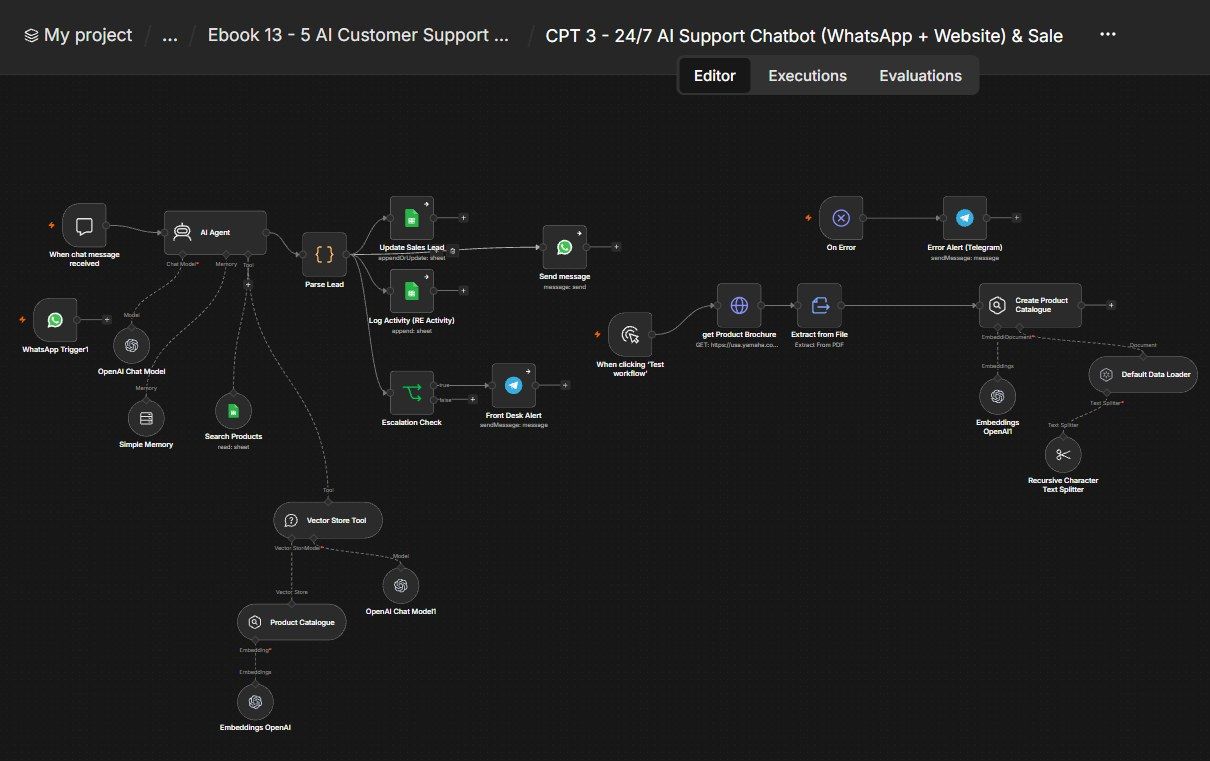
How this n8n workflow works
- 1A customer messages on WhatsApp or website chat
- 2AI searches your product sheet and documents
- 3It replies with a grounded answer or recommendation
- 4The lead and chat are logged to your CRM
- 5Hot leads and upset customers alert you on Telegram
Who this workflow is for
Why it matters: e-commerce and SaaS brands that want one always-on bot doing both jobs — deflecting support tickets with grounded answers AND converting browsers into buyers with real product recommendations. Because answers come from your own KB and catalog, it doesn't hallucinate policies or prices; because it scores and logs every chat, your sales team gets warm leads handed to them automatically.
Inside the workflow: node by node
Every one of these nodes is explained in the ebook, with each setting, prompt and expression printed so you can copy it.
- 1. WhatsApp Trigger1
- 2. When chat message received
- 3. AI Agent
- 4. OpenAI Chat Model
- 5. Simple Memory
- 6. Search Products (Tool)
- 7. Vector Store Tool
- 8. Product Catalogue (Vector Store)
- 9. OpenAI Chat Model1
- 10. Embeddings OpenAI
- 11. Parse Lead
- 12. Send message
- 13. Update Sales Lead
- 14. Log Activity (RW Activity)
- 15. Escalation Check
- 16. Front Desk Alert
- 17. When clicking 'Test workflow'
- 18. get Product Brochure
- 19. Extract from File
- 20. Default Data Loader
Before you start
- An n8n account.
- An OpenAI API key (gpt-4o + text-embedding-3-small).
- A Google Sheet with Products, Sales Leads, and RW Activity tabs + Google Sheets credential.
- A WhatsApp Business (Cloud API) number + credential (for live use).
- A Telegram bot + your chat ID.
- A product/FAQ PDF (hosted at a URL) for the knowledge base.
Quick setup guide
- 1Credentials: Connect OpenAI, Google Sheets, WhatsApp, and Telegram.
- 2IDs: Set YOURSHEETID on the three Google Sheets nodes, YOURCHATID on the two Telegram nodes, and YOURPHONENUMBERID on the WhatsApp send node.
- 3Sheets: Build Products, Sales Leads, and RW Activity tabs; fill the Products catalog with name, price, description, stock.
- 4Build the KB: Put your PDF URL in get Product Brochure, then click Test workflow once to run the ingestion (it embeds the PDF into the whatsapp-75 store).
- 5Test the bot: Open the Chat Trigger and ask a policy question (from the KB) and a product question (from the catalog) → confirm grounded answers. Then connect WhatsApp and activate.
What success looks like: One bot answers support questions from your own docs, sells from your real catalog, logs every lead to the CRM, and hands hot/angry customers to a human — no hallucinated policies or prices.
Common problems and fixes
KB answers are empty
Why: Ingestion not run
Fix: Click Test workflow to build the store first
"No answer" for known FAQ
Why: Chunk too big / wrong PDF
Fix: Keep chunk 2000/overlap 200; use the right PDF
KB forgets after restart
Why: In-memory store
Fix: Expected; move to Pinecone/Qdrant for production
Invents products/prices
Why: Catalog tool not wired
Fix: Wire Search Products via aitool; fill the Products sheet
Embeddings mismatch error
Why: Build/query models differ
Fix: Use text-embedding-3-small on both sides
Setup time
- With Claude Code30–45 minutes
Give the ebook to Claude Code and it builds the workflow for you.
- Import the JSON yourselfAbout 2 hours
Import the ready workflow JSON and connect your accounts.
- Build it by reading the ebookAbout 1 day
Follow every node and setting step by step to learn it fully.
Get this workflow
- Ready-to-import n8n workflow JSON
- Step-by-step PDF: every node and setting explained
- Copy-paste prompts and expressions — no coding
Frequently asked questions
Will this work on free n8n?
Yes. n8n itself can be free (the self-hosted Community edition) or you can use n8n Cloud. The workflow runs on both. You only pay for the outside services it uses, such as AI tokens, and many of them have free tiers to start.
How do I get the API keys (WhatsApp, OpenAI and others)?
The ebook includes a setup video for every API and account this workflow needs, so you can get each key step by step without any coding.
Do I need to know coding?
No. Every node, setting, prompt and expression is printed in the ebook, ready to copy-paste, and the workflow JSON can be imported in one click.
Can I use this Customer Support workflow for my clients?
Yes. Once it works for you, you can set it up for your own business or for clients and charge for the setup.
KB answers are empty: how do I fix it?
Ingestion not run. Fix: Click Test workflow to build the store first.
"No answer" for known FAQ: how do I fix it?
Chunk too big / wrong PDF. Fix: Keep chunk 2000/overlap 200; use the right PDF.
KB forgets after restart: how do I fix it?
In-memory store. Fix: Expected; move to Pinecone/Qdrant for production.