n8n workflow · Chapter 2 of 5
Membership Sales Bot (WhatsApp)
Updated · Tested on n8n 1.x · Part of the n8n Gym ebook
A 24/7 WhatsApp salesperson that replies in the lead's language, qualifies them, pitches your real plans and books free trials.
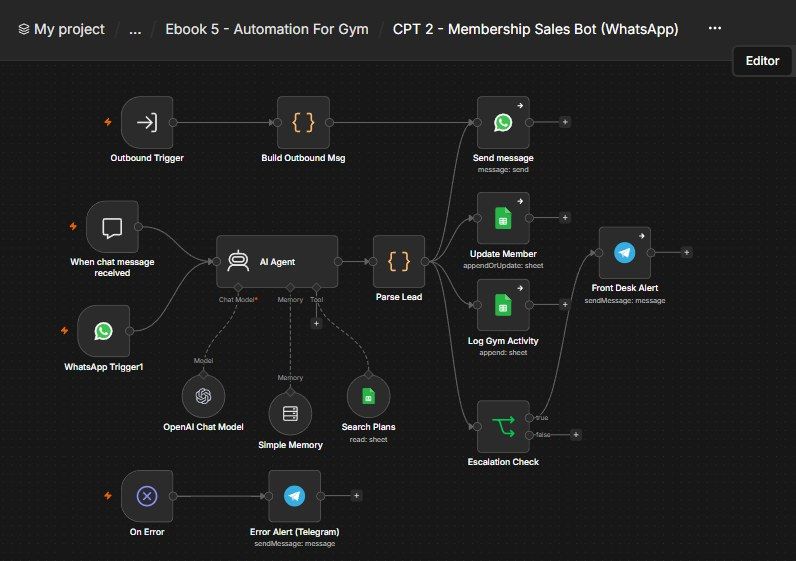
How this n8n workflow works
- 1A lead messages your gym on WhatsApp
- 2AI replies in their language and qualifies them
- 3It pitches matching plans and offers a free trial
- 4The CRM is updated and the chat logged
- 5Hot leads trigger a Telegram alert
- 6Other workflows can send messages through this bot
Who this workflow is for
- Gyms & fitness studios — reply to every WhatsApp enquiry in seconds, day or night, and qualify + pitch while you sleep.
- Personal trainers & online coaches — handle a flood of DMs without a receptionist.
- Any membership business — the same pattern qualifies leads for yoga studios, sports academies, tuition centres.
Why it matters: Fitness buyers message several gyms at once and join whoever answers first and feels most helpful. A bot that greets instantly, speaks the customer's language, pitches the right plan from your real price list, and books a free trial captures those buyers before a competitor even opens their phone — and hands your human team only the already-qualified, already-hot leads. Plus the outbound side keeps existing members renewing and re-engaging automatically.
Inside the workflow: node by node
Every one of these nodes is explained in the ebook, with each setting, prompt and expression printed so you can copy it.
- 1. When chat message received — The Test Trigger
- 2. WhatsApp Trigger1 — The Real Front Door
- 3. AI Agent — The Qualifying Salesperson
- 4. Parse Lead — Split the Reply From the Hidden Data
- 5. Send message — The WhatsApp Reply
- 6. Update Member — Keep the CRM Current
- 7. Log Gym Activity — Record the Chat
- 8. Escalation Check — Only Bother You for Good Leads
- 9. Front Desk Alert — The Hot-Lead Telegram
- 10. Outbound Trigger — Let Other Workflows Call This Bot
- 11. Build Outbound Msg — Write the Right Message
- 12. On Error → Error Alert (Telegram) — The Safety Net
Before you start
- An n8n account (Cloud or self-hosted).
- A WhatsApp Business Cloud API setup (Meta) — both the trigger (incoming messages) and send (the reply).
- An OpenAI (or OpenRouter) API key — powers the chat agent (uses gpt-4o).
- A Google Sheets credential — the same Gym CRM sheet from Chapter 1 (Gym Members, Gym Activity) plus a new Gym Plans tab of your real memberships.
- A Telegram bot + your chat ID — the Hot/Warm-lead alerts and error alerts.
Quick setup guide
- 1Credentials: Add WhatsApp Cloud API (trigger + send), OpenAI/OpenRouter, Google Sheets, and Telegram (see the video table). Do these once.
- 2Prepare the sheet: Use the same CRM sheet from Chapter 1 (Gym Members, Gym Activity) and add a Gym Plans tab filled with your real plans/prices. Copy the Sheet ID.
- 3Import the workflow: And reconnect every red credential node. Put your Sheet ID on all three Google Sheets nodes (Search Plans, Update Member, Log Gym Activity), your chat ID on both Telegram nodes, and your WhatsApp credential on the trigger and Send message nodes.
- 4Edit the Agent's System Message + Build Outbound Msg: Replace FitZone Gym, the website/brochure link, facilities and plans with your real gym's. Keep the ###LEAD### output-contract block exactly — Parse Lead depends on it.
- 5Set the WhatsApp Send node: Pick your real Sender Phone Number, and change the fallback number in the recipient expression to your own test number.
- 6Test, then go live: Test in the built-in chat first, then Activate and message your real WhatsApp Business number.
What success looks like: A natural, language-matched WhatsApp conversation that qualifies the lead, pitches the right plan, books a free trial, updates your CRM, and pings you the moment a lead turns hot.
Common problems and fixes
Bot never pitches plans
Why: Gym Plans tab empty or wrong tab name / Sheet ID
Fix: Fill Gym Plans with real rows; set the correct Sheet ID + tab on Search Plans
Customer sees the ###LEAD### block
Why: Parse Lead not wired between the agent and Send message
Fix: Ensure the flow is Agent → Parse Lead → Send message; Text Body must be {{ $json.reply }}
Replies in the wrong language
Why: System Message's LANGUAGE RULE edited/weakened
Fix: Keep the LANGUAGE RULE line at the top of the system message
Bot repeats questions
Why: Memory not attached or key wrong
Fix: Attach Simple Memory; keep the Key on messages[0].from so each lead has their own memory
CRM row duplicates each message
Why: "Column to match on" not set to Phone
Fix: Set match = Phone on Update Member
No hot-lead Telegram
Why: Escalation Check false, or chat ID wrong
Fix: Lead must be Hot/Warm (notifyowner true); check YOURCHATID
Outbound message not sent
Why: Calling workflow didn't pass phone/purpose
Fix: Chapter 4/5 must pass {phone, name, purpose, details} to the Outbound Trigger
Setup time
- With Claude Code30–45 minutes
Give the ebook to Claude Code and it builds the workflow for you.
- Import the JSON yourselfAbout 2 hours
Import the ready workflow JSON and connect your accounts.
- Build it by reading the ebookAbout 1 day
Follow every node and setting step by step to learn it fully.
Get this workflow
- Ready-to-import n8n workflow JSON
- Step-by-step PDF: every node and setting explained
- Copy-paste prompts and expressions — no coding
Frequently asked questions
Will this work on free n8n?
Yes. n8n itself can be free (the self-hosted Community edition) or you can use n8n Cloud. The workflow runs on both. You only pay for the outside services it uses, such as AI tokens, and many of them have free tiers to start.
How do I get the API keys (WhatsApp, OpenAI and others)?
The ebook includes a setup video for every API and account this workflow needs, so you can get each key step by step without any coding.
Do I need to know coding?
No. Every node, setting, prompt and expression is printed in the ebook, ready to copy-paste, and the workflow JSON can be imported in one click.
Can I use this 5 n8n automation - Gym workflow for my clients?
Yes. Once it works for you, you can set it up for your own business or for clients and charge for the setup.
Bot never pitches plans: how do I fix it?
Gym Plans tab empty or wrong tab name / Sheet ID. Fix: Fill Gym Plans with real rows; set the correct Sheet ID + tab on Search Plans.
Customer sees the ###LEAD### block: how do I fix it?
Parse Lead not wired between the agent and Send message. Fix: Ensure the flow is Agent → Parse Lead → Send message; Text Body must be {{ $json.reply }}.
Replies in the wrong language: how do I fix it?
System Message's LANGUAGE RULE edited/weakened. Fix: Keep the LANGUAGE RULE line at the top of the system message.