n8n workflow · Chapter 3 of 5
Trial & Renewal Calling Agent
Updated · Tested on n8n 1.x · Part of the n8n Gym ebook
An AI voice agent that phones leads and members to book trials, chase dues and win renewals — then logs a summary of every call and sends it to you.
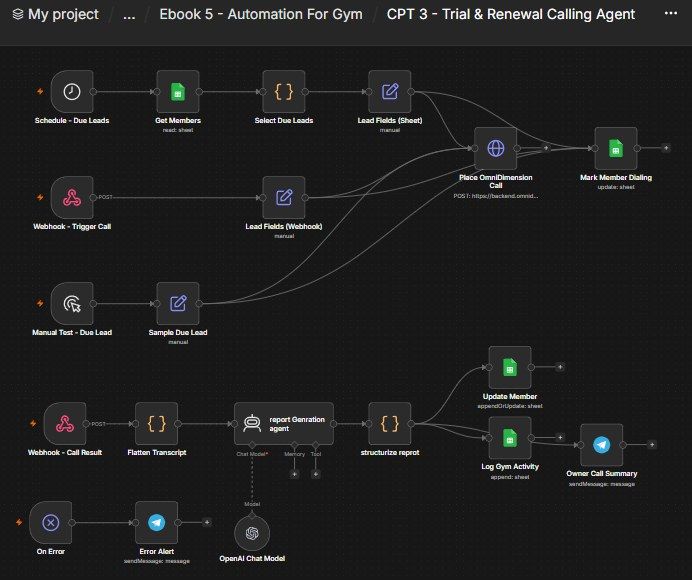
How this n8n workflow works
- 1Every hour it picks members due for a call
- 2It sets the call purpose: sales, trial, renewal, dues
- 3The AI voice agent dials them
- 4After the call, AI writes a summary
- 5Your CRM is updated and you get a Telegram recap
Who this workflow is for
- Gyms & fitness studios — every warm lead gets a call within the hour, and members get proactive trial-follow-up, renewal and dues calls automatically.
- Personal trainers & coaching businesses — follow up campaign leads and lapsing clients by phone without a tele-caller.
- Any membership business — the same pattern books trials and drives renewals for yoga, sports academies, tuition.
Why it matters: Fitness leads go cold in days, and members churn silently at renewal time. A voice AI that phones every warm lead, chases every un-joined trial, and calls every expiring/overdue member — all automatically, adapting its pitch to the reason — recovers memberships that a busy front desk would simply never get to, for a few cents of AI + voice minutes per call.
Inside the workflow: node by node
Every one of these nodes is explained in the ebook, with each setting, prompt and expression printed so you can copy it.
- 1. Schedule – Due Leads — The Hourly Trigger
- 2. Get Members — Load the CRM
- 3. Select Due Leads — Pick Who to Call
- 4. Lead Fields (Sheet) — Tidy the Lead + Work Out the Purpose
- 5. Place OmniDimension Call — Dial the Member
- 6. Mark Member Dialing — Don't Call Twice
- 7. Webhook – Trigger Call — Let Chapter 5 Call One Member
- 8. Lead Fields (Webhook) — Tidy the Webhook Lead
- 9. Manual Test – Due Lead + Sample Due Lead — Build Without Calling
- 10. Webhook – Call Result — Receive the Transcript
- 11. Flatten Transcript — Turn Any Format Into Clean Text
- 12. report Genration agent — Summarise the Call
- 13. structurize reprot — Split the Summary Into Fields
- 14. Update Member — Write the Call Result to the CRM
- 15. Log Gym Activity — Record the Call in the Audit Log
- 16. Owner Call Summary — Telegram the Recap
- 17. On Error → Error Alert — The Safety Net
Before you start
- An n8n account (Cloud or self-hosted) — hosts this workflow + its webhook URLs.
- An OmniDimension account (omnidim.io) — the voice AI + phone number. You'll need an API key, an agent ID, and an outbound "from" number ID.
- A Google Sheets credential — the same Gym CRM sheet from Chapters 1–2.
- An OpenAI (or OpenRouter) API key — writes the post-call summary.
- A Telegram bot + your chat ID — the call-summary and error alerts.
Quick setup guide
- 1Credentials: Add OmniDimension (your API key), Google Sheets, OpenAI/OpenRouter, and Telegram (see the video table). Do these once.
- 2OmniDimension agent: Create your calling agent, attach an outbound number, and copy your agent ID, from-number ID + API key into Node 5.
- 3Import the workflow: And reconnect every red credential node. Set your Sheet ID on all three Google Sheets nodes, your chat ID on both Telegram nodes, and your API key/agent ID/from-number ID on the call node.
- 4Wire the callback loop: Copy the Production URL of Webhook – Call Result and paste it into OmniDimension's post-call webhook setting.
- 5Test: Put your own number in Sample Due Lead and run Manual Test – Due Lead; take the call, then confirm the CRM row updates and the Telegram summary arrives. Then Activate so the hourly schedule goes live.
What success looks like: A warm lead or a due member gets an automatic, natural call, and you get back a clean CRM update + a phone summary — no human dialling required.
Common problems and fixes
No call is placed
Why: OmniDimension API key/agent ID/number wrong, or endpoint changed
Fix: Re-check the Authorization key, agentid, fromnumberid, and the dispatch URL against OmniDimension docs
Same member called repeatedly
Why: Node 6 not marking "Dialing", or match column wrong
Fix: Ensure Mark Member Dialing writes Call Outcome = Dialing and matches on Phone
Transcript never arrives
Why: Callback URL mismatch
Fix: OmniDimension's post-call webhook must be the Production URL of Webhook – Call Result
Wrong call script (sells to a renewal)
Why: Purpose derived wrong
Fix: Check the Lead Fields purpose expression + that Stage / Payment Status are set correctly
CRM row not updated
Why: Wrong Sheet ID or match column
Fix: Use the exact Sheet ID; match on Phone
No Telegram summary
Why: Bot token / chat ID wrong
Fix: Re-check the Telegram credential and YOURCHATID
Setup time
- With Claude Code30–45 minutes
Give the ebook to Claude Code and it builds the workflow for you.
- Import the JSON yourselfAbout 2 hours
Import the ready workflow JSON and connect your accounts.
- Build it by reading the ebookAbout 1 day
Follow every node and setting step by step to learn it fully.
Get this workflow
- Ready-to-import n8n workflow JSON
- Step-by-step PDF: every node and setting explained
- Copy-paste prompts and expressions — no coding
Frequently asked questions
Will this work on free n8n?
Yes. n8n itself can be free (the self-hosted Community edition) or you can use n8n Cloud. The workflow runs on both. You only pay for the outside services it uses, such as AI tokens, and many of them have free tiers to start.
How do I get the API keys (WhatsApp, OpenAI and others)?
The ebook includes a setup video for every API and account this workflow needs, so you can get each key step by step without any coding.
Do I need to know coding?
No. Every node, setting, prompt and expression is printed in the ebook, ready to copy-paste, and the workflow JSON can be imported in one click.
Can I use this 5 n8n automation - Gym workflow for my clients?
Yes. Once it works for you, you can set it up for your own business or for clients and charge for the setup.
No call is placed: how do I fix it?
OmniDimension API key/agent ID/number wrong, or endpoint changed. Fix: Re-check the Authorization key, agentid, fromnumberid, and the dispatch URL against OmniDimension docs.
Same member called repeatedly: how do I fix it?
Node 6 not marking "Dialing", or match column wrong. Fix: Ensure Mark Member Dialing writes Call Outcome = Dialing and matches on Phone.
Transcript never arrives: how do I fix it?
Callback URL mismatch. Fix: OmniDimension's post-call webhook must be the Production URL of Webhook – Call Result.