n8n workflow · Chapter 4 of 5
Retention / Churn-Saver + CRM & Reports
Updated · Tested on n8n 1.x · Part of the n8n Gym ebook
Your AI gym manager: keeps every member's stage up to date, starts renewal and win-back outreach, drafts paperwork and sends a daily PDF report.
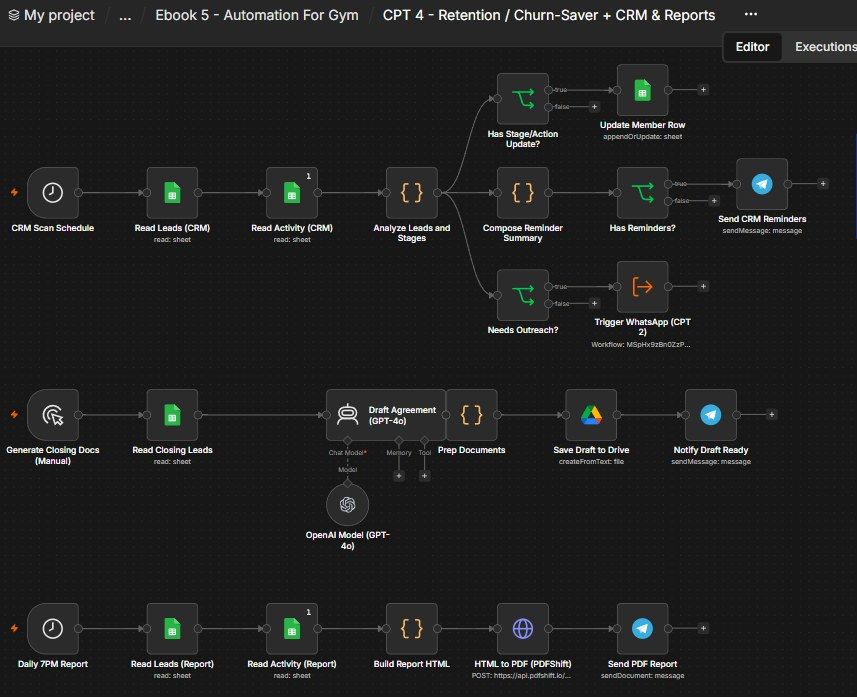
How this n8n workflow works
- 1Every 2 hours it reads your members and activity
- 2It updates stages and spots who needs saving
- 3Those members get WhatsApp and a follow-up call
- 4On demand, AI drafts membership paperwork
- 5Every evening you get a PDF report on Telegram
Who this workflow is for
- Gyms & fitness studios — stop silent churn: every expiring, overdue or absent member is chased automatically before they cancel.
- Any membership business — the renew/win-back/dues pattern fits yoga studios, sports clubs, subscription services.
- Owners who want visibility — the daily PDF report shows member health at a glance.
Why it matters: In a gym, retention is profit — keeping a member costs a fraction of winning a new one, yet members churn quietly at renewal time or after they stop showing up. An AI manager that spots every at-risk member and reaches out (WhatsApp then call) automatically saves memberships a busy front desk would never get to, drafts the joining paperwork instantly, and hands the owner a clear daily scorecard — work that would otherwise need a full-time manager.
Inside the workflow: node by node
Every one of these nodes is explained in the ebook, with each setting, prompt and expression printed so you can copy it.
- 1. CRM Scan Schedule — Run Every 2 Hours
- 2. Read Leads (CRM) + Read Activity (CRM) — Load the Data
- 3. Analyze Leads and Stages — The Brain
- 4. Has Stage/Action Update? — Only Write When Needed
- 5. Update Member Row — Write the New Stage & Next Action
- 6. Compose Reminder Summary — Build the Owner's Digest
- 7. Has Reminders? — Don't Send an Empty Message
- 8. Send CRM Reminders — The Digest on Telegram
- 9. Needs Outreach? — Who Needs Saving Right Now
- 10. Trigger WhatsApp (CPT 2) — Send the Save-the-Member WhatsApp
- 11. Generate Closing Docs (Manual) — Run It When You Need Papers
- 12. Read Closing Leads — Only the Active Members
- 13. Draft Agreement (GPT-4o) — Write the Paperwork
- 14. Prep Documents — Name the File and Pair Text to Member
- 15. Save Draft to Drive — Store It as a Google Doc
- 16. Notify Draft Ready — Tell the Owner
- 17. Daily 7PM Report — The Evening Trigger
- 18. Read Leads (Report) + Read Activity (Report)
- 19. Build Report HTML — Turn Numbers Into a Charted Page
- 20. HTML to PDF (PDFShift) — Make the PDF
Before you start
- An n8n account (Cloud or self-hosted).
- A Google Sheets credential — the same Gym CRM sheet from Chapters 1–3 (Gym Members, Gym Activity).
- A Google Drive credential — where AI-drafted documents are saved (same Google login as Sheets).
- An OpenAI (or OpenRouter) API key — GPT-4o drafts the documents.
- A Telegram bot + your chat ID — reminders, draft-ready notices, and the daily PDF.
- A PDFShift API key (pdfshift.io) — turns the HTML report into a PDF. QuickChart (charts) needs no key.
- Chapter 2's workflow already built — this one calls it to send the retention WhatsApps.
Quick setup guide
- 1Credentials: Add Google Sheets, Google Drive, OpenAI/OpenRouter, Telegram, and your PDFShift key — see the video table. Do these once.
- 2Import the workflow: And reconnect every red credential node. Put your Sheet ID on all six Google Sheets nodes, your chat ID on all three Telegram nodes, your Drive credential on Save Draft to Drive, your PDFShift key on HTML to PDF (PDFShift), and point Trigger WhatsApp (CPT 2) at your Chapter 2 workflow.
- 3Test Part A: Add a fake activity/row that's at-risk (e.g. Membership End tomorrow, or Payment Status = Pending) and run the top flow — check the member gets a WhatsApp (via Chapter 2), Next Action becomes a call, and a reminder digest arrives on Telegram.
- 4Test Part B: Set a member's Stage = Member, click Generate Closing Docs, and confirm a Google Doc (welcome letter + agreement + receipt) is created + a Telegram notice arrives.
- 5Test Part C: Run the report and confirm a charted PDF lands on Telegram. Then Activate so the 2-hourly scan and 7 PM report run automatically.
What success looks like: At-risk members get saved automatically (WhatsApp then call), your pipeline updates itself, membership paperwork drafts into Drive, and a professional PDF report arrives every evening — all hands-free.
Common problems and fixes
No retention WhatsApp sent
Why: Needs Outreach? false, or Trigger WhatsApp not pointed at Chapter 2
Fix: Ensure the member is at-risk/renewal/dues; select your CPT 2 workflow on the trigger node
Same member messaged repeatedly
Why: Next Action / Call Outcome not being set
Fix: The analyzer skips members already flagged/called — keep those columns updating
Stages never change
Why: Activity words don't match keywords
Fix: Use activity Outcomes/Actions containing words like "joined", "paid", "trial done", "cancel", "renew"
Empty reminder / no message
Why: Nothing was due or changed
Fix: Correct — Has Reminders? blocks empty digests
No PDF / PDFShift error
Why: API key missing or response not set to File
Fix: Add the X-API-Key; set Response Format → File, field data, and Telegram Input Binary Field data
Draft invents details
Why: System message weakened
Fix: Keep the rule to use bracketed placeholders and never invent binding specifics
Setup time
- With Claude Code30–45 minutes
Give the ebook to Claude Code and it builds the workflow for you.
- Import the JSON yourselfAbout 2 hours
Import the ready workflow JSON and connect your accounts.
- Build it by reading the ebookAbout 1 day
Follow every node and setting step by step to learn it fully.
Get this workflow
- Ready-to-import n8n workflow JSON
- Step-by-step PDF: every node and setting explained
- Copy-paste prompts and expressions — no coding
Frequently asked questions
Will this work on free n8n?
Yes. n8n itself can be free (the self-hosted Community edition) or you can use n8n Cloud. The workflow runs on both. You only pay for the outside services it uses, such as AI tokens, and many of them have free tiers to start.
How do I get the API keys (WhatsApp, OpenAI and others)?
The ebook includes a setup video for every API and account this workflow needs, so you can get each key step by step without any coding.
Do I need to know coding?
No. Every node, setting, prompt and expression is printed in the ebook, ready to copy-paste, and the workflow JSON can be imported in one click.
Can I use this 5 n8n automation - Gym workflow for my clients?
Yes. Once it works for you, you can set it up for your own business or for clients and charge for the setup.
No retention WhatsApp sent: how do I fix it?
Needs Outreach? false, or Trigger WhatsApp not pointed at Chapter 2. Fix: Ensure the member is at-risk/renewal/dues; select your CPT 2 workflow on the trigger node.
Same member messaged repeatedly: how do I fix it?
Next Action / Call Outcome not being set. Fix: The analyzer skips members already flagged/called — keep those columns updating.
Stages never change: how do I fix it?
Activity words don't match keywords. Fix: Use activity Outcomes/Actions containing words like "joined", "paid", "trial done", "cancel", "renew".