n8n workflow · Chapter 5 of 5
Daily Free 100 LinkedIn Scraper — No API
Updated · Tested on n8n 1.x · Part of the n8n Lead Generation ebook
Fill in a niche and location, and it collects up to about 100 public LinkedIn profiles into your Google Sheet — free, with no paid scraper or LinkedIn API.
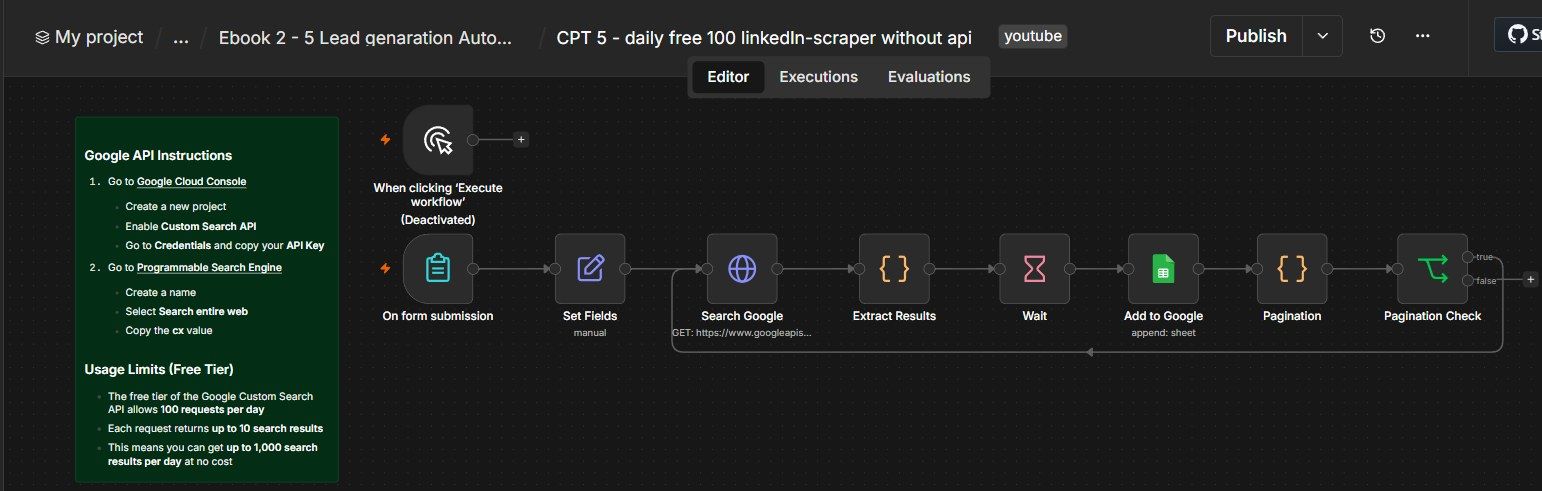
How this n8n workflow works
- 1You submit a form with niche and location
- 2Google Custom Search finds public LinkedIn profiles
- 3Name, headline, link and bio are extracted
- 4Each profile is saved to your Google Sheet
- 5It loops through pages until 100 results
Who this workflow is for
- Agencies & freelancers — build a targeted prospect list for cold outreach without paying for a scraper.
- Recruiters — find candidates by role + location straight from public LinkedIn profiles.
- SDRs / sales teams — top up the CRM with fresh, niche-specific leads every morning.
- Founders — validate a niche by pulling a list of the exact people you'd sell to.
Why it matters: LinkedIn Sales Navigator is ~$99/month, and dedicated scraping APIs charge per lead. Google's Custom Search API is free for 100 requests/day — and since each request returns up to 10 results, that's up to 1,000 profile lookups a day at zero cost. For a small team doing outreach, that's a real tool budget saved every single month.
Inside the workflow: node by node
Every one of these nodes is explained in the ebook, with each setting, prompt and expression printed so you can copy it.
- 1. On form submission — The Trigger
- 2. Set Fields — Start the Page Counter
- 3. Search Google — The Free LinkedIn Search
- 4. Extract Results — Pull Out the Lead Fields (Code)
- 5. Wait — Be Polite to the API
- 6. Add to Google — Save the Leads
- 7. Pagination — Work Out "Keep Going?" (Code)
- 8. Pagination Check — Loop or Stop (If)
Before you start
- An n8n account (Cloud or self-hosted)
- A Google account with two free things set up
- a Google Custom Search API key (from Google Cloud Console → enable Custom Search API → Credentials)
- a Programmable Search Engine set to Search the entire web → copy its cx value
- A Google Sheets credential in n8n (where the leads get saved)
Quick setup guide
- 1Get your free Google keys: Google Cloud Console → new project → enable Custom Search API → Credentials → copy the API key.
- 2Make your leads sheet: New Google Sheet with columns Linkdine url, Name, Title, description in Row 1.
- 3Import the workflow: And reconnect the Google Sheets credential.
- 4Paste your values: In Search Google: key = your API key, cx = your cx, and set q to your niche + location + site:linkedin.com/in.
- 5Run it: Open the form (Test/Production URL), enter a niche + location, submit — or use the manual trigger for a quick test.
What success looks like: A Google Sheet steadily filling with on-target LinkedIn leads, up to ~100 per run, with no manual searching.
Common problems and fixes
"API key not valid" / 400 error
Why: Wrong key, or Custom Search API not enabled
Fix: Re-copy the key; enable Custom Search API in Google Cloud
Results aren't LinkedIn profiles
Why: Missing the site operator
Fix: Keep site:linkedin.com/in in the q value
Only 10 leads, no paging
Why: Loop not wired, or Google hit its 100 cap
Fix: Confirm Pagination Check's true output goes back to Search Google
"Quota exceeded"
Why: Past 100 free requests today
Fix: Wait for the daily reset, or add billing for more
Nothing saves to the sheet
Why: Sheets credential not reconnected, or wrong columns
Fix: Reconnect the credential; match the four column names exactly
Names look wrong
Why: Title didn't contain " - "
Fix: Some profiles format titles differently; the code falls back to null safely
Setup time
- With Claude Code30–45 minutes
Give the ebook to Claude Code and it builds the workflow for you.
- Import the JSON yourselfAbout 2 hours
Import the ready workflow JSON and connect your accounts.
- Build it by reading the ebookAbout 1 day
Follow every node and setting step by step to learn it fully.
Get this workflow
- Ready-to-import n8n workflow JSON
- Step-by-step PDF: every node and setting explained
- Copy-paste prompts and expressions — no coding
Frequently asked questions
Will this work on free n8n?
Yes. n8n itself can be free (the self-hosted Community edition) or you can use n8n Cloud. The workflow runs on both. You only pay for the outside services it uses, such as AI tokens, and many of them have free tiers to start.
How do I get the API keys (WhatsApp, OpenAI and others)?
The ebook includes a setup video for every API and account this workflow needs, so you can get each key step by step without any coding.
Do I need to know coding?
No. Every node, setting, prompt and expression is printed in the ebook, ready to copy-paste, and the workflow JSON can be imported in one click.
Can I use this Lead Generation workflow for my clients?
Yes. Once it works for you, you can set it up for your own business or for clients and charge for the setup.
"API key not valid" / 400 error: how do I fix it?
Wrong key, or Custom Search API not enabled. Fix: Re-copy the key; enable Custom Search API in Google Cloud.
Results aren't LinkedIn profiles: how do I fix it?
Missing the site operator. Fix: Keep site:linkedin.com/in in the q value.
Only 10 leads, no paging: how do I fix it?
Loop not wired, or Google hit its 100 cap. Fix: Confirm Pagination Check's true output goes back to Search Google.